DAVE NG
Members
-
Joined
-
Last visited
Everything posted by DAVE NG
-
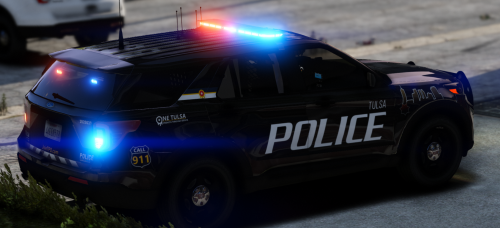 why one is tulsa and the other Los santos ?
 -
-
i brought gta5 from steam but when i try to load Ragehook, it keep saying my game is Pirated Not supported. is there a way to fix this ?
-
-
I can’t Find vehicle.ide. Is there other way to make the car permanently clean ??
-
i try setting it to 0.0 for both dirtLevel, but the result is still the same. is there other way ??
-
how do i change it from vehicle.meta ?? how do i change it from vehicle.meta ??
-
When I spawn a vehicles, they almost always spawn in dirty. is there a way to fix this problem permanently, instead of F4 to wash every time i spawn.
-
i try but not working.
-
When I spawn a vehicles, they almost always spawn in dirty. is there a way to fix this problem permanently, instead of F4 to wash every time i spawn.