


Omina
Members
-
Joined
-
Last visited
Everything posted by Omina
-
What was in the update?
-
 Hi, I followed the install instructions and installed LemonUI SDN3, but I just get "Aborted script SimpleHud.main" when I launch the game and the menu doesn't open - help please? [14:40:08] [DEBUG] Instantiating script SimpleHUD.Main ... [14:40:08] [WARNING] Aborted script SimpleHUD.Main. [14:40:08] [INFO] Started script SimpleHUD.Main.
- 557 comments
- 28 reviews
-
-

- 1
-
-
Well I finally figured it out, turns out it was to do with the way I was using OpenIV. Instead of dragging the modded gameconfig.xml from folder into OpenIV while in Edit mode, you have to right click on an empty space, click Add, then navigate to the gameconfig.xml you want and add it that way - that ensures it replaces the file! I was using the same gameconfig from before the updates all along!!! But now all my add-on cars work again 🙂

-
Wanted to play some LSPDFR again. After updating to the latest GTA V I started from a fresh mods folder, installed a few add-on vehicles and packs which worked before + NaturalVision, EUP and SUP. I also installed Packfile, Heapfile and custom gameconfig.xml from these: https://www.gta5-mods.com/tools/packfile-limit-adjuster https://www.gta5-mods.com/tools/heapadjuster https://github.com/pnwparksfan/gameconfig/releases But when I start my game, it still crashes when I go over a certain number of DLCs by adding them in dlclist.xml. It doesn't seem to matter which one it is, but for example if I remove the "vtcoq" entry right now, the game launches and everything up to "polscout" will be loaded: But anything after the polscout entry and the game crashes on the loading screen. Is there something I need to adjust in the adjusters or gameconfig to make this work? I had all of these DLCs working before the latest update (each entry except for the LSSD pack, NVR and LA_ROADS contains 1 add-on vehicle) <Item>dlcpacks:/polscout/</Item> <Item>dlcpacks:/11john11_lssd_pack/</Item> <Item>dlcpacks:/MODDING/</Item> -- about 5 vehicles and 1 weapon mod, plus 2 retextures of existing cars <Item>dlcpacks:/voitturyv/</Item> <Item>dlcpacks:/vtcoq/</Item> <Item>dlcpacks:/vtgauntletsher/</Item> <Item>dlcpacks:/vtvaccapol/</Item> <Item>dlcpacks:/Vivid_NaturalVision/</Item> <Item>dlcpacks:/NVR_carcols/</Item> <Item>dlcpacks:/NVR_textures/</Item> <Item>dlcpacks:/LA_ROADS/</Item> <Item>dlcpacks:/eup/</Item> <Item>dlcpacks:/sup/</Item> Any help would be appreciated
-
 How to remove the covid masks: 1. Open DefaultRegions.xml in your text editor 2. Find and Replace comp_beard="102" and comp_beard="91" with a blank space
- 367 comments
- 17 reviews
-
-

- 1
-
-
 Great callout pack! Though I wanted to suggest maybe adding a callout, same as the killer clown one but the gunman is a drug user, alcoholic or just an overall crazy person, and it happens a lot more frequently, basically to make it more realistic like something you would actually see in the US. I know it's more of a fun one, but killer clowns seem a bit bizzare, especially if they're the only ones running around with weapons in public, haha
- 635 comments
- 53 reviews
-
Interesting, as the update was supposed to add re-encountering suspects that you may have tried to catch before, but then escaped. This doesn't seem to be case given this thread. Seems best to keep this disabled until they maybe flesh this out in a future update. Thanks a lot for the solution!
-
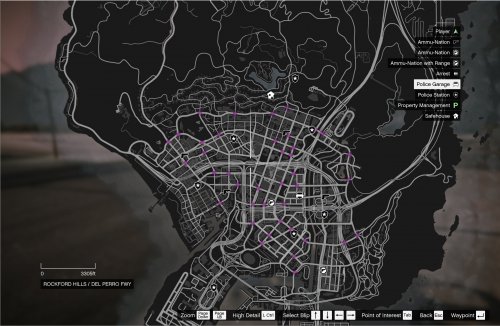 Does this blip escaped pursuit suspects? If not, is it something you might plan on adding? Could be really useful with 4.7 and re-encountering those that get away!



