


patpat3131
Members
-
Joined
-
Last visited
Everything posted by patpat3131
-
Is LSPDFR broken or somthing? was working fine untill the update, did clean install, removed mods folder, disabled and allowed GTA folder, Rageplugin and RPH files. I even did a clean sweep on the files and removed the mods ans scripts folder. still crash on start up. Any ideas?
-
You double click it and a window ahould ask you to uninstall it. but its not working for myself.
-
So the windows update broke the mod? because it was working fine last night with NO mods folder as well and it's now not working.... 😕
-
Yeah, this program is picky as hell. It conflicts with ALOT of mods. When you change certain files such as skins for guns, plugins for other mods, scripts. Anti virus also flags it as a false positive if i'm correct? so it's not a virus even though anti thinks so. When you alter files, LCPDFR will crash constantly untill you redownload it and get the Vanilla scripts back to replace the "mods folder" one. Meaning if you alter a DLC List, .rpf or say a weapons.meta...the mod will still crash even though you just changed them back...causing you to use process of elimination untill it works again..which in most cases you have to delete your "mods" folder and start over again, meaning you will lose all your add ons and such... That's why they said you cannot test this mod with any other ones since this data base is so big, their are many files that conflict. Although, usually add-on cars and those files that you place in the DLC list will work, if of course your trainer spawner and DLC files/lines are added. but again, if a script or file breaks the LCPDFR mod, you will have to re add your mods folder and start all over... so i just deleted it and use select few scripts and tons of cars with no problems. no worth the loss. but it does sucks not able to be on the other side of the law anymore... 😞
-
I've figured after 3hours if i have an altered DLC list it wont work after..even if i delete thoes other DLCs files and rpfs. I put back the orginal files and it still crashes on start up. Do you have any add on vehicles with an altered DLC file?
-
Still not working after clean install -removed mods folder -scripts -allowed anti virus for program -re installed LSPDFR -Window mode With Direct X 11 -latest version of GTA5. -Not Pirated copie -Disabled custom loading screens - Shut off/ deactivated anti virus/allowed exception when on Still crashing... Please update/fix this plug in..
-
What files did you allow?
-
Same, Tried many options and looked all over online and no solution...not sure WTF is going on.
-
It has nothing to do with your DLC folder. they keep saying to check for other conflicing mods but the funny thing is.....When the file is deleted with no scripts or mods it still crashes via start up....
-
Game is crashing upon start up regardless what i do... -Removed mods folder -scripts -re downloaded plug in for Rage LSPDFR -re installed LSPDFR -window mode Direct X11 selected STill crashes upon start up. Is there somthing wrong with this mod?
-
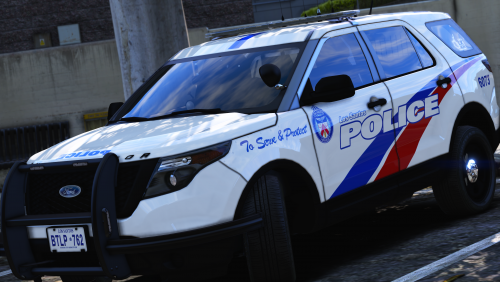 How can i download these cars? I downloaded the skins but not the actualy vehicles, was wondering if you should shed some light on the models you are using for your law enforcement, looks alot better than mine. Tried applying the impala skin on the one i have in game and i it doesn't quite match up... :/
- 36 comments
- 8 reviews
