Markey
Members
-
Joined
-
Last visited
Files posted by Markey
-
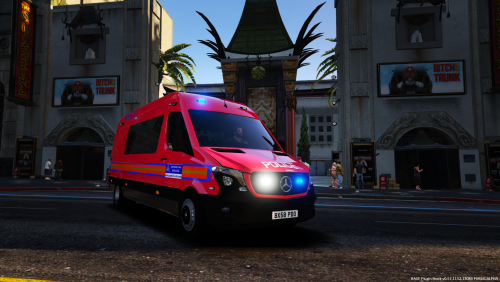
DPG Mercedes Sprinter
This skin is based off of the following picture -
however due to lack of models I have skinned it off of British Gamer 88's 2017 Lancashire Police Mercedes Sprinter.
I noticed there is a lack of DPG content within the British community so I hope to bring out some more skins - requests are welcomed!
Any issues please leave a comment! It would be greatly appreciated if you could also leave a review dependent on how you find this van!
Notes-
This skin+vehicle is not accurate to it's real life counterpart however I have tried my best to make it look the same, yet modernised!
How to Install-
Download British Gamers 88 van (The model used) here - https://www.gta5-mods.com/vehicles/2017-lancashire-police-mercedes-sprinter-els-enabled Follow the installation guide given on that van to allow it to install correctly. Download the skin given here. Place it somewhere, on your desktop for example! Using OpenIV, open up the policet_hi.yft and policet.yft and replace car_sign_1 with my skin here. Enjoy it ingame!
This mod goes great with-
Sometimes to get the correct skin ingame, you need to go to - Vehicle Options > Vehicle Livery Menu > and change the livery to 0 (Using simple trainer)!
WITHOUT PRIOR APPROVAL BY MYSELF, THIS SKIN MAY NOT BE USED IN ANY 'CLANS' UNDER ANY CIRCUMSTANCES!
DO NOT REUPLOAD!
- 139 Downloads
- 2 Comments
Submitted