




DeputyNasty
Members
-
Joined
-
Last visited
Everything posted by DeputyNasty
-
.thumb.png.4ab504d37fbd8b768097f8ccbc502e95.png) Awesome pack. I have a question though, all of the vehicle's rear glass lightbar inside of the vehicle does not have any "glow" as it appears to be just a dull light that moves. I have removed the tint, cleaned, and fixed vehicle but no luck. Any advice on making the rear glass lights look better?
Awesome pack. I have a question though, all of the vehicle's rear glass lightbar inside of the vehicle does not have any "glow" as it appears to be just a dull light that moves. I have removed the tint, cleaned, and fixed vehicle but no luck. Any advice on making the rear glass lights look better?- 77 comments
- 13 reviews
-
Sweet! Thank you again, DeputyNasty
-
Yes this seem to have worked! Thank you so much for your time. I had no idea why Immersive Dispatch would be conflicting with Grammar Police. I believe they may have conflicting files possibly? Also, is there a way to use the program that you are screen shotting that shows the errors in your log? Thank you so much again, Deputy Nasty
-
Hello, @DarkVypr So I have removed ComputerPlus and updated RagePluginHook. I am still receiving a crash upon going on duty. I have attached the most recent RPH log containing the crash. Thank you again for assisting me with his, DeputyNasty RagePluginHook.log
-
Good evening, This will probably be an easy fix for most of you who are far more experienced with reading the RPH logs. Is anyone able to help me see what the issue is as to why LSPDFR crashes once I attempt to Go on Duty either by using the ForceDuty command or actually inside of the PD locker room. Either way LSPDFR crashes. I have uploaded my RPH log if anyone is able to assist me in solving this issue. Thank you in advance, DeputyNasty RagePluginHook.log
-
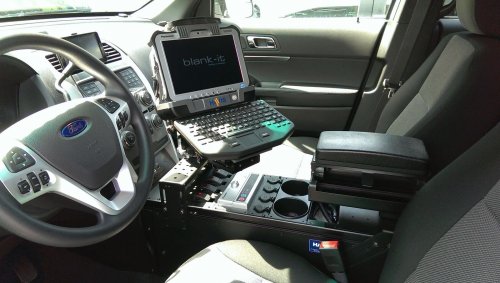 How would I able to add this to an explorer if it was added as an "addon" vehicle for ex. "sheriff21"?
 -
 One of my favorite mods, however, I do have one issue ever since the new update of this mod. Sometimes when I go to click the person's name on the person list, instantly crashes the game. Not sure if it's on my end or the mod's end, but I thought I would put it here just in case.
- 1,743 comments
- 172 reviews

.thumb.png.4ab504d37fbd8b768097f8ccbc502e95.png)

