


BestReplay
Members
-
Joined
-
Last visited
Everything posted by BestReplay
-
Progress Update: LCPDFR Loads fine, and ELS Only crashes if I activate my lights before selecting the car... Now I do have an issue when engaging a Pursuit, where ALT + E Spawns the Feltzer from the Trainer, I have gone into all INI Files and deleted it out of the trainer however it sometimes will still spawn. Progress Update: LCPDFR Loads fine, and ELS Only crashes if I activate my lights before selecting the car... Now I do have an issue when engaging a Pursuit, where ALT + E Spawns the Feltzer from the Trainer, I have gone into all INI Files and deleted it out of the trainer however it sometimes will still spawn.
-
Scratch what I just said last time, I managed to fix my resolution with youtube videos, I am now having crashing problems when I load up and Turn on my EMS Lights with ELS.. Game stops working
-
1920x1080 is my correct resolution*
-
Alright so I do have a setback however, I launched the game yesterday morning and realized my Screen was the 800x600... That doesnt fit my screen, 1120x720 I think is the resolution that fits my screen... Anyway, the game would tell me my resources were low and that I couldnt change anything in my graphics tab. However, with it being 800x600, I could launch LCPDFR and start it up without a problem, my next issue was Building quality and Graphics were as if I had a 1999 Computer with a crappy processor, Some buildings didnt even load in. So after uninstalling everything and starting fresh, I could launch the game and change the Quality and Graphics... I know I would Apply them to stay that way, Lets not forget my Resources now showed up green, with 202/512mb... Now when I downgrade, I am magically back to 800x600, My resources go straight down to 202/109mb...... Computer Specs: OS Name Microsoft Windows 10 Home Processor Intel(R) Core(TM) i7-4710HQ CPU @ 2.50GHz, 2501 Mhz, 4 Core(s), 8 Logical Processor(s) Locale United States Hardware Abstraction Layer Version = "10.0.14393.206" Time Zone Central Daylight Time Installed Physical Memory (RAM) 16.0 GB Total Physical Memory 15.9 GB Available Physical Memory 11.3 GB Total Virtual Memory 18.3 GB Available Virtual Memory 12.6 GB I am unable to find my graphics card, however I do know its a Nvidia graphics processor.
-
So I have made a huge amount of progress now, I did the registry and got the game Updated, It does launch and I am able to make it to the Start screen. However after I clicked start the game does not load, It will go threw all of the Loading images, But if I try to click or Launch my task manager, my screen goes black and my Computer basically freezes. I have tried leaving it loading for about an Hour with no luck of actually getting into the game itself. Now I do have ELS 8, the vdH Tow service and PoliceHelper, I also have a Simple Trainer 6.5, Along with Traffic Flow scripts. I am not sure what causes the game to take ages to load.
-
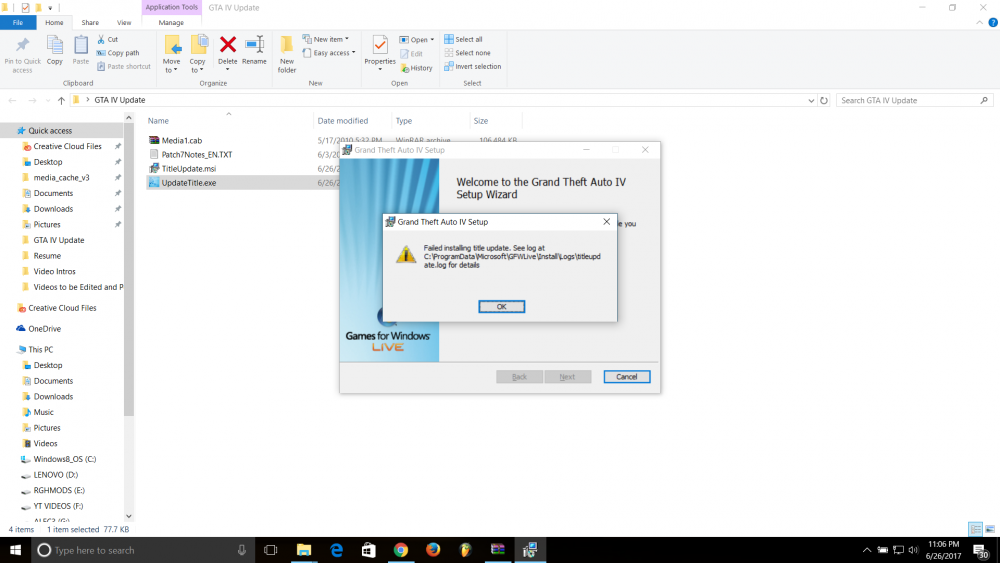
This is just that one problem I keep hitting no matter how many times i restart or reinstall GTA IV
-
Alright So I have looked into this and made it to the point of extracting and attempting to the install the Update... However the Updatetitle.exe runs into a Error and wont install.
-
Much like the title says its true, If I attempt to Launch GTA IV from the GTAIVLauncher.exe as told too from watching videos, The game will act like its loading and then it wont launch, Now this only happens when LCPDFR is installed in the same GTA IV Directory Files, If I uninstall it, the game launches just fine from my windows 10. I do however have the game downloaded via Steam, I am not sure how many of these issues we run into but I have tried both LCPDFR 1.0 and 1.1 auto installers with no luck.
