jaydenblaine
Members
-
Joined
-
Last visited
Everything posted by jaydenblaine
-
Yes I have they both go in the same place? or is it a different file location for the _hi.yft file?
-
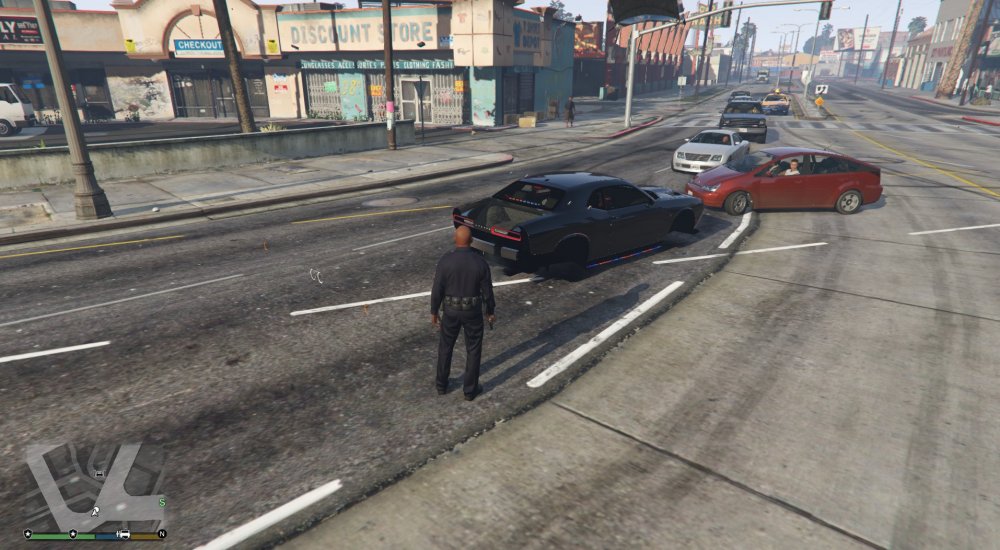
Hello everyone, I've been playing lspdfr for a few days now and have been absolutely loving it! However I recently attempted to install 2 vehicle mods following the steps on the guide I have linked and the cars aren't appearing correctly. As you can see from my screenshot all the vehicles I had attempted to add to the game have appeared like this. I've tried removing all mods and starting from a fresh game file and that didn't seem to work. I got in the vehicles and they still drive around so the handling has been copied over fine its just the visual affect of the car. They have no wheels, no boot and some object rotates around the car as it drives. I want to thank the person who originally spent the time writing out that guide you did a very good job and it was a good read so thank you. I would greatly appreciate it if someone could help me out with my issue. Thanks Jayden