


wpannone
Members
-
Joined
-
Last visited
Everything posted by wpannone
-
I've decided to make an authentic, 4-item screen, Motorola APX8000 background skin for PoliceSmartRadio by Albo1125. Attached is the skin, of course, and the applicable configuration files. To install, simply overwrite the existing files in \Grand Theft Auto V\plugins\LSPDFR\PoliceSmartRadio\Display.
-
When the controller is “enabled” in the ELS.ini file, the “Q” and “X” keys don’t activate anything (as they shouldn’t). The “Q” and “X” keys are only active when the controller is “disabled” in the ELS.ini file. Even more bizarre: When the controller is “disabled” and while I am pushing down on any button on the controller, the “Q” and “X” keys are disabled only as long as you are pushing a button on the controller....very strange.
-
I’ve discovered a quite annoying bug within ELS that I would like to see if anyone has any insight on. I use the Xbox controller for driving and other plugins. I disabled the controller in the ELS.ini because the ELS controls on the controller interfere with my other plugins. I’ve noticed that when the controller is disabled in the ELS.ini file, the “Q” key can enable the lighting and the “X” button can activate the blackout function; even though the “J” key is set to activates the lights and the “\” key activates blackout. This is the case only when the controller is disabled. When the controller is ensnarled in the ELS.ini, this problem doesn’t exist. Does anyone else experience this same problem or can anyone point me in the right direction for a fix? Thanks everyone! :)
-
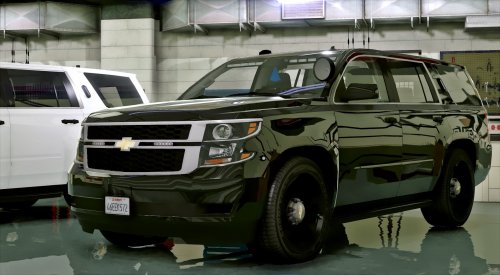 Great model! 10 out of 10! However, when I select the model in the game, the only color option is white. There isn't a black option as pictured. Is anyone else noticing this and can anyone point me in the right direction? Thanks so much!
- 56 comments
- 13 reviews
