


KGS
Members
-
Joined
-
Last visited
Everything posted by KGS
-
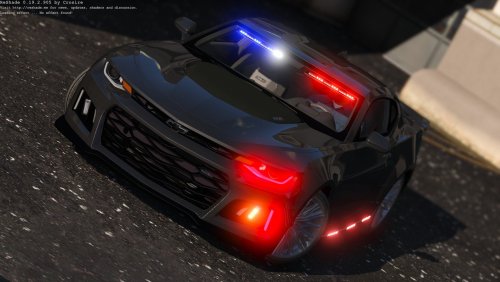 Looks great, i wish the back lights would be a bit brighter other than that it runs smoothly. Great Handling and Easy install. Would recomend to a friend.
- 31 comments
- 36 reviews
 Nice and Easy Install, works great, just a little buggy, wish it would work with towing, makes my video seem more realistic. Thanks for the mod!
- 587 comments
- 106 reviews
 This is a great car. Love how it is not ELS. Easy install, great light patterns, lots of great features! Looks good in video.
- 74 comments
- 30 reviews
Hey guys! So I am doing a series on GTA LSPDFR, along with just about everyone else.... But Hey, at the end of each of my videos, a cookie appears out of no where when you watch it. Who doesn't want free cookies? Please check out my channel at: yt.kgshub.us Here is the first episode of my series. If there is anything you noticed that I can improve on please tell me! also please link me any mod I should include in the series.
Account
Navigation
Search
Configure browser push notifications
Chrome (Android)
- Tap the lock icon next to the address bar.
- Tap Permissions → Notifications.
- Adjust your preference.
Chrome (Desktop)
- Click the padlock icon in the address bar.
- Select Site settings.
- Find Notifications and adjust your preference.
Safari (iOS 16.4+)
- Ensure the site is installed via Add to Home Screen.
- Open Settings App → Notifications.
- Find your app name and adjust your preference.
Safari (macOS)
- Go to Safari → Preferences.
- Click the Websites tab.
- Select Notifications in the sidebar.
- Find this website and adjust your preference.
Edge (Android)
- Tap the lock icon next to the address bar.
- Tap Permissions.
- Find Notifications and adjust your preference.
Edge (Desktop)
- Click the padlock icon in the address bar.
- Click Permissions for this site.
- Find Notifications and adjust your preference.
Firefox (Android)
- Go to Settings → Site permissions.
- Tap Notifications.
- Find this site in the list and adjust your preference.
Firefox (Desktop)
- Open Firefox Settings.
- Search for Notifications.
- Find this site in the list and adjust your preference.