


yesindeed
Members
-
Joined
-
Last visited
Everything posted by yesindeed
-
 You will now receive my love.
 -
-
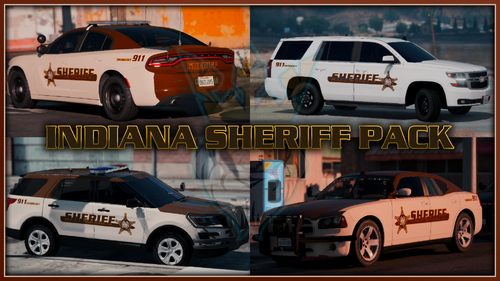 YES! An Indiana pack! GTAKING23000, I wanted to ask consent. Can I use these skins in a Roblox game I'm developing? I'd give all proper credits and make sure that people know you made the skin. Love the work!
- 10 comments
- 1 review
-
-

- 1
-
-
-
No problem. I'm always willing to help! @OfficerHotStuff21
-
As of 12:00 pm EST tomorrow, my first lspdfr tutorial video comes out. That gives you just enough time to watch it while you enjoy friday! Not great quality. Sorry! Not sure if I put this in the right spot.Hopefully!
-
 I've been working on my skillsand I want to move some of my work to my new discord. So go ahead and head over there using this link: https://discord.gg/cKxe3sV . Sorry about the screen shot. I can't run my game without it lagging on my core2 duo. So yeah. Merry Christmas, Happy hanukkah, Merry Kwanzaa, and see ya later.
 -
-
-
 Absolutely!
 -
-
-
I'll work on it. I might just make a pack including all of those states
-
Thank you. Is there a specific state that you want me to do next?
-
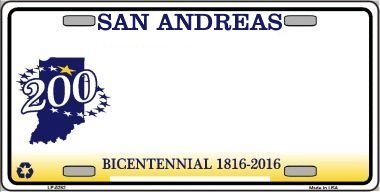
I spent about an hour working on these plates. They are based off of almost any Indiana plate design based off of some images. The Instructions are in the file. Have a great summer! 😉 GTAFAN5
-
.thumb.png.7e8fe6ee6f40236500649734cea66efd.png) Hey everyone I made elkhart police textures with the right font!! I used paint.net to copy and paste the Elkhart Police lettering onto the templates. Anyway here are the models that I recommend using for this pack: taurus: http://www.lcpdfr.com/files/file/16488-els-los-santos-sheriff-departement-pack/ cvpi: http://www.lcpdfr.com/files/file/16545-els-san-andreas-highway-patrol-mega-pack/ fpiu: http://www.lcpdfr.com/files/file/18193-2016-fpiu-legend/ raptor: http://www.lcpdfr.com/files/file/18774-els-lore-friendly-livery-blues-2017-f-150-raptor-slicktop/ Have a good summer 😉 GTAFAN5
Hey everyone I made elkhart police textures with the right font!! I used paint.net to copy and paste the Elkhart Police lettering onto the templates. Anyway here are the models that I recommend using for this pack: taurus: http://www.lcpdfr.com/files/file/16488-els-los-santos-sheriff-departement-pack/ cvpi: http://www.lcpdfr.com/files/file/16545-els-san-andreas-highway-patrol-mega-pack/ fpiu: http://www.lcpdfr.com/files/file/18193-2016-fpiu-legend/ raptor: http://www.lcpdfr.com/files/file/18774-els-lore-friendly-livery-blues-2017-f-150-raptor-slicktop/ Have a good summer 😉 GTAFAN5 -
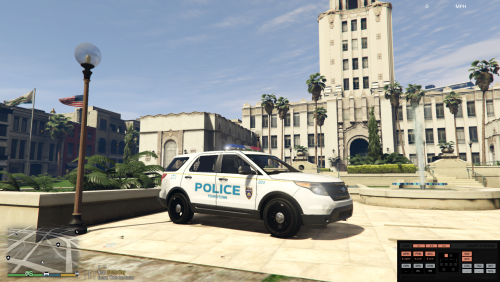 I think this skin is amazing. You should do a whole skin pack.
 -
Thanks for moving the topic.
-
Hello everyone. I am thinking about making an Orange County,IN mega pack. Do you have any suggestions on how to make an Indiana sheriff skin? Please leave your suggestions. Thanks, GTAFAN5
-
.thumb.png.f90d5d2f2767446432bcb4cd1bc0ff68.png) Hello this is my first map mod ever, so don't expect everything to be perfect. I have added more WORKING railroad crossings at the sandy shores crossing, stop signs, yield signs, street lights, and trees. Map Editor: https://www.gta5-mods.com/scripts/map-editor Please don't re upload this pack. Enjoy :)
Hello this is my first map mod ever, so don't expect everything to be perfect. I have added more WORKING railroad crossings at the sandy shores crossing, stop signs, yield signs, street lights, and trees. Map Editor: https://www.gta5-mods.com/scripts/map-editor Please don't re upload this pack. Enjoy :) -
@Kallus I apologize for posting in the wrong location. I will pay attention closer to what forum I will post on.
-
I have been working on my Elkhart County, Indiana Mega Pack. And I know how to do the two cities that are in the pack, but I dont know how to make the Sheriff skins. Can someone please give me a suggestion on how to make an Elkhart County Sheriff texture? My last one was very bad. Thank You!! :)
-
-
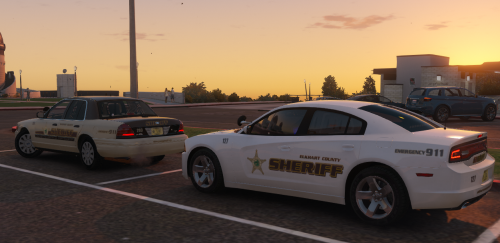 @ISPfan12 Its ok but thank you for the apology. And where do you get the car decals?
- 10 comments
- 1 review
-


.thumb.png.7e8fe6ee6f40236500649734cea66efd.png)
.thumb.png.f90d5d2f2767446432bcb4cd1bc0ff68.png)
