Empire
Members
-
Joined
-
Last visited
Files posted by Empire
-
*Included Files*
-Read me (You're reading it now!)
-Screenshots
-Skins
** You may not upload or distribute these Textures without my written consent**
============================
Copyright Under Bayside Gamers
============================
- 99 Downloads
- 3 Comments
Updated -
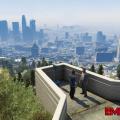
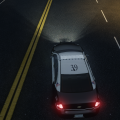
Empire Improved Configuration ENB
Just an improvement to gaming experience which is based of icenhancer 2.1 for patches 1.0.7.0 and 1.1.1.0, this configuration is compatible with ELS V8 and multiplayer, Empire (that’s me) decided to share my improved individual's will have different taste for things.
Difference between the default icenhancer 2.1 to my configuration that it’s designed for better ELS V8 and just did not like the default as it’s dark at nights. The location, surrounding lights, and surrounding shadows has been tweaked to my liking for better Environment values for Direct Lighting Intensity. And there are no red sky’s. Only one down full witch you will receive an error mma10 after you close down your game, it’s perfectly normal and don’t worry about it.
This configuration is designed for a high end PC (average of 25+ fps), keep in mind that low to mid end PC will work as tested by Jack on a Low end system. So what are you waiting for join me and have the expensive
of your life. My configuration is done thought the iCEnhancer config tool.
Download Today
http://youtu.be/B3rF2Rmyez4
*WARNING* This is a very powerful ENB I am not responsible for EFLC, GTAIV or PC issues. Download at your own Risk!
===========================
*Compatibility*
===========================
1.0.7.0
EFLC (1.1.1.0)
ELS v8
Multiplayer
===========================
*PACKAGE CONTENT*
===========================
-Images (total 14)
-Readme "Installation for beginners" instructions and recommended mods.
-Files folder option, iceconfig, icebloom.fx, iceshader.fx.
-visualSettings.dat
-DayL 3.0 Version of Icenhancer 2.1
-ELS preset plus ELSCredits.ini
===========================
*Recommended Mods*
===========================
iCEnhancer 2.1 by iCELaGlacE http://goo.gl/10zh7T
New Headlights by empire24453 http://goo.gl/FuCuGs
HD Metallic Car Paint by icelaglace: http://goo.gl/YMykOE
HD Road Textures by seb-le-dingue: http://goo.gl/jaQre3
Coronas V-Style 2.1 by Josemar Santos: http://goo.gl/PHBIL4
===========================
*Additional Infor*
===========================
YouTube channel: https://www.youtube....re2445/featured
twitter Page: https://twitter.com/empire24453
PC Specs (I get around 40 fps with this):
CPU: Intel Core i7-3930 - 3.20 GHZ
Graphics Card: ASUS GTX 680 (2GB)
RAM: Corsair Vengeance - 4x4GB DDR3 1399MHz
Operative system: Windows 7 Ultimate 64-bit
===========================
*Credits*
===========================
iCELaGlacE For the ENB 2.1,
DayL for Version of Icenhancer 2.1,
ELS is coded by Lt.Caine
Boris, DKT70, Fabriciuz, Buzz Icenhancer settings,
Jack and BRAVO 9 ACTUAL for testing.
===========================
*Copyright*
===========================
IceLaGlace, DayL 3.0, Lt.Caine, Empire24453
Give credit to the Recommended Mods above.
*****************************************************************
****************Empire24453 productions*************
*****************************************************************
- 85 Downloads
- 3 Comments
Updated -
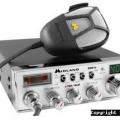
Here is just an basic sound effect for team-speak, this adds more life to it -more realistic role-playing. this pack is easy to install and that for these people are new or not I add an Tutorial with this!!. so thank-you for reading and looking 'and please feel free to download this pack. I'll be working on the next greatest sound mod, I'll make it more HD like 'But I don't have time so it will be a whirl and twirl.
*Contains in the Pack*
-mic_click_self_on.wav
-mic_click_self_off.wav
-Police_Squelch.mp3
-Readme
*Download Information*
1). Extracted the Folder with RAR or WinZip
2). go to - computer/localdisk/programfiles/teamspeak3client/sound then pick the default or what ever you want to go in (some people had things changed like I have) then replace the WAV from the sound pack folder
3). that's it Enjoy.
* TEAMSPEAK 3 - Mic Clicks Tutorial (copy-past link)*
http://www.youtube.com/watch?v=O4hdFJ5laGY
http://youtu.be/m--J2qEzX4A
- 15,821 Downloads
- 5 Comments
Updated -
A very simple mod that replaces the loading screens Images background to an Grand Theft Auto 5 Background theme,
There are 2 ways to install them for GTAIV and EFLC, Go down to download Information.
*Download Information*
Step A Extracted the Folder with RAR or WinZip
Open up spark IV then go to GrandTheftAutoIV/Common/PC/Models/Texturs/
In the Texturs replace Loadingscreen.wtd, by clicking on the import button
Then this step is very important to click/hit the SAVE button
[*]Step B
Use SparkIV go Go to Textures Edit loadingscreens.wtd and Import and replace the .png like so.
Then this step is very important to click/hit the SAVE button
Enjoy Your new Theme, By Empire3010/24453
*Contains in the Pack*
-Loadingscreen.wtd
-Readme
-Image
** You may not upload or distribute these Textures without my written consent**
============================================================
Copyright Empire3010/Empire24453 Productions
============================================================
- 57 Downloads
- 4 Comments
Submitted -
Another very basic modifications that anyone can do, and you only have to use Photoshop or free programs like paint.net. Just hope that you have fun and say wow how cool the lights are at night, and even if you had ENB it will make it even wooer and better.
Replace texture headlights using openiv or sparkiv located at pc/textures/lights_occluders.wtd
Same for EFLC......
======================================
Copyright Empire/Empire24453 Productions
======================================
- 468 Downloads
- 4 Comments
Updated -
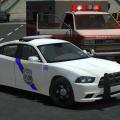
This is an exclusive small pack that I'm releasing, as I'm developing the biggest car pack of empire bay police department (texture pack). An total of 12 vehicles. (more information later on this year)
How to Install the Police Computer (easy)
Go to C:Program Files (x86) Grand Theft Auto IVGTAIV or EFLClcpdfr
Replace mainmenu with this file.
ENJOY!
** You may not upload or distribute these Textures without my written consent**
============================================================
Copyright Empire3010/Empire24453 Productions
============================================================
- 18 Downloads
- 3 Comments
Submitted -
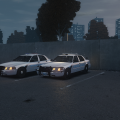
Here is my next modification "texture Skin" The Festus Crown Victoria Police Interceptor from the Festus Police Department, located in Missouri,
Watch it in 720p or 1080p
http://www.youtube.com/watch?v=6vKr-U8xHlQ
check this cool Short Intro video out from empire24453/3010
*File Included*
-Readme
-Pictures (total of 12 images)
-Skins, 1 to 4 (total 0f 4 skins)
** You may not upload or distribute these Textures without my written consent**
============================================================
Copyright Empire3010/Empire24453 Productions
==========================================================================
- 36 Downloads
- 9 Comments
Updated -
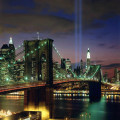
A very simple mod that replaces the loading screens Images background to an New-York Background theme,
There are 2 ways to install them, Go down to download Information.
*Download Information*
Step A
1. Extracted the Folder with RAR or WinZip
2. Open up spark IV then go to GrandTheftAutoIV/Textures/
3. In the Texture replace Loadingscreen.wtd, by clicking on the import button
4. Then this step is very important to click/hit the SAVE button
Step B
1. Use SparkIV go Go to Textures>loadingscreens.wtd and insert the .pngs like so.
2. Then this step is very important to click/hit the SAVE button
3. Enjoy Your new Theme, By Empire3010/24453
*Contains in the Pack*
-Loadingscreen.wtd
-Readme
-Image
http://www.youtube.com/watch?v=Fm8bWx8ymog
============================================================
Copy-right Empire3010/Empire24453 Productions
==========================================================================
- 191 Downloads
- 4 Comments
Updated -
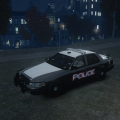
New Police Skin
This is just A basic Textures that I thought I shall do "today' as I was being bored stiff, and since I really like my work' so I thought I will share this CVPI skin with the world-ish
-I hop you all have fun using this skin "enjoy'
============================================================
Copy-right Empire3010/Empire24453 Productions
=============================================================
- 26 Downloads
- 16 Comments
Updated -
Very Very First Textures, Thanks
Warning: You may not upload or distribute these Textures without my written consent
Install: Police.WDT - Replace, with police_sign_1 And SAVE!!
Author: Empire3010 From Major-Gaming And LCPDFR.com
============================================================
Copy-right Empire3010/Empire24453 Productions
============================================================
- 63 Downloads
- 5 Comments
Updated -
FDNY Ambulance texture for the F350 ( http://gtapolicemods...do=file&id=1377 )
To it: open SPARK IV and go to modelscdimagesvehicles.img then replace the skin of your ambulance with this one.
**Remember
Do no reload or modify without my permission.
Don't forget to make .
**FILES INCLUDED:
Readme.txt
Paint_sign_1
template
Pictures
Extra Light Colors
**NAME: F350 Ambulance Textures by empire3010/24453
** You may not upload or distribute these Textures without my written consent
============================================================
Copy-right Empire3010/Empire24453 Productions
==========================================================================
- 221 Downloads
- 1 Comments
Updated