




ThisIsTheJohnDoe
Members
-
Joined
-
Last visited
Everything posted by ThisIsTheJohnDoe
-
 A must have, the first plugin I always install when getting my LSPDFR updated or redone.
- 161 comments
- 23 reviews
-
-

- 1
-
-
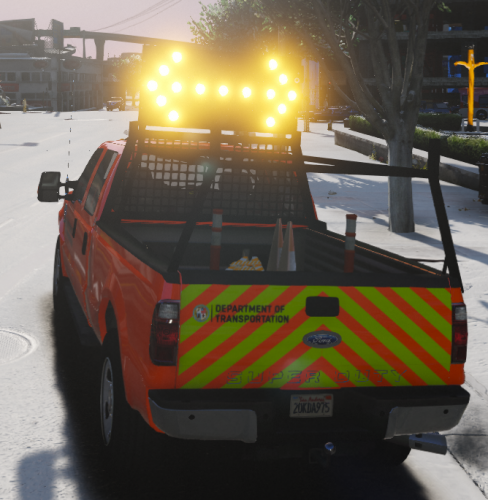 Sweet vehicle for some simple patrols, just to take MVAs and do some traffic control, or to act as traffic control in the back of a slow-speed pursuit while AI Cops do their thing on front.
- 19 comments
- 8 reviews
-
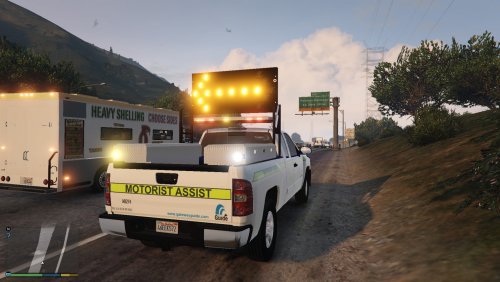 Installation instructions are odd as there is a vehicle.meta file but nothing mentioned in the instructions. I made this work using utilitytruck2, but if I use utilitytruck3 I get weird glitches visually and the truck switches shades of purple and dashboard textures on its windows. Good model, just fix this please ;)
- 18 comments
- 6 reviews
-
 Was reticent a bit at first because I enjoy Lore-Friendly packs, but this is such a good pack with so much choice (3 parts :D) that it'll be The Chosen One at least for a good while, until I go through all the vehicles I installed on a good amount of patrols. Very good and accurate documentation from what I understand, research work thoroughly done! Thanks so much for all the work, and cheers for everyone involved and credited.
- 125 comments
- 51 reviews
-
-
- 1
-
-
 10/10 model. Everything on point, well updated, and excellent detailing. A must-have in my game.
- 209 comments
- 40 reviews
-
Love the update. We need a firetruck with the same livery style :) Keep it ELS. It's a plugin easy to install and to use (if you just remove unnecessary keybindings). If anyone needs help installing ELS just send me a message. No reason for you to do non-ELS. Thanks for the thorough model, hard to find but rewarding to see ambulance arriving on scene during my shoot-out endings.
- 209 comments
- 40 reviews
-
Install GTA V clean and test story mode into. Then install RPH clean and test RPH. Then install LSPDFR and re-install RPH over-it (for updated RPH since the bundled one with LSPDFR is outdated) and test again your game. Then and only then install mods 1 BY 1 and TEST each time.
-
Controller? I literally use 1 controller button and the space-bar and that's it for the lights. Nothing else. I don't care about the light pattern so I leave its buttons unassigned, I just keep 1 button that parses between silent and 3 sirens, and another that does the same for the lights.
- 209 comments
- 40 reviews
-
 Hi, great mod so far, the callouts are very interesting. However I've gotten a few crashes for the same reason. The only custom vehicles I have are for ELS police vehicles, and I have EUP installed for my uniforms. Thanks in advance,
- 546 comments
- 103 reviews
-
Install ELS. Quite easy to do and you won't regret it. I never got ELS till' yesterday and so far so good. No ELS-related crashes what-so-ever as well.
- 209 comments
- 40 reviews
-
Yeah but it doesn't keep archives that you can then review. It's RP only, no real purpose.
-
Is this project still alive? Just a curious player wanting to add more immersion to his game :)
-
 RPH + Albo = 100% Functionality. You should create a team with the other modders, and see if you can group your respective codes on Github to create some kind of "evolved plugin" that would beautifully encompass everything. No, seriously. Not only would you get more work done and better since it's all in harmony with no conflicts, but it would really make LSPDFR great again :)
- 379 comments
- 113 reviews

