crossfire291
Members
-
Joined
-
Last visited
Everything posted by crossfire291
-
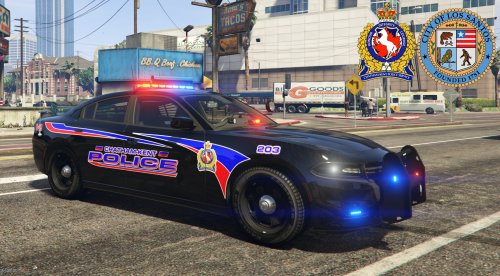 Are you having trouble with the whole thing, or just a certain file or vehicle? There is a way, but at this time I am not moding the vehicles. They come as they are. In the future I will be doing my own stuff from scratch as much as I can. I will be adding more to this pack, plus making another pack with older vehicles and skins that are no longer in service. I have a CVPI skin ready to go. The older skins will be very similar, only white, and one black 2008 charger. I wanted to start with making the skins that the department currently uses on their current vehicle lineup. After I complete all that, I may try to put these skins on other cars such as FPIS and Impala's.
- 3 comments
- 1 review
-
Chatham-Kent Police Service (Ontario, Canada) + Los Santos Police Department Skin Pack. Comes with 2015 Chevy Tahoe, 2016 Dodge Charger x2, and 2016 Ford Police Interceptor Utility. Click the links to download the vehicles. Replace the skins using Open IV. Be sure to back up any files or skins you replace. Links are below and in the Instructions in the download. I will be updating the pack with my own vehicles and more vehicles as well as new skins, so check back from time to time. 2015 Tahoe 2016 Marked Charger 2016 Stealth Charger 2016 FPIU
- 3 comments
- 1 review
-
Negative. I have that option here in the threads, but not in the PM box. On the left it should show the paper clip and say drag files here, or choose files. I just typed that as I was looking at it. However it doesn't have the in the PM at all, just the "Insert other media" on the right.
-
Hi everybody, I've been on here for a bit now. I was making vehicle skins for some of Thehurk's vehicles. I don't have GTA V and can't take the shots myself. I had someone to inspect the skins, but they flaked out, and I had someone to take screenshots, but they also flaked out. I've been trying to get these vehicle skins release for about 2 months now, maybe a bit longer. I need someone who can check the skins out, and take screenshots for me. I will include a link to you in the pack when I release it. Whenever I can afford to build a new computer and run GTA V, or whatever is next, I can handle things myself. Til then I am looking for help. PM me or reply here. Also, if you PM me, can anyone show me were and how I upload the files via PM? Thanks in advance everyone for any and all help.
-
Lookin' dope! Keep up the good work!