

officialy2004inc
Members
-
Joined
-
Last visited
Everything posted by officialy2004inc
-
"A procedure imported from "Advancedhook.dll" could not be loaded" #LoveGTA4
-
Okay... First the downgrade hehe
-
Alright, but I'm also reinstalling it too to see if it would work (Did and 1.0.8.0 backup so copying files :D).
-
Didn't work... same problem.. BUT... My mouse is fixed!!! These are the files in my game root file...
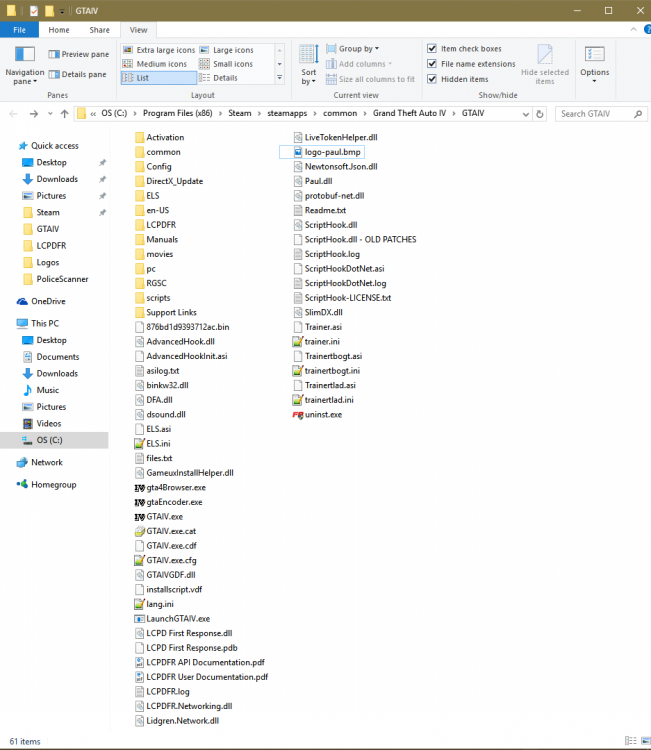
-
I gave you some extras :P LCPDFR.log ScriptHook.log asilog.txt
-
No the Error loading script LCPDFR_loader.loader (Running of memory :P) When ever I start the game
-
But I am getting the error still and ELS doesn't work...
-
Yes, by running everything admin :P
-
Oh sh*t! I forgot I disabled that :P One sec... When I try to start as Admin, it gives me the classic: "SecuLauncher: failed to start application. [2000]"... Alright I started the Launcher as admin and it ranned... but then failed to load LCPDFR_loader.loader
-
No Script error's :(Yes, but Posted up top are the "New" problems :PNow it's saying: [ERROR - 1:23:25 AM] [] System.IO.FileLoadException: A procedure imported by 'AdvancedHook.dll' could not be loaded. File name: 'AdvancedHook.dll' LCPDFR.log Diagnostics_7.1.2017_1_18_10.logYou assumed correctly.. I fall short last time I tried to play GTA V... haven't tried it in a while.. Just got RAM Upgraded. OMG! System Dependencies bar is GREEN!!!! But the Log Check isn't.... Diagnostics_7.1.2017_1_18_10.logYes, I have 8.51 but not installed at the moment only LCPD:FR 1.1. Also, the mouse is still unresponsive in-game... Another point of interest: Thank you so much for helping me on this! I though all support was closed :PIn-game it wasn't responding I'll try again.. Diagnostics_6.1.2017_18_29_40.logWould this also fix my ELS problem too? I haven't been able to actually use it at all.No, the mouse in non-responsive, and still have the same error...Wait that's what the problem was? :P God, I need to take that Java/Coding ClassIt "broke" my mouse control, and still has the same error... Checked both System32 and SysWOW64, both have it, GTAIV ROOT does not.Alright here you go... not sure if I need to start the game or whatever Diagnostics_6.1.2017_22_17_48.logStill says that it's still missing... Line from the Check Application: Failed to resolve MSVCR110.dll from C:\Program Files (x86)\Steam\steamapps\common\Grand Theft Auto\GTAIV\ADVANCEDHOOKINIT.ASI I've tried to paste them in the System32 and SysWOW64. Replaced the one in Syaytem 32 and added it in the SysWOW64. So confused... GTA is weirdAlrighty, I've had LCPD:FR + ELS v8.51 + Simple Trainer v65 and it would work fine. But now... Im getting the nice error: "Error in script 'LCPDFR_Loader.loader'!" I've done the LCPD:FR check and says I'm missing the "MSVCP110.dll from ADVANCEDHOOKINIT.ASI. Im broken... But the trainer works fine. I've tried the dsound version and the x-live-less. I'll attach my LOG's for further help. I do have TS3 if that'll help the process more P.S. the Log Check failed to EDIT: Added my Diagnostics Log. asilog.txt LCPDFR.log ScriptHook.log Diagnostics_6.1.2017_18_29_40.log