


.png.23ede7ea83df29d007f792ce7a8a9116.png)
MisterFirestorm
Members
-
Joined
-
Last visited
Everything posted by MisterFirestorm
-
I was indeed using SHVDN and upon removing it I can happily say I am able to load plugins and do pretty much everything else. I never thought to remove it due to SHV being updated but I guess that might not make too much sense since I don't believe they're created by the same person. I don't even remember what scripts I needed it for but I'll try playing for a bit and see if I even need it or if any other problems arise. Thank you so much for your help but I guess my question now is what happened? Is there a bug with SHVDN or maybe there's something conflicting with it? I haven't really seen this to be a common problem for other people so far. Again thanks a lot for your help, I really appreciate it and I hope I won't run into any other problems.
-
I believe it should be here: - edited since I retrieved it and it might contain user information -
-
As I was in the process of creating the keys and stuff I looked in the CrashDumps folder and found a few GTA5.dmp files already there consistent with the times of the crashes. When I zip one of them though it's still around like 18mb so how can I get that to you?
-
If I did it correctly then here's the log. Not sure too much changed in it though. I tried loading EUP menu. RagePluginHook.log
-
The process pretty much just dies immediately. No crash report is generated, the application just abruptly exits with no message of any kind from neither the system nor rage. I also have a new gameconfig and am able to load up with it, but I still get the same crash when I try to load plugins.
-
Yeah it's on the most recent. I've tried reinstalling it many times. I tried a number of solutions but I've only seem to made the problem worse. I used to be able to go on patrol, use EUP menu, run the spotlight plugin etc. all without any actual LSPDFR plugins installed like I mentioned, but after trying some fixes I found now when I load any plugin with RPH the game will crash in the same manner no matter what. So what I thought was for sure an LSPDFR issue, might just be either a system issue or an RPH one. Are these the details you are looking for? Faulting application name: GTA5.exe, version: 1.0.2699.0, time stamp: 0x62d9ac71 Faulting module name: clr.dll, version: 4.8.4515.0, time stamp: 0x624ce98e Exception code: 0xc00000fd Fault offset: 0x00000000006833c0 Faulting process id: 0x2c4 Faulting application start time: 0x01d8a50d9f4b7ebf Faulting application path: E:\SteamGames\steamapps\common\Grand Theft Auto V\GTA5.exe Faulting module path: C:\Windows\Microsoft.NET\Framework64\v4.0.30319\clr.dll Report Id: e7c5a9a4-3a39-4809-a14a-318657f1c1a9 Faulting package full name: Faulting package-relative application ID:
-
I did a bit more testing on my own and found that I can only get LSPDFR to load when I have nothing in the Grand Theft Auto V\plugins\LSPDFR folder. If a single file is in there the game will crash and if it's empty I can load LSPDFR and go on duty. What could be causing this?
-
I tried reinstalling the .NET framework and also used the repair tool after kind of glancing at this and still no luck. I tried searching for solutions to clr.dll errors and if my understanding is correct it might mean a memory problem? I'm aware that plugins like LSPDFR take a lot of memory, but if LSPDFR didn't actually load would it be the cause? Or did it simply just try to load but couldn't so it just terminated the game? Thank you.
-
I am able to load the game up properly into story mode. I even verified my game files through steam before starting. I checked all my custom vehicles and all of them work properly including add on ones. I have tried restarting rage multiple times with only LSPDFR running and no other plugin, and continue to get a crash. I am able to start rage on it's own with no plugins no problem, but once I try and load LSPDFR it crashes. Could it be a callout pack I have installed or maybe a script? I manually updated LSPDFR first and I thought I might've installed it wrong so I used the auto installer and still no luck. I updated SHV and the packfile adjuster as well. The log is also pretty short and I'm just not sure why it's crashing so fast. Normally I've been able to resolve issues on my own or through looking at other threads but I feel I've tried a lot of things already. Maybe there's something obvious in that short log that I'm missing but I guess I don't know enough about troubleshooting if I can't find it myself so any help would be appreciated. I do have quite a bit installed, but it has been able to run just fine before the update, I haven't added anything else.RagePluginHook.log
-
 Alright, thank you so much! I know nothing about modding or weapons, so you were really helpful. Thanks again.
- 266 comments
- 22 reviews
-
I used this one: https://www.gta5-mods.com/weapons/tactical-m4 I have no problems with your plugin other than the constant texture switching, some of which don't even seem to be proper weapon textures. Now that I'm thinking about it, maybe it might be a problem with the weapon itself? Not sure. Thank you!
- 266 comments
- 22 reviews
-
First off, I love this, thank you for creating it. I installed a custom M4 into the carbine rifle slot a few weeks ago, and had no problems until now. Now it constantly switches the weapon's texture while it's on my back. The game and everything else runs fine and the plugin never crashed. Do you think I maybe installed the weapon wrong? Can this plugin have issues with custom guns? Thanks!
- 266 comments
- 22 reviews
-
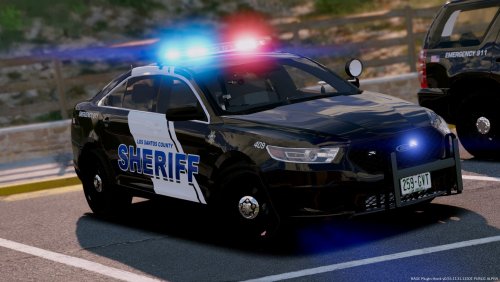 I'm quite new to adding vehicle packs but after a few weeks of usage the chevy tahoe's main lightbar just doesn't have lights any more. When the AI uses it, they never appear. When I use it and add all components, they show up, then disappear after a while.
- 17 comments
- 11 reviews
-
I see, I will continue to play LSPDFR from now on because I do not know how to downgrade versions on steam. Thank you.
-
Thank you for giving me a better understanding of what you know of. I hope someone within the LCPDFR team will be able to see this as well.
-
I recently bought GTA IV. I have GTA V along with LSPDFR. After playing and loving the LSPDFR mod, I wanted to try out LCPDFR only to find out that version 1.1 of LCPDFR is not compatible with version 1.8 of GTA IV. I have even tried the automatic and manual installation of both LCPDFR 1.1 and 1.0d, but the entire GTA IV game would not start up. I have a steam version of GTA IV, and I do not know how to go back to version 1.7.0 of GTA IV. If anyone could inform me of any way I can fix this, please do. If not then please state whether or not you know if the LCPDFR team will ever consider updating at least one last time. The game of GTA IV and mod of LCPDFR may be old, but people do still play it/want to play it. Please give me any information of this if you could, thank you.
.thumb.png.7490e3f2fbc30c09ebf40c4d21ecbfb1.png)
