


RazorKGD
Members
-
Joined
-
Last visited
Everything posted by RazorKGD
-
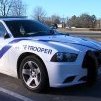
.thumb.jpg.61de846de400ca98f85d205992527de1.jpg) I installed the blue and blue light option. However, I installed the actual vehicles themselves, and the carcols.meta, and carivations.meta files. I didn't install the .xml files because I don't know how to. So that may be the problem. But when I'm in game, the bull bar only sometimes appears on the vehicle once I start using it on the street. In the garage it will show but then disappear the second I use it. Also that ALPR things on the back disappear, and appear as the lights are flashing which is kinda annoying. Any help on this? @Bxbugs123
I installed the blue and blue light option. However, I installed the actual vehicles themselves, and the carcols.meta, and carivations.meta files. I didn't install the .xml files because I don't know how to. So that may be the problem. But when I'm in game, the bull bar only sometimes appears on the vehicle once I start using it on the street. In the garage it will show but then disappear the second I use it. Also that ALPR things on the back disappear, and appear as the lights are flashing which is kinda annoying. Any help on this? @Bxbugs123- 265 comments
- 83 reviews
.thumb.jpg.61de846de400ca98f85d205992527de1.jpg)