


HeyImSquiggles
Members
-
Joined
-
Last visited
Everything posted by HeyImSquiggles
-
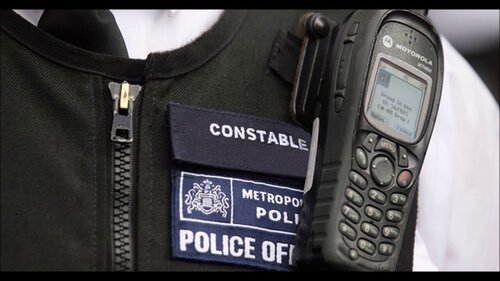 This file replaces the standard LSPDFR radio intro and outro tone from the radio crackle, to the current three-tone blip used by the Met Police right now as heard in their videos. It seems there isn't an outro for their radios so I just used the generic radio blip as the outro noise. TIMESTAMP 8:44 FOR A DEMO OF WHAT IT SOUNDS LIKE!!!!
 -
Alright so for anybody looking at this in the future - as far as I'm aware since they released the new update a month ago to GTA 4 there is no way to play LCPDFR along with ELS and whatnot. The only way is to get a pirated version online that is using the 1.0.7.0 patch, completely standalone from Steam. Thanks all
-
How are people to play LCPDFR then if they have the latest update? It is literally impossible.
-
Anybody else got a way around this? Have no idea how and when GTA 4 changed to the complete edition making me unable to update.
-
Okay thank you, but I used the same version of GTA IV on old computers(that supported the 1.0.7.0 patch and was just called "Grand Theft Auto IV" on steam), and at no point did I buy "The Complete Edition". Is there any way I can just get the same version of GTA that I had on the previous computers, without buying a new copy on Steam? I downloaded the same version of GTA 4 twice on other computers and so far this is the only one that has translated to the complete edition, which is presumably the reason for not being able to update to the 1.0.7.0 patch?
-
Yep LCPDFR runs! Only problem is I can't run ELS? When I put the files in both ELS and LCPDFR stop running. Is there a way around that also?
-
Thank you, I’ll try!
-
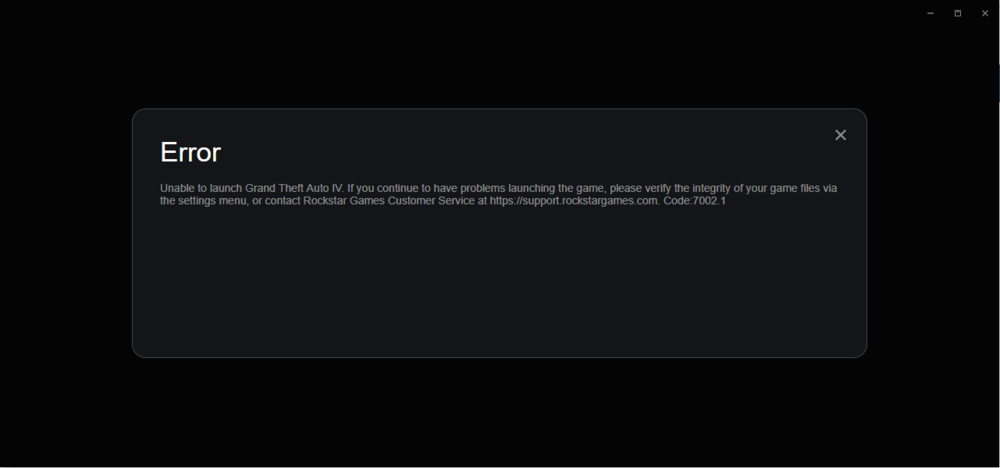
Hey So when I got GTA 4 on Steam on my new computer, it was on 1.0.2.31, which makes me unable to install LCPDFR on it. I downloaded the 1.0.7.0 patch off Rockstar, updated it, checked the version on the GTAIV.exe and everything checked out. Now when I start the game I get the screenshot included. I've downgraded from 1.0.8.0 before on other computers, and on DIFFERENT versions of socialclub, which I believe is new, and everything went fine. Can anybody help out please? Thanks
-
Hey I don't wanna have to reinstall everything in order to get the default FATCOP model again. Could anybody give me a link? Thanks!
-
Hi there, No worries issues like this happen sometimes. Have a go at some of these things and see if they help Disabling (Or making exceptions for GTA5, GTALauncher.exe etc) antivirus & firewall software Running RagePluginHook as admin If you don't have any luck with those two, Reinstall RagePluginHook Go to Steam Game Library > Right click on the game > Properties > Local Files > "Verify Integrity Of Game Cache" YOU SHOULD ONLY RESET THE GAME CACHE IF NOTHING ELSE HAS WORKED, BECAUSE IT REMOVES ALL THE CAR, PED & OBJECT MODELS WITHOUT A MOD FILE! If none of these work, please let me know!
-
Bump guys, still need help!
-
Bump
-
Bump, still in need of assistance!
-
Alright, did another test with thr Sensor mode on this time, here are the results Without GTA 5 Running With GTA 5 Running
-
Alright, I had HWiNFO (64-bit) open, and started GTA 5. Here are the results Without GTA 5 Running With GTA 5 Running
-
I'll try that right now and report back.
-
Sure thing! I'm using an Intel Core(TM) i5 CPU 750 with 2.67GHz of ram. Before like 2 months ago I was able to play the game perfectly with the exact same processor.
-
I also made a video demonstrating the lag at
-
Hi guys, Around a month or two ago I got some hardcore lag spikes while playing GTA, but I didn't really act on it until now. Basically Whenever I start GTA, I spawn in Franklin's House(All missions complete), When I move forward or move my mouse sometimes The game freezes for like 2 seconds then continues fine with like 60 fps. Then about A minute in to the game when I go outside, it starts to freeze every 4-5 seconds, then Go down to like 30-20 FPS. I will also mention that the sound also stutters during these Spikes My graphics card is an NVIDIA GTX 760 My processor is an Intel i5 Dual Processor Additionally I cleaned out my PC, and I think i noticed a few differences for the better, but before that I also did a few others things like change my graphics down(because that always helps right?) So I'm not sure if that had an impact. Also nothing happened before this that would contribute To the issues, no loud pop, no computer screaming, nothing like that. And when I tried Dirty Bomb, Another Steam game something similar happens, but a lot worse, like I can't even move in game, Yet CS:GO, Insurgency, Minecraft(Yes I did try it) work absolutely fine. So before this I was able to Run the game perfectly, but now I reinstall the game, start vanilla and this happens. Very odd. Thanks for your time, thanks in advance for any help!
-
 As of now, no. If I get the game working again, sometime in July. If he gives me permission, yes.
- 7 comments
- 2 reviews
-
No, it says "<audioNameHash>WINDSOR</audioNameHash>" No, it says "<audioNameHash>WINDSOR</audioNameHash>" Got it! Changed it back to <audioNameHash /> and it works! Cheers :D
-
Yes, and I have tried it with other vehicles and vehicle data files.
-
Hey, so whenever I go into my POLICE2 car(I've used loads of different ones To try and avoid this issue with no success) I hear the radio playing, and I can't Turn it off. Some of you may think that I could change this via the vehicles.meta Or carvariations.meta but I've tried taking the lines of an emergency vehicle that Does not have the radio playing and replacing, with of course making it suitable for The vehicle. I've tried for 3 hours without a break, with no joy. I've really appreciate Some support!
-
 Great plugin! One small problem, there's a glitch with RPH 60. Whenevr you approach the vehicle you've just stopped, it immediately drops frames to around 10.
- 3,646 comments
- 306 reviews
-
-

- 1
-
-
Thank you sir!

