


Lieutenant Dan
Members
-
Joined
-
Last visited
Everything posted by Lieutenant Dan
-
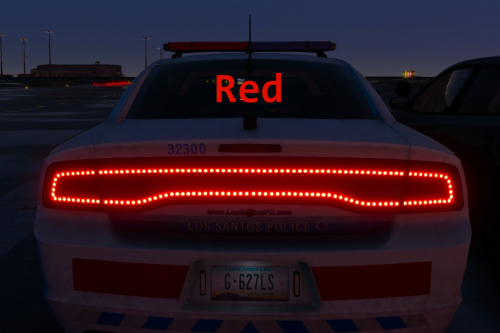 Bxbugs123's model. There is no point in using this for Thehurk's model, as he actually has better lights, making this obsolete.
- 22 comments
- 4 reviews
-
-
 A speed limiter would certainly be possible, and is already implemented, just not adjustable in game.
- 330 comments
- 24 reviews
-
-
-
It would be possible, but that would mean you don't have immediate control over your throttle and brakes, which is what my plugin attempts to give you, while maintaining a slow speed. Also, that idea would make my plugin the same as all of the other already released cruise control plugins.
- 330 comments
- 24 reviews
-
Thanks for the suggestion, I think I will implement what you stated, alongside a precision toggle key, where if you have it on, the throttle moves up slowly, but if off, the throttle is the regular 100%/0% system.
- 330 comments
- 24 reviews
-
-

- 1
-
-
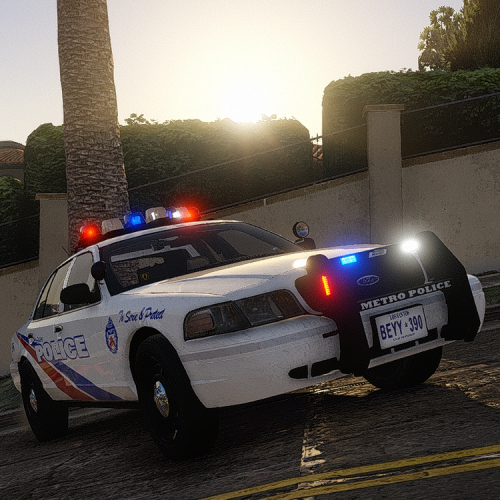 Are you sure you're replacing the files correctly? Try it again. Make sure you're replacing the npc files in STREAMED_VEHICLES_GRANULAR_NPC and the non npc in STREAMED_VEHICLES_GRANULAR.
- 40 comments
- 7 reviews
-
Strange, when me and Kallus tested the files ourselves, it worked fine. Do you hear the door sounds but not the engine? (p.s, you don't have to call me sir)
- 40 comments
- 7 reviews
-
Did you remove your resident.rpf from mods/x64 and then restart with a new one, creating a new vehicles + vehicles.oac and putting my sounds in it?
- 40 comments
- 7 reviews
-
You probably exceeded the size limit for the vehicles.awc file, meaning that any other sound mod you might've gotten is conflicting with mine. Try using a stock resident.rpf.
- 40 comments
- 7 reviews
-
-
Hello LSPDFR community, I've all day been trying to change the current player's vehicle's shift points. What I mean by this is trying to prevent the vehicle from redlining, and shifting somewhere at 1/2 or 1/3 RPM. This has proven hard, as I haven't found a Rage function or native function that allows to change shift points. I am wondering, is this even possible? Thanks, Lt. Dan.
-
-
I'll be updating the method of speed control so rather than modifier keys, you'll be able to gradually adjust the throttle, allowing for modulation of the throttle and also allowing you to have access to full throttle in one key at the same time.
- 330 comments
- 24 reviews
-
-
- 2
-
-
Yeah, that was one of my plans. I'll go ahead and release an update during this weekend hopefully. Thanks for the suggestions :)
- 330 comments
- 24 reviews
-
-
- 4
-
-
Thank you for the great suggestion, and this would also solve the motorbike problem. What did you mean by control where the shift points should be?
- 330 comments
- 24 reviews
-
-
Description This modification enhances keyboard and mouse driving in Grand Theft Auto V, by smoothing out throttle, brake and steering, providing a cruise control feature with auto-follow, and other miscellaneous improvements such as engine control, fuelling, etc. Aggressive driving is still possible, either by double tapping W/S, or enabling race mode (detailed user guide included in download). Important This mod is known to be incompatible with ikt's Manual Transmission, and Custom Gear Ratios. It may also be incompatible with other similar driving mods. Features - Smooth acceleration/deceleration - Smooth, realistic steering (with steering angle hold outside of vehicle) - Ignition control (engine stays on when leaving vehicle) - Fuel consumption and refueling - Cruise control with auto-follow - Improved, automatic gearbox - Optional custom gear ratios - Compact and informative UI - Extensive configuration - Turn and hazard indicators with automatic cutoff Planned Features - Odometer (have to figure out how this will work in game) Known Bugs - UI may flicker when FPS fluctuates a lot - If Menyoo is installed, AI shifting will not work in certain spots (such as Vespucci beach) - Please report any further bugs Installation 1. Ensure you have the following installed: - ASI Loader (OpenIV > Tools > ASI Manager) - ScriptHookV (latest version) - ScriptHookV .NET (latest version) 2. Navigate to the Grand Theft Auto V main directory. 3. Go to the Scripts folder (part of ScriptHookV .NET, if such folder does not exist, create it). 4. Unpack the archive that was downloaded into the Scripts folder (SmoothDrivingV.dll and the SmoothDrivingV folder should be alongside one-another inside the Scripts folder). Changelog - V1.01: - Added sequential shifting - Added ability to disable smooth steering Source Code https://github.com/LieutenantDan1/SmoothDrivingV
- 330 comments
- 24 reviews
-
-
-

- 38
-
-
.thumb.jpg.6d33a2d66815492d26ce295293fa7995.jpg) I'm just saying there are pylons on the actual lanes, which would be problematic for drivers wanting to switch lanes.
I'm just saying there are pylons on the actual lanes, which would be problematic for drivers wanting to switch lanes.- 4 comments
- 2 reviews
-
Why are there pylons on the lane lines? What if someone wants to use that turn lane?
- 4 comments
- 2 reviews
-
-
- 1
-
-
-
-
-
Did you try the new update (1.10)? I attempted to increase the volume on that one.
- 40 comments
- 7 reviews

.thumb.jpg.6d33a2d66815492d26ce295293fa7995.jpg)