



.gif.e7e109fa0c956d01ee1ed1696dd55ac2.gif)
Wild42
Members
-
Joined
Everything posted by Wild42
-
It must be the firewall that prevent the outbound traffic from your GTA V. Unblock the outbound traffic on Windows firewall for GTA V exe file. Please refer to Windows guide on how to do that. If that failed, the firewall is not set properly. To test it, you can temporarily unblock all outbound traffic on Windows firewall. I got an e-mail from another user with similar issue. He managed to solve that: hello Bejo! i just wanna say thank you for your help and support for the mod, it took me a little to understand but i finally found the outbound requests and gave gtaV permissions and TA-DA! its working perfectly! I'm going to work so I don't have time to test this, but this is what Bejo sent me.
-
 I listened to the files outside of the game in windows media player and I don't hear it there, I'm just saying it might be something on my end, I'm not sure. But even with the pop this mod is great, thank you, Ima keep it regardless.
- 38 comments
- 9 reviews
-
My audio pops everytime one of these alerts play, anyway I can fix that? Otherwise great mod, thanks! Edit: I don't think it's this mod, might be BetterDispatchAudio. Edit2: Nope it's this.
- 38 comments
- 9 reviews
-
Yeah done that, and also running defender. I'm on windows 7.
-
Most mods have installation instructions, either on the page or in a readme in the file. Usually a safe bet to have a good read beforehand, found this in the link you posted; To install the vehicles meta file, navigate to: C:\Program Files (x86)\Steam\steamapps\common\Grand Theft Auto V\mods\update\update.rpf\common\data\levels\gta5 Or the spot you put your metas in. Simply copy over this line over the existing police3 line.
-
Literally having the exact same issue, I even tried emailing the mod creator and he told me the exact same thing other people have. "Make sure the gaming PC is connected to internet. Also check you antivirus/firewall to allow outbound traffic from RPH and GTA V." It sucks that no one seems to know how to resolve this issue, I hope a solution is found soon, it seems a few cool mods rely on StopThePed to actually function.
-
-
-
-
 Love how the one I wanted is the only one that hasn't been checked yet lol. Can't wait to use this though, thanks for the mod.
- 269 comments
- 17 reviews
-
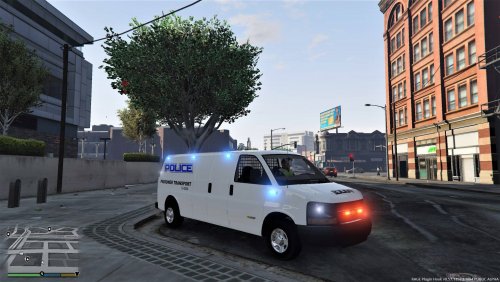 Awesome mod, but should the police transport from the 3.2 beta seat download allow for 6 people in the back? Cus maybe I've missed a step.
- 137 comments
- 13 reviews
-
Never crossed my mind, the notification makes it seem like theres an issue with the plugin itself. It was last updated on the 15th of November, two months after the latest LSPDFR update but maybe it isn't up-to-date yet. I'll leave it for a while, thanks for all your help.
-
Only change seems to be they're both telling me verifying failed and they've been disabled. Guessing theres no way to just, you know. Change something so it just TRIES to work instead of throwing the .dll equivalent of a tantrum because it can't make sure it's the latest version. RagePluginHook.log
-
Yeah, no, nevermind. It loaded but still doesn't work apparently. Shame the guy cut himself off so he can't help people. Anyway the notification for the failed update seems to have stopped but it's showing for another addon he has, ultimate backup. And the StopThePed menu doesn't open, just makes a sound everytime I press E. RagePluginHook.log
-
So I've been trying to get this to work for two days, but apparently when I reinstalled it to show you the issue it started working so I'll share what I did just in-case. Before I unzipped the plugin I right-clicked and clicked this; Then apply, and now it's working. Thanks for your help though, I appreciate it a bunch.
-
Yup.
-
I'm aware the plugin is no longer hosted here and have since gone to the owners website, but he seems to be missing any method of contacting him so when I'm faced with; "This plugin is DISABLED because it failed to verify the version" I don't know what to do. - GTA, RAGE etc all have firewall exceptions - My internet is fine It's such a shame because I'm finding all these mods that both recommend in some cases, require stop the ped and for some reason the owner has made it so it breaks your game if it can't check it's the latest version.
.thumb.gif.6e96e1e7051f5376df8c51e5a628b9cc.gif)

