


LS Designs
Members
-
Joined
-
Last visited
Everything posted by LS Designs
-
*UPDATE* After changing absolutely nothing, both liveries are now spawning in and are able to be changed through the trainer. Although, my other issue (ai not recognising me as an emergency vehicle) is still not fixed. Any help on this would be appreciated!
-
As per the title says, I wish to change a civilian vehicle into a slot that can be used by a modded emergency vehicle. Before we go any further - is it actually possible for me to do such a thing, or do I have to result to dealing with addon slots? Now to the issue... 👍 I've put in an emergency motorcycle (using it as a paramedic vehicle), under the civilian slot of 'Ruffian' (which is also a motorcycle). I've copied all the necessary handling lines for the mod etc and put them in the correct file. I have then gone and copied the vehicles line provided with the mod, and put all those lines into the designated 'Ruffian' in the vehicles file. I have also changed the audio hash to 'policeb'. Then here I am thinking all will be fine, so I go in game and test it out. The sirens and ELS lights do work. The sound of the policeb motorcycle is working, thus not having any civilian radio. But there are 2 issues - 1. being that vehicles will not get out the of the way of my motorbike (more so stop in the middle of the road and cause you to go up their rear end but hey 🤣), is there something else I'm missing for this to actually happen? At the moment the ai is just acting like I'm a normal motorbike, and getting the odd honk of aggression... 2. being that I am not able to change liveries in the trainer. I have 2 liveries in the necessary vehicle file, yet only the first one appears in game. I have made sure to have 'FLAG_HAS_LIVERY' in the correct area as that appears to be the line needed going by some research, but that does not seem to make a difference 😞 After doing some troubleshooting myself, I have noticed that you must have 'FLAG_EMERGENCY_SERVICE' in the necessary area. I have left out 'FLAG_LAW_ENFORCEMENT' as one would presume that is only for police vehicles. I also noted that the 'Ambulance' area did not contain those words (I have although tried it in game with the LAW_ENFORCEMENT flag, but still no luck). Hopefully that all makes sense... I'm one of those few people who read over what they typed several times before clicking that post button 😉 P.S. On a little side note - is there a way to stop this particular vehicle from spawning in game? I'm saying this as in a number of areas, I'm seeing quite a few spawn on the side of the road. When in reality, there are not that many in real life 🤣...any help would be massively appreciated!
-
I'm finally back and active on here! Unfortunately due to lack of time, there has been no progress on the Washington D.C. based LSPD pack Although, it did seem to be liked a lot by a number of you! Let me know what you think, should I make another pack?
-
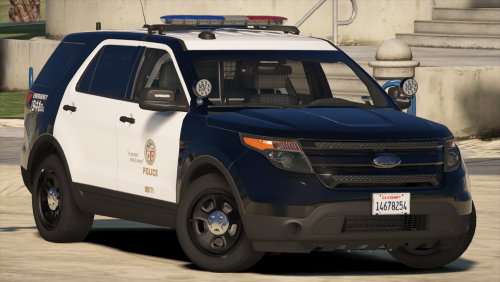 What can I say... this is honestly my favourite model out there for the game. You've done a superb job on it! And you've just hit a milestone, review 100 on this
- 563 comments
- 116 reviews
-
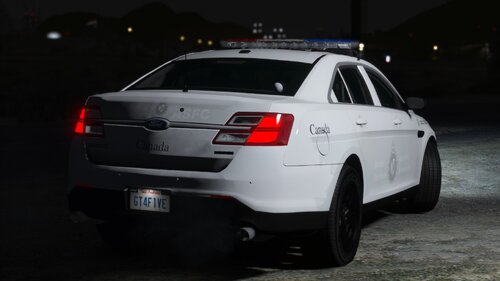 Very nice collection of textures, they look superb! And yes, I am finally back and active
- 8 comments
- 9 reviews
-
-

- 1
-
-
Hi all, To those who recognise me and downloaded my texture pack, I am back and active! Now down to business... Would anyone be willing to edit a model of a particular SUV (add lights etc) and do the conversion to GTA 5? I've tried a number of times to work with model files, but all attempts have gotten me no where sadly. If you are genuinely interested - then please let me know and I'll be sure to give you more details
-
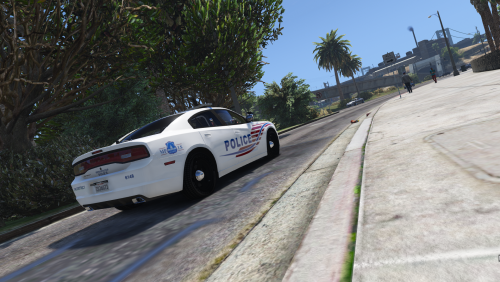 And I am back on the forum! Unfortunately I have been fairly busy over the past year and a bit, so no progress has been made on this pack. Although, do keep an eye out in case I do decide to add more textures in the future
- 8 comments
- 4 reviews
-
@LRayM14 - SUV's will be added to the pack in future updates, there will be many more additions to this
- 8 comments
- 4 reviews
-
@jg45042 - thanks for the kind words. Indeed I have done many skins in the past, but never got around to finishing them. Anyhow, this is the first of many packs to come!
- 8 comments
- 4 reviews
-
--------------------------------------------------- >>> Showroom for LS Designs <<< ---------------------------------------------------- Just a place to show off my WIP and released modifications for Grand Theft Auto V. As of now, I am only working on skins/textures. Feel free to leave a comment, suggestion or critique below!! My first skin pack has been released - a Washington D.C. based LSPD pack: Washington D.C. based LSPD Skin Pack is now available!
-
------------------------------------------------------------- >>> Washington D.C. based LSPD Skins <<< ------------------------------------------------------------- These textures are for the Los Santos Police Department, based off the Washington D.C. Police Department layout. This pack includes a few of many vehicles that the Washington D.C.P.D. currently use. In future updates, I will provide more skins for various vehicles in which the Washington D.C.P.D. have. *All skins in this download are original and created by me (LS Designs)* *Do not re-upload these files anywhere without my prior permission beforehand* *I can not be held responsible for any game issues caused while my textures are installed* Vehicles used when making the textures within this download: 2011 Ford Crown Vic by Bxbugs123 2014 Dodge Charger by Bxbugs123 Please be sure to read the readme file included with this download. If you enjoy these textures, please feel free to leave a positive review down below! To stay tuned for my upcoming releases, give my profile a follow to receive all the latest!!
- 8 comments
- 4 reviews
-
-
- 6
-

