




SHAWNLYNCH23
Members
-
Joined
-
Last visited
Everything posted by SHAWNLYNCH23
-
WE dont... its basicly a safeguard to stop modders and its a piss off. They really want us to play the basic game and buy their shark cards for content ( cause like we have the time to grind away at missions to afford the new car or outfit ). They effectively made this new launcher to bypass any RPH, plugins and other files. I personlay dont see why we cant mod ... we are not making a profit from it
-
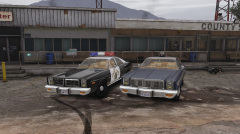 very nice! Im a big fan of The Dukes Of Hazzard ... it would be nice if there was a Hazzard County Sherrif skin for this car to go along with the 1969 Dodge Charger mod

