sixium
Friends of LSPDFR
-
Joined
Everything posted by sixium
-
-
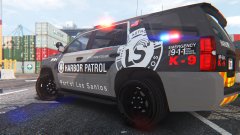
From the album: Los Santos Views
LSPA-HPD skin for Thehurk's 2015 Chevy Tahoe PPV. WIP 2015 K-9 Tahoe PPV by thegreathah! =D To be released as Part 3 of the LSPA-HPD pack. -
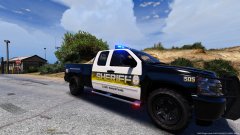 Where find the truk?
 -
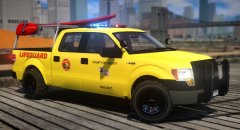 Still stuck in GTAIV? =\
 -
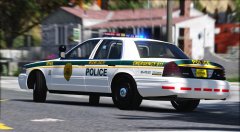 Watch what you secrete, this is a family oriented site.
 -
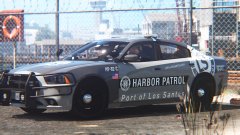 Okay =(
 -
From the album: Los Santos Views
Bxbugs's 2014 Charger. 2014 Dodge Charger Pursuit by Bxbugs123, ready for him to ELS-enable it =) -
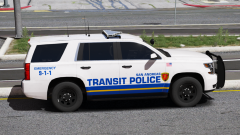 Very nice
 -
From the album: Los Santos Views
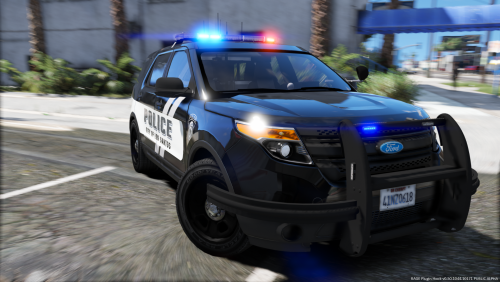
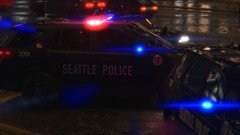
Seattle Police Department 2016 FPIU skin. The most accurate skin you will ever find of SPD, 99%+ accuracy. 2016 FPIU by Thehurk -
Beginning of the next chapter. 2016 FPIUs! Both Thehurk and JasonCT203 templates. Will be released as Part3 with pre-2015 Chargers. 2016 FPIUs by Thehurk and ALLENjr12
-
From the album: Los Santos Views
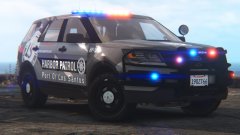
The beginning of the next chapter of the LSPA-HPD. 2016 FPIU ELS models (both Thehurk and JasonCT203 templates). WIP ELS 2016 FPIUs by Thehurk and ALLENjr12! Skins will be released as a part of LSPD-HPD Pack 3 along with pre-2015 Chargers. -
-
-
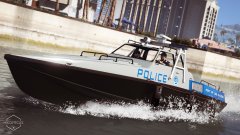 Where can i find this boat???? =O
 -
-
 There is no better or worse, man. Keep up the good work, any contribution to the community is great in my book.
- 22 comments
- 17 reviews
-
-

- 1
-
-
-
-
That is in the works, along with the "other" '16 FPIU. I'm not too fond of the '16 FPIU, along with the '15+ Tahoes (the design of them, absolutely nothing against the models), so I left them to do afterwards hahahah =P
- 22 comments
- 17 reviews
-
-
- 1
-
-
You might notice that a lot of the vehicles in the screenshots have identical unit numbers. Pay no attention to that, the actual skins all have unique numbers =)
- 22 comments
- 17 reviews
-
-
- 1
-
-
From the album: Los Santos Views
Released =D -
Released!! The Dinghy will have to wait, I'm having a bit of trouble with the template.
-
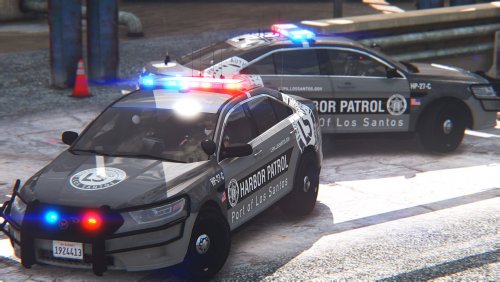
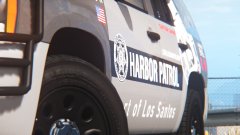
LSPA-HPD (Los Santos Port Authority - Harbor Patrol Division) Fleet Skin Pack Original livery skin pack for multiple vehicles in 4K ---------- Los Santos Port Authority - Harbor Patrol Division (LSPA-HPD) All-original design for a fleet of vehicles. The Los Santos Port Authority's Harbor Patrol Division is the LSPA's law-enforcement and emergency-services arm for the entirety of Elysian Island, Terminal Island, the Port of Los Santos, and their surrounding coastal areas. They also patrol the harbor itself with maritime vessels. The LSPA-HPD has two subdivisions: Harbor Patrol and Fire & Rescue. Harbor Patrol handles all law-enforcement duties in the Los Santos harbor area with uniform, canine, and maritime patrols, and they patrol with the same vehicles the LSPD uses. Fire & Rescue provides emergency medical, fire, and rescue services in the Los Santos harbor area and they are responsible for everything from injuries of crew to cargo and ship fires to personnel rescue. They use mainly Chevrolet Tahoes, with the Dive Team using a specially-outfitted Ford F350 SuperDuty, and EMS using Dodge RAM 3500 ambulances. The LSPA Harbor Patrol Division's livery design consists of a metallic gray-on-charcoal color scheme, a prominent stylized large LSPA logo on the sides of the vehicle, and large bold lettering all over the vehicle. Black stripes are a major feature and are on the sides and rear of the vehicles. Also featured are stylized roof markings (LAX-style). LSPA-HPD Fire Department vehicles share the same features, but are on a pearlescent blue color scheme with black bumpers. All vehicles feature reflective chevrons on the rear. This design is a collection of a bunch of influences and inspirations. There's some PG County PD in there, some Australian police livery influences, a bit of NFS, a bit of European, a bit of LAPD, a bit of CHP, and a bit of personal design choices. There's some lettering in DIN, which Seattle PD uses (of course). The rest is Helvetica. The "patch" on the rear of the vehicles is original as well, just a circular patch with the seal of Los Santos and the logo of Los Santos Port Authority. ---------- Here are the vehicles that are included: 2013-16 Chevrolet Impala 9C1 (Officer Underwood Template) V1.1 2013 Chevrolet Tahoe (OfficerUnderwood and GeorgieMoon templates) 2015+ Chevrolet Tahoe (Thehurk Template) V1.1 2014 Dodge Charger (Bxbugs/Carper Template) V1.1 2015 Dodge Charger (OfficerUnderwood Template) 2016 Dodge Charger (Thehurk Template) V1.1 Dodge RAM Ambulance (glitchgamer) Ford CVPI (Bxbugs and DSF templates) 2013 Ford F350 SuperDuty (Thehurk) 2016 Ford FPI (OfficerUnderwood Template) 2014 Ford FPIU (JasonCT203 Template [Every 2014 FPIU]) 2016 Ford FPIU (Thehurk and JasonCT203 templates) V1.1 Rockstar Police Boat Dinghy (Bonus skin) [FUTURE RELEASE] Rockstar MTL Fire Engine (Bonus skin) ---------- What's included in the files: - Part1 - SUV/Truck Skins - Part2 - Sedan skins - Part3 - V.1.1.0 Release - READMEs - Screenshots ---------- INSTALLATION Using OPENIV, open the relevant vehicles.rpf (located in various locations depending on model, refer to the model's documentation). Locate the model of your choice (e.g. "sheriff" or "police2"), select the model's ".ytd" file and click the "Edit mode" button. Replace the "xxxx_sign_x" texture(s) with the texture(s) of your choice from this pack. Save And Close the window. Enjoy! If you like/require 2K-resolution textures, scale these skins by 50% using your favorite image editor and save as PNG. ---------- MODELS USED ---------- Please enjoy! And let me know what you think! =DD
- 22 comments
- 17 reviews
-
-
-

- 24
-
-
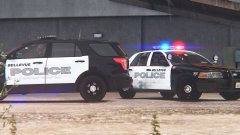 They're not released.
 -
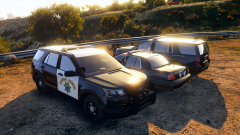 =OOOOOOOOOOOOOOOOOOOOOOOOOOOOOOOOOOOOOOOOOOO