


ramer120
Members
-
Joined
-
Last visited
Everything posted by ramer120
-
UPDATE: Still no startup. Did another clean install, and deleted my 2nd copy of GTA (unmodded). It looks like Norton controls all the Windows Defender stuff, so I skipped that and ensured that Norton allows everything in the GTA main folder. I only have files for GTA, LSPDFR, RPH, and Scripthook added to the root folder. Also verified game integrity via Steam. RPH Log:
-
Reinstalled RAGE and tried alt-tab'ing out to hook it, still no luck. Will try a fresh install again later. Thank you for all the advice!
-
RPH 1.74.1261.16020 GTA 1.0.1868.0
-
I went back and ensured that RAGE is set to "Allow" by Norton, and ran as an admin. Same issues however.
-
Hi All! I'll preface this by saying I haven't played since March, and it looks like there is this new R* Launcher. I did a clean install of GTA (Steam Version), RPH 1.74.1261.16020 (Dec 14 release), Scripthook 1.0.1868.0 (Dec 16 release), and LSPDFR 0.4.5. I installed a few custom cars and weather/timeycle mods using OpenIV 3.2 before booting using the RAGE exe. I found out that doesn't work with the new R* Launcher. So I went digging and found these 3 solutions: 1) Launch RAGE and GTA at the same time 2) Launch GTA and then launch RAGE at the home screen 3) Launch GTA and then launch RAGE when within Story Mode I've tried all 3, including making sure Norton allows RPH and I run as an admin, but each time I load into GTA, none of the mods seem present and the F4 RAGE console doesn't work. RAGE says "Hooking game instance" and then errors out at "Insufficient permissions or bad anti-virus". Please help!
-
I'm also having a related issue where starting via RPH brings me to the normal "Online vs Story Mode" menu. It doesn't seem that RPH is actually hooking into the game. EDIT: This fixed my problem. https://www.lcpdfr.com/forums/topic/86309-cannot-get-lspdfr-to-work-rage-problem-maybe/?do=findComment&comment=557625
-
Thank you so much, works fine now. Only questions is any guesses as to why this happened in the first place? Maybe its something I can avoid in the future.
-
Hi all, I downloaded RPH 0.56 and now have texture LOD loss in game, and a missing RAGE F4 overlay that freezes the game when opened just like normal (I can still type commands blindly). I've removed my mods folder (containing MVGA and many vehicle replacements) and plugins folder, but the problem does not correct. I've also updated RAGENativeUI with no results. I launched my modded GTA through Steam and the issues are not present, only when launching with RAGE. System is not an issue since im running an i5 and GTX 1050 Ti (and more importantly, since it was working before the update). It may help to know that I also updated to the newest Windows 10 version just recently released, but it hasn't affected any other game. Any suggestions? RagePluginHook_29072017_232241.log
-
 Hi Turpino, I love the pack but was wondering if you could add the DSF CVPI back into it? Or DM me the textures?
- 16 comments
- 9 reviews
-
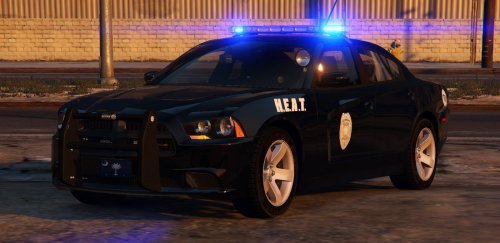 Absolutely adore the car but quick question: I've installed it in the POLICE2 slot, but the handling is very very weird. Any control input is delayed as if the car is sliding on ice in slowmo. I've tried changing the handling line in "mods/update/update.rpf/common/data/levels/gta5/vehicles.meta" from POLICE2 to POLICE, POLICE3, and FBI with no luck. Any thoughts on something I might be doing wrong?
- 56 comments
- 25 reviews
-
Hi all, I posted another thread earlier over here and thought I resolved the issue...guess not. Basically, my game will always crash after the 1011 update if I've made ANY changes to ANY carvariations.meta or vehicles.meta files within mods/update/update.rpf. Currently I can only get .OIV's to work (Bxbugs123 charger & cvpi, and MVGA 2.6) within the mods folder. Any kind of tinkering with other files always leads to a game crash. Hoping this is a easy fix as I've already tried both making a new mods folder from scratch and redownloading RPH 0.51. Thank you!
-
Thank you for the quick reply Cyan! Sorry to hear that but glad to get some closure.
-
Hi all! First forum post so kinda disappointing its under these circumstances. Anyway, I've updated all the stuff I can to RPH 0.51 and the newest title update (1011) but my game repeatedly crashes on loading. I'm thinking its an issue with the update.rpf file within my mods folder. If I remove the mods folder entirely, the game works fine. If i remove just update.rpf it loads and is playable for ~5min. When updating to RPH 0.51, I had to copy over the new update.rpf but reinstalled my backed-up vehicles.meta. Given that I have replaced all vanilla emergency vehicles, is there anyway I can fix this without having to start the mods folder from scratch? Thank you in advance!
-
.thumb.jpg.1db0be3e377ccefdd47e57a95ec56762.jpg) Probably a simple answer, but can anybody tell me how to disable the multiple base colors the car spawns with? Many of the liveries look awkward if the base color is blue, red, black, etc.
Probably a simple answer, but can anybody tell me how to disable the multiple base colors the car spawns with? Many of the liveries look awkward if the base color is blue, red, black, etc.- 239 comments
- 70 reviews
-
 I think I saw a similar comment earlier, but for the life of me I cannot download this mod. I've tried 7zip, 9zip, and rarOpener and none can unarchive the download :(
- 3,646 comments
- 306 reviews
.thumb.jpg.1db0be3e377ccefdd47e57a95ec56762.jpg)
