darkhatos
Members
-
Joined
-
Last visited
Files posted by darkhatos
-
CREDITS
Model: gta sa
Textures: gta sa
conversion to GTA V: Swpok
Unlocked version : 2w90k
Conversion Police version : DarkHatos
Fedsig Arjent S2 : 0taku ,DarkHatos
Panasonic Toughbook CF : 0taku
Template : DarkHatos
Skin : DarkHatos
Install ADDONS
go to OpenIV, drag and drop "lambolapd" folder here "GrandTheftAutoV\mods\update\x64\dlcpacks"
go to "GrandTheftAutoV\mods\update\update.rpf\common\data"
open dlclist.xml add this
<Item>dlcpacks:/lambolapd/</Item>
lambolapd.xml here
C:\Program Files\Rockstar Games\Grand Theft Auto V\ELS\pack_default
Update 1.1
Add New Taillight
Add New Handling
Rework all textures and matérials
fix hubs wheel
fix lights
fix Collisions
update 1.2
Fix Handling & vehicles.meta for LSPDFR
Update 1.3
Fix Plates
Fix Headlights
Add Template folder
THANKS FOR DOWNLOADS MY LAPD CAR 🙂
- 5,227 Downloads
- 22 Comments
Updated -
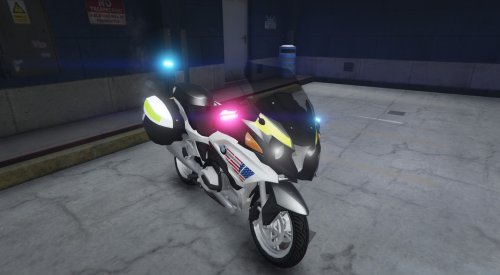
FRANCAIS Version
Pour la Moto aller dans OpenIV ensuite
Grand Theft Auto V\Mods\update\x64\dlcpacks\patchday17ng\dlc.rpf\x64\levels\gta5\vehicles.rpf
Pour le vehicles.meta aller dans OpenIV ensuite
Grand Theft Auto V\Mods\update\update.rpf\common\data\levels\gta5
extraire le vehicles.meta d'origine sur votre bureau et l'ouvrir avec NotePad ensuite aller dans le dossier du mods ouvrez le fichier "META" copier le contenu qui ce trouve dans "vehicles.meta" et coller le a la place de celui d'origine en effacant les lignes qui correspondent a celui-ci !
pour l'ELS ouvrir le dossier "ELS" et copier le contenu dans Rockstar Games\Grand Theft Auto V\ELS\pack_default
ENGLISH Version
For the Moto go in OpenIV then
Grand Theft Auto V \ Mod \ update \ x64 \ dlcpacks \ patchday17ng \ dlc.rpf \ x64 \ levels \ gta5 \ vehicles.rpf
For the vehicles.meta go in OpenIV then
Grand Theft Auto V \ Mods \ update \ update.rpf \ common \ data \ levels \ gta5
extract the original vehicles.meta on your desktop and open it with NotePad then go to the mods folder open the file "META" copy the content found in "vehicles.meta" and paste it instead of the one original by erasing the lines that correspond to this one!
for the ELS open the "ELS" folder and copy the content into Rockstar Games \ Grand Theft Auto V \ ELS \ pack_default
- 14,201 Downloads
- 17 Comments
Updated