CiscoFan
Members
-
Joined
-
Last visited
Files posted by CiscoFan
-
This brings back the original HUD (heads up display).
1. Open OpenIV
2. Enable Edit Mode
3. Navigate to /GTA V/Update/Update.rpf/x64/patch/data/cdimages
4. Copy minimap.gfx, minimap.ytd,player_switch.gfx and replace them.
5. Copy graphics.ytd to x64a.rpf/textures.
6. Copy hudcolor.dat to update/update.rpf/common/data/ui.
7. Copy hud_reticle.ytd to update/update.rpf/x64/patch/cdimages/scaleform_generic.rpf/.
8. Copy hud.ytd to /update/update.rpf/x64/patch/data/cdimages/scaleform_generic.rpf.
9. Copy frontend.xml to update/update.rpf/common/data/ui/frontend.xml
10. Copy pause_menu_header.gfx andpause_menu_header.ytd to update/update.rpf/x64/data/cdimages/scaleform_frontend.rpf
11. Copy player_switch_prologue.gfx andplayer_switch_stats_panel.gfx to update/update.rpf/patch/data/cdimages/scaleform_generic.rpf.
12. Run GTA V!
This has the original files as well.
Credit goes to Vitalik2187836 on GTA5-MODS.com for taking out the faded portion of the minimap
CHANGELOG
Removed Faded portion of minimap
Working on the minimap.rpf files (waiting for software)
Added old gen radio wheel and weapon wheel with proper icons but don't purchase the railgun or hatchet.
Fixed known bugs that users reported.
Fixed the bug where the sniper scope wasn't transparent.
Added screenshots
Added old pause menu header
Added old Stats area of hud
Added Next Gen Blips
Updated Instructions.
UPCOMING: Previous Gen Minimap ydds
VIDEO: https://www.youtube.com/watch?v=FML0_c5iM-s
- 759 Downloads
- 1 Comments
Updated -
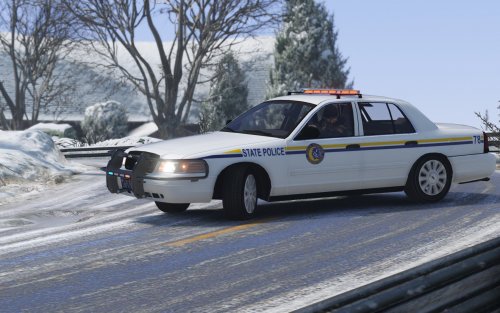
North Yankton State Police CVPI
By DroidRZRLover
Installation:
Place the Policeold2 .YFT and .YTD files into x64e/levels/gta5/vehicles.rpf and delete the .hi+.YTD file.
You need to add the lines below to the mpjanuary2016 carvariations.meta that is located in update/x64/dlcpacks/mpjanuary2016/common/data(or really anyother dlc update that has a carvariations.meta)
Credits:
- Whelen Dominator Series modeled and textured by tomcat8492.
- Model is original Ford Crown Victoria by Schaefft, modified for and converted to GTAIV by Chasez.
- This version of the CVPI model has been modified by Bxbugs123 & Lt.Caine with permission by Schaefft and Chasez.
- Rims By Bxbugs123, Textures By Lt.Caine
- Ford Crown Victoria Hubcap modeled by Bueno
- Inner rim by DSF
- Tire by Rockstar Games
- CVPI Ported by DroidRZRLover
- Whelen Dominator ported by DroidRZRLover
- Go Rhino Pushbar w/ wraparound by Bxbugs123, ported by DroidRZRLover.
- 2,647 Downloads
- 42 Comments
Updated