


PeterU
Members
-
Joined
-
Last visited
Everything posted by PeterU
-
-
 The log file suggests that the crash was caused by HeroCop. Could you try removing HeroCop and seeing if the crash still occurs?
- 546 comments
- 103 reviews
-
This bug should be fixed in v0.8.0.0, but I haven't had a chance to replicate it myself. Please let me know if you see this issue again!
- 546 comments
- 103 reviews
-
-

- 1
-
-
-
I'm experiencing the same issue, but I'm afraid that doesn't mean I know how to fix it!
- 546 comments
- 103 reviews
-
I have seen this exact behaviour with invisible drivers (if you hijack them, they suddenly appear in the driver's seat!), but I put it down to me unloading and loading LSPDFR multiple times in one GTA session, as I do a lot when developing.
- 546 comments
- 103 reviews
-
I've struggled to download your attached log -- it says the file doesn't exist. Could you try again, or upload to an online service and link to it? I've seen this after unloading and reloading LSPDFR a few times, but not in normal play. Can you provide a RagePluginHook.log file from one of these occasions?
- 546 comments
- 103 reviews
-
What version of Rage Plugin Hook do you have? PeterUCallouts requires at least 0.41.
- 546 comments
- 103 reviews
-
Please attach a RagePluginHook.log file from the gaming session in which this issue was seen. This will be in Logs\ in your GTA folder. I've noticed this myself and seen it in some videos as well -- it is on my list to investigate for the testing cycle of the upcoming release.
- 546 comments
- 103 reviews
-
-
- 1
-
-
0.7.0.0 is tested on RPH 0.42, but does not use any new features from that RPH release. I would expect it to work fine on 0.40 and 0.41 as well, although I can't spend time testing with these releases also!
- 546 comments
- 103 reviews
-
Were you doing anything in particular just before it crashed? The last thing my code did was have the suspect flee (so they must have just seen you), but there's no suggestion that the crash was caused by that from the log.
- 546 comments
- 103 reviews
-
Thanks for reporting this. I'll look into addressing it in the next release.
- 546 comments
- 103 reviews
-
-
- 1
-
-
Vastly improved version of this, which now uses a combination of the TraceExtent method above and the native ENTITY::HAS_ENTITY_CLEAR_LOS_TO_ENTITY_IN_FRONT to do this in a much more realistic and efficient way. I no longer make the mistake, as @alexguirre points out, of making the radius of the TraceExtent cylinder too big (which not only gave potentially inaccurate results from a logical point of view, but hurt performance a lot). This will always check to see if the passed ped can see the local player character, and then optionally also will run a TraceExtent to determine peds and vehicles that are possibly in the suspect's range, and if we are interested in them (they are a cop), then we run the native to actually determine if there is a clear line of sight. It supports sending different flags at runtime based on what you are interested in evaluating, though I haven't tested that in the real world yet, and some of them are not yet implemented, as so far I only want to use 'All'! Thanks to @alexguirre, @Stealth22 and @Albo1125 for their help with this. http://pastebin.com/VWmmTcBR
-
Oops... I guess I need to be up-to-date in order to get the updates to the updater...
-
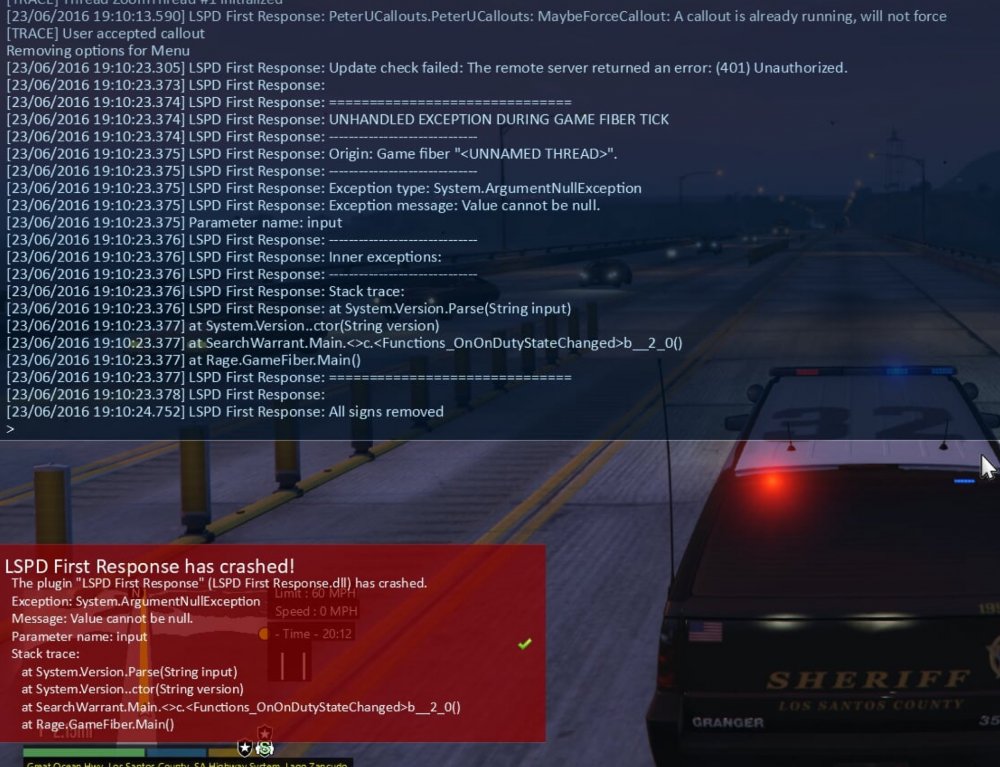
@Darkmyre I just experienced what I think might be this crash for myself. As SearchWarrant checked for updates and received a 401 from LCPDFR.com, it appears to crash with an ArgumentNullException. It looks like a null was passed to System.Version.Parse:
-
Could there be something to do with System.Version.Parse(String input) that SearchWarrant is doing before the sleep that is crashing (and perhaps in particular on German-language system)? I'm reading it as that the crash is happening in Rage.GameFiber.Main(), not another fiber that might be doing the sleeping. @Maurice97 Does this crash occur immediately after going on duty, or is there a delay?
-
In that RPH log, the PeterUCallout update thread was terminated (the ThreadAbortException) by the fact that the whole of LSPDFR was about to crash. Because my update check code creates a new GameFiber and sleeps it for a random delay before checking for updates, I don't think this is my update check code crashing if the crash occurs immediately. It looks like the SearchWarrant update check (@Darkmyre ) might be responsible for the initial exception:
-
In response to the new feature here at LCPDFR.com, where file authors can upload beta versions for selected users to test, I'd like to invite users to request access to debugging versions of PeterUCallouts. Testing across lots of different installations and ensuring that new features don't cause conflicts with the variety of elements in different people's LSPDFR installs is challenging without help. If there are any willing participants, here's what I would expect from you: you have a good understanding of where your log files are, how to find the relevant entries and are able to report issues concisely and precisely you have a good understanding of how to edit .ini files you are willing to "stress test" particular features/particular scenarios I'm working on by playing them a number of times over (I get very bored of my own callouts after testing them enough times to be happy they work OK!) you are willing to keep these pre-release versions and their features to yourself, so as not to spoil any surprises Adding a little more about surprises: I like to add into my callouts scenarios and possibilities that are quite rare and quite different from the common ones -- so that even if you think you've played that callout a million times before, there is always that potential to be blind-sided! If you're a member of the Debugging Division, you'll get to see and test these lower probability scenarios, perhaps many times, but I'll want you not to shout loudly about them and spoil them for others! (Yes, you do have to spoil them for yourselves, but hopefully by making them surprising, exciting and stable, we make other players of the game very happy!) I'd like a smallish group, preferably with a nice diversity across things like: computer specifications number of other plugins installed number of custom vehicle models installed etc. languages and regional settings playing styles Those who are interested can message me with some details regarding the bullet points above. Thank you in advance for anyone who wishes to help.
-
 This is truly wonderful. I love the realism of having a real distance between where the EMS units spawn; the realistic time taken for them to arrive may have an impact on whether or not the patient will survive. The clever use of the CPR animations also adds to that feeling of immersion. I'm very excited about how this might develop in future versions, and will be using it now for all my LSPDFR sessions.
- 781 comments
- 85 reviews
-
-
- 1
-
-
Aha... I'm pretty sure that's it. The next version of the callouts will support non-English number formats, so you shouldn't then need a workaround. In this case, the Possible Burglary callout was chosen by LSPDFR to be started. So, what should have happened is that the callout is offered to you as normal. However, because of the localization issue, it couldn't set up properly (the many log lines with the errors are Possible Burglary not succeeding in the set up process), so my code cancels offering the callout to avoid crashing LSPDFR. So, in the UI you never see the callout offered, as if it never happened!
- 546 comments
- 103 reviews
-
What language and localization settings do you have set in Windows? (Control Panel > Clock, Language and Region > Change date, time or number formats) It looks like it might be that the Possible Burglary callout is struggling to figure out that the numbers in the (in this case) Properties.xml file are valid, possibly because of different number formats using a different decimal separator symbol. If this turns out to be what is wrong here, I should be able to get a permanent fix in the next release. A workaround would be to find/replace all the decimal points in the callouts' XML files with whatever is set as your decimal separator in Windows' number formats settings.
- 546 comments
- 103 reviews
-
-
- 1
-
-
Are you 'on duty' with LSPDFR when you're trying to get the callouts to load? It looks like here you might be trying to load the callouts dll directly as a Rage Plugin Hook mod, rather than just loading LSPDFR. You shouldn't try to load PeterUCallouts.dll into RPH directly. Just load LSPDFR in your Rage Plugin Hook startup script -- it will automatically handle loading all the callouts it finds in the correct folder (GTA V dir\plugins\LSPDFR).
- 546 comments
- 103 reviews
-
On further investigation — you're absolutely right, it is something slowing down, and because my LSPDFR system is only really capable of 30 fps, I wasn't noticing a slowdown to 20-25 fps. The culprit was how frequently I was checking to see if the suspect could see the player/a police vehicle. This should be addressed in v0.3.1, which I have just released. In my testing, it now stays around 28-30 fps on my system. Hopefully it also stays fast on others' systems that are 60 fps capable!
- 546 comments
- 103 reviews
-
-
- 2
-
-
Is there a particular point that the FPS drops start, or is it all the way throughout the callout? Is it only when you get within range and see the "Remember that the suspect is not aware" prompt, or even before that? I didn't experience this in my testing, but perhaps there is something running every tick in Process() that is too expensive, or running when unnecessary! If you are able to provide a RagePluginHook.log from one of these moments of lag, that will help too.
- 546 comments
- 103 reviews
-
Here is my code for CanPedSeePolice which implements a World.TraceExtent to determine if the passed Ped can see a police officer, the local player, or a police vehicle. This does still contain references to some of my own private methods (CommonUtils.DumpLog is my custom logging wrapper), so some things will need changing, but hopefully this helps others! Provided "as is", without guarantees!


