Skip to content
View in the app

A better way to browse. Learn more.

LCPDFR.com

A full-screen app on your home screen with push notifications, badges and more.

To install this app on iOS and iPadOS
  1. Tap the Share icon in Safari
  2. Scroll the menu and tap Add to Home Screen.
  3. Tap Add in the top-right corner.
To install this app on Android
  1. Tap the 3-dot menu (⋮) in the top-right corner of the browser.
  2. Tap Add to Home screen or Install app.
  3. Confirm by tapping Install.

Kyjack

Members
  • Joined

  • Last visited

Everything posted by Kyjack

  1. Tried to turn off anti-virus, reinstalled LSPDFR (Apart from "LSPDFR/data/custom" because its a hassle to redo) and still doing it. LOG below someone please help ❤️ UPDATE: Deleted my LSPDFR/data/custom folder contents and now working!
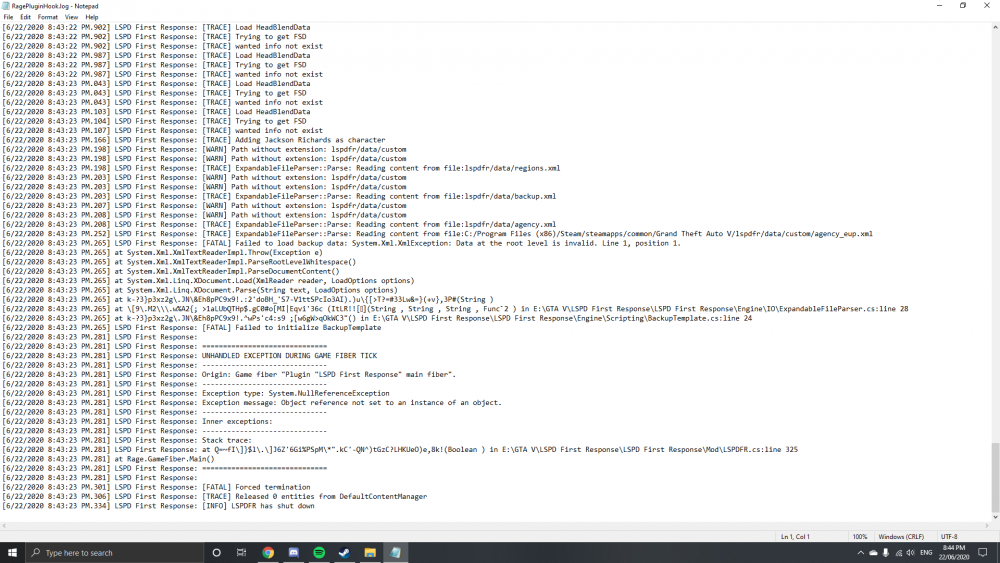
  2. @SamYeah so my game crashes after downloading. How do I uninstall?
  3. Update: I have since disabled my antivirus (Trend Micro Security) and looks like it worked!
  4. I have a clean GtaV directory, just downloaded. I have only LSPDFR 0.4.6 and the new Rage Plugin 1.74. GtaV freezes and exits, no crash message, no nothing. Rage.exe then deletes itself and I cant find any logs because they have been deleted. Please help.
Account

Navigation

Search

Search

Configure browser push notifications

Chrome (Android)
  1. Tap the lock icon next to the address bar.
  2. Tap Permissions → Notifications.
  3. Adjust your preference.
Chrome (Desktop)
  1. Click the padlock icon in the address bar.
  2. Select Site settings.
  3. Find Notifications and adjust your preference.