


llennellV3
Members
-
Joined
-
Last visited
Everything posted by llennellV3
-
![Liberty Sheriff's Ofice [LSO] Officer seen interacting with a man on a sidewalk.](//s3-gallery.int-cdn.lcpdfrusercontent.com/gallery/album_3544/sml_gallery_121254_3544_39002.jpg) Nice job on the uniforms. Would you mind sharing? Thanks!
Nice job on the uniforms. Would you mind sharing? Thanks! -
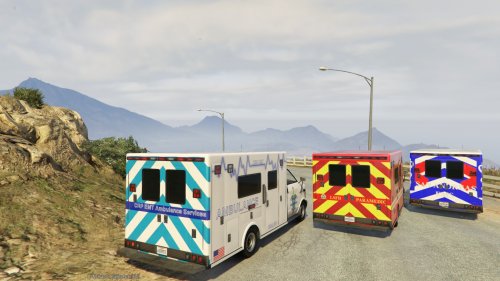 Hey thanks for the mod. I love it. I am having a problem with it. Whenever I get close to the ambulance, it turns into the regular ambulance in the game. As I start to walk away, as I get further away from the ambulance, it shows the mod. Any way to fix this? What am I doing wrong? Thank you!
- 32 comments
- 5 reviews
-
.thumb.png.e88f1892e13ddb98db35e668d465c34b.png) Thanks for this awesome mod. I am hoping someone can help me. Iam new here. This is literally my first post here. I am also new to modding GTA V. I modded IV, but that was years ago. This vehicle is the first mod I am trying. I installed it over Police3 and everything seems to work PERFECTLY fine. I tried to replace what would be "Police1" (the police file without a number next to it) and it half works. The Imapala shows up fine from a distance, but once you get close, it morphs back into the original cop car in GTA made by Rockstar. I tried copying and pasting the "model=police3" segment into there the "model=police" segment was in the vehiles (meta I believe) file, but it doesn't work. What must I do to replace the "Police" or "Ploice1" (essentially) spot. THANKS!
Thanks for this awesome mod. I am hoping someone can help me. Iam new here. This is literally my first post here. I am also new to modding GTA V. I modded IV, but that was years ago. This vehicle is the first mod I am trying. I installed it over Police3 and everything seems to work PERFECTLY fine. I tried to replace what would be "Police1" (the police file without a number next to it) and it half works. The Imapala shows up fine from a distance, but once you get close, it morphs back into the original cop car in GTA made by Rockstar. I tried copying and pasting the "model=police3" segment into there the "model=police" segment was in the vehiles (meta I believe) file, but it doesn't work. What must I do to replace the "Police" or "Ploice1" (essentially) spot. THANKS!- 182 comments
- 44 reviews
![Liberty Sheriff's Ofice [LSO] Officer seen interacting with a man on a sidewalk.](http://s3-gallery.int-cdn.lcpdfrusercontent.com/gallery/album_3544/sml_gallery_121254_3544_39002.jpg)
.thumb.png.e88f1892e13ddb98db35e668d465c34b.png)