


JZersche
Members
-
Joined
-
Last visited
Everything posted by JZersche
-
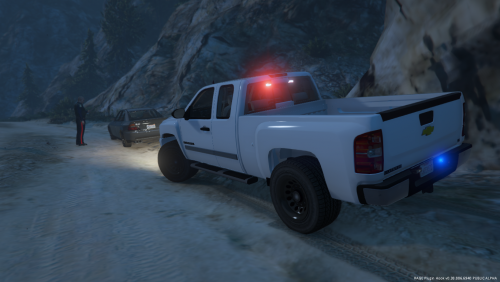
.thumb.jpg.1db0be3e377ccefdd47e57a95ec56762.jpg) Here is a nice screenshot showcasing your models :D How can I turn them both on at the same time? RequiredExtras only works for lightbars, It will only spawn one or the other, if you have 2 lightbar extras_1 and extras_2 placing them in required causes the game to spawn either 1 or 2, but never both at the same time, that's how that is meant to be utilized. Basically I want to set the vehicle to spawn always with the antennas and also the radar with the chance of spawning the rambar, the problem then will be one of the spotlights not spawning 100% of the time, I don't know how it works, but I've never seen your model spawn with 2 spotlights at the same time so that shouldn't be an issue, but like I said, if there's a way to set the radar and antennas to spawn 100% of the time along with either the spotlights down/up then it would be perfect. Are you going to do a marked version? Anyone having problems with the model here: police4 config (unmarked) http://pastebin.com/1QV0xXV9 (carvariations.meta) http://pastebin.com/DFipKdwW (vehicles.meta) sheriff config http://pastebin.com/72bZbq56 (carvariations.meta) http://pastebin.com/ziHW1KbG (vehicles.meta) You should just make a version WITH the Radar, Antennas, Spotlights(down) ALWAYS. Then another version WITHOUT Radar, Antennas, BUT with the spotlights aimed down. Is there a way to spawn vehicles without any extras?
Here is a nice screenshot showcasing your models :D How can I turn them both on at the same time? RequiredExtras only works for lightbars, It will only spawn one or the other, if you have 2 lightbar extras_1 and extras_2 placing them in required causes the game to spawn either 1 or 2, but never both at the same time, that's how that is meant to be utilized. Basically I want to set the vehicle to spawn always with the antennas and also the radar with the chance of spawning the rambar, the problem then will be one of the spotlights not spawning 100% of the time, I don't know how it works, but I've never seen your model spawn with 2 spotlights at the same time so that shouldn't be an issue, but like I said, if there's a way to set the radar and antennas to spawn 100% of the time along with either the spotlights down/up then it would be perfect. Are you going to do a marked version? Anyone having problems with the model here: police4 config (unmarked) http://pastebin.com/1QV0xXV9 (carvariations.meta) http://pastebin.com/DFipKdwW (vehicles.meta) sheriff config http://pastebin.com/72bZbq56 (carvariations.meta) http://pastebin.com/ziHW1KbG (vehicles.meta) You should just make a version WITH the Radar, Antennas, Spotlights(down) ALWAYS. Then another version WITHOUT Radar, Antennas, BUT with the spotlights aimed down. Is there a way to spawn vehicles without any extras?- 239 comments
- 70 reviews
-
Buggs, I have a suggestion. Create a few modified versions of this vehicle. One of them should have RADAR + ANTENNAS as a single EXTRA 5. You currently have the RADAR as EXTRA 5 and the ANTENNAS as EXTRA 6. Combine them. Another issue is when you might enable FLAGS_ALL_EXTRAS, you end up with 4 spotlights. Could you correct this by making 2 separate models? Model 1: Everything the way you have it now. Model 2: Remove EXTRA_4 (spotlights aimed down) - But leave EXTRA_3 - Combine EXTRA 5 with EXTRA 3 (Radar+Spotlights Up) (Chance of spawning without Antennas) Model 3: Remove EXTRA_3 (spotlights aimed up) - But leave EXTRA_4 - Combine EXTRA 5 with EXTRA 4 (Radar+Spotlights Down) (Chance of spawning without Antennas) Model 3: Remove EXTRA_3 and EXTRA_4 (Chance to spawn with Radar/Antennas) (Rambar/Guard) Model 4: Remove EXTRA_3 and EXTRA_4 and also EXTRA_6 (Chance to spawn with Radar) (Rambar/Guard) Model 5: Remove EXTRA_4 [Leave 3] Combine EXTRA_5 [Radar] + EXTRA_6 [Antennas] together as one EXTRA_5. (Chance to spawn with Radar+Antenna) (Rambar/Guard) (Spotlights Up) Model 6: Remove EXTRA_3 [Leave 4] Combine EXTRA_5 [Radar] + EXTRA_6 [Antennas] together as one EXTRA_5. (Chance to spawn with Radar+Antenna) (Rambar/Guard) (Spotlights Down) Marked version: Model 5: Make one more with the radar (EXTRA_5) permanently part of the vehicle, and leave everything else as it is. Then set in vehicles.meta <RequiredExtras>EXTRA_3 EXTRA_4</RequiredExtras> If and when you make a marked version, don't set the lightbar to be an extra, because the only way to get it to spawn 100% of the time is to have FLAGS_ALL_EXTRAS set which would be perfectly fine as long as you remove EXTRA_3 or 4 as two separate versions, basically do the same for the marked. The marked version should always have the rambar on it, therefore make the rambar permently part of the car and the guard that goes around it will be an extra that spawns randomly :) If FLAGS_ALL_EXTRAS is set, the marked verison would spawn with the spotlights aimed either up or down (2models) radar+antennas(singleExtra) and the rambar and guard that goes around it. You could release an additional model where the radar is no longer an EXTRA and is built directly in to the car. If you do that, this model will be perfect.
- 239 comments
- 70 reviews
-
Hey Bugs, when you find the time, make a civilian version of this vehicle as well, take all the lights out of it, etc! The model is brilliant, just wish the interior was a little more detailed than it already is.
- 239 comments
- 70 reviews
-
-
.thumb.jpg.4066677156985e22489bfecddc2f6c45.jpg) The REVERSE LIGHTS don't flash! It's just little balls of light, the entire light should flash like other models..
The REVERSE LIGHTS don't flash! It's just little balls of light, the entire light should flash like other models..- 376 comments
- 81 reviews
-
-
 Only 1 generic_lightbar_e is emissing on the front bar, also no interior gauge lighting, add that and model is A+
- 26 comments
- 8 reviews
-
How? Can't open in OpenIV.. I know it's possible, others have done it.
-
I mean if you use. The meta files you provided are missing data. <Item> <modelName>police4</modelName> <txdName>police4</txdName> <handlingId>POLICE</handlingId> <gameName>POLICE4</gameName> <vehicleMakeName /> <expressionDictName>null</expressionDictName> <expressionName>null</expressionName> <animConvRoofDictName>null</animConvRoofDictName> <animConvRoofName>null</animConvRoofName> <animConvRoofWindowsAffected /> <ptfxAssetName>null</ptfxAssetName> <audioNameHash /> <layout>LAYOUT_STANDARD</layout> <coverBoundOffsets>SHERIFF_COVER_OFFSET_INFO</coverBoundOffsets> <explosionInfo>EXPLOSION_INFO_DEFAULT</explosionInfo> <scenarioLayout /> <cameraName>DEFAULT_FOLLOW_VEHICLE_CAMERA</cameraName> <aimCameraName>DEFAULT_THIRD_PERSON_VEHICLE_AIM_CAMERA</aimCameraName> <bonnetCameraName>VEHICLE_BONNET_CAMERA_MID_HIGH</bonnetCameraName> <povCameraName>DEFAULT_POV_CAMERA</povCameraName> <FirstPersonDriveByIKOffset x="0.000000" y="-0.060000" z="-0.060000" /> <FirstPersonDriveByUnarmedIKOffset x="0.000000" y="0.-050000" z="-0.020000" /> <FirstPersonProjectileDriveByIKOffset x="0.000000" y="-0.075000" z="-0.045000" /> <FirstPersonProjectileDriveByPassengerIKOffset x="0.000000" y="-0.075000" z="-0.045000" /> <FirstPersonProjectileDriveByRearLeftIKOffset x="0.000000" y="0.020000" z="0.030000" /> <FirstPersonProjectileDriveByRearRightIKOffset x="0.000000" y="0.020000" z="0.030000" /> <FirstPersonDriveByLeftPassengerIKOffset x="0.000000" y="0.000000" z="0.000000" /> <FirstPersonDriveByRightPassengerIKOffset x="0.000000" y="-0.060000" z="-0.060000" /> <FirstPersonDriveByRightRearPassengerIKOffset x="0.000000" y="0.000000" z="0.000000" /> <FirstPersonDriveByLeftPassengerUnarmedIKOffset x="0.000000" y="0.000000" z="0.000000" /> <FirstPersonDriveByRightPassengerUnarmedIKOffset x="0.000000" y="0.000000" z="0.000000" /> <FirstPersonMobilePhoneOffset x="0.155000" y="0.270000" z="0.508000" /> <FirstPersonPassengerMobilePhoneOffset x="0.136000" y="0.223000" z="0.405000" /> <FirstPersonMobilePhoneSeatIKOffset> <Item> <Offset x="0.136000" y="0.156000" z="0.425000" /> <SeatIndex value="2" /> </Item> <Item> <Offset x="0.136000" y="0.156000" z="0.425000" /> <SeatIndex value="3" /> </Item> </FirstPersonMobilePhoneSeatIKOffset> <PovCameraOffset x="0.000000" y="-0.145000" z="0.645000" /> <PovCameraVerticalAdjustmentForRollCage value="0.000000" /> <PovPassengerCameraOffset x="0.000000" y="0.000000" z="0.000000" /> <PovRearPassengerCameraOffset x="0.000000" y="0.000000" z="0.000000" /> <vfxInfoName>VFXVEHICLEINFO_CAR_GENERIC</vfxInfoName> <shouldUseCinematicViewMode value="true" /> <shouldCameraTransitionOnClimbUpDown value="false" /> <shouldCameraIgnoreExiting value="false" /> <AllowPretendOccupants value="true" /> <AllowJoyriding value="false" /> <AllowSundayDriving value="false" /> <AllowBodyColorMapping value="true" /> <wheelScale value="0.237100" /> <wheelScaleRear value="0.237100" /> <dirtLevelMin value="0.000000" /> <dirtLevelMax value="0.850000" /> <envEffScaleMin value="0.000000" /> <envEffScaleMax value="1.000000" /> <envEffScaleMin2 value="0.000000" /> <envEffScaleMax2 value="1.000000" /> <damageMapScale value="0.600000" /> <damageOffsetScale value="1.000000" /> <diffuseTint value="0x00FFFFFF" /> <steerWheelMult value="1.000000" /> <HDTextureDist value="5.000000" /> <lodDistances content="float_array"> 15.000000 30.000000 60.000000 120.000000 500.000000 500.000000 </lodDistances> <minSeatHeight value="0.839" /> <identicalModelSpawnDistance value="20" /> <maxNumOfSameColor value="10" /> <defaultBodyHealth value="1000.000000" /> <pretendOccupantsScale value="1.000000" /> <visibleSpawnDistScale value="1.000000" /> <trackerPathWidth value="2.000000" /> <weaponForceMult value="1.000000" /> <frequency value="100" /> <swankness>SWANKNESS_1</swankness> <maxNum value="2" /> <flags>FLAG_EXTRAS_REQUIRE FLAG_EXTRAS_STRONG FLAG_LAW_ENFORCEMENT FLAG_EMERGENCY_SERVICE FLAG_DONT_SPAWN_IN_CARGEN FLAG_HAS_INTERIOR_EXTRAS FLAG_HAS_LIVERY FLAG_REPORT_CRIME_IF_STANDING_ON</flags> <type>VEHICLE_TYPE_CAR</type> <plateType>VPT_FRONT_AND_BACK_PLATES</plateType> <dashboardType>VDT_GENTAXI</dashboardType> <vehicleClass>VC_EMERGENCY</vehicleClass> <wheelType>VWT_MUSCLE</wheelType> <trailers /> <additionalTrailers /> <drivers> <Item> <driverName>S_M_Y_Sheriff_01</driverName> <npcName /> </Item> </drivers> <extraIncludes /> <doorsWithCollisionWhenClosed /> <driveableDoors /> <bumpersNeedToCollideWithMap value="false" /> <needsRopeTexture value="false" /> <requiredExtras /> <rewards> <Item>REWARD_WEAPON_PUMPSHOTGUN</Item> <Item>REWARD_AMMO_PUMPSHOTGUN_ENTER_VEHICLE</Item> <Item>REWARD_STAT_WEAPON</Item> </rewards> <cinematicPartCamera> <Item>WHEEL_FRONT_RIGHT_CAMERA</Item> <Item>WHEEL_FRONT_LEFT_CAMERA</Item> <Item>WHEEL_REAR_RIGHT_CAMERA</Item> <Item>WHEEL_REAR_LEFT_CAMERA</Item> </cinematicPartCamera> <NmBraceOverrideSet /> <buoyancySphereOffset x="0.000000" y="0.000000" z="0.000000" /> <buoyancySphereSizeScale value="1.000000" /> <pOverrideRagdollThreshold type="NULL" /> <firstPersonDrivebyData> <Item>STD_POLICE_FRONT_LEFT</Item> <Item>STD_POLICE_FRONT_RIGHT</Item> <Item>STD_POLICE_REAR_LEFT</Item> <Item>STD_POLICE_REAR_RIGHT</Item> </firstPersonDrivebyData> </Item> The audio hash is missing. Everything else is correct, I just did a reinstall of the model, the only problems are that the reverse lights don't light up with the sirens on, only the corona lights come on, not the entire reverse lights. The second issue is that the front light in the middle of the car seems out of place, it's just a solid red light? Maybe the whole car should be nothing but blue lights, is that possible? Good model, only problem is the reverse lights and missing audiohash, which I can fix the audiohash problem. But I don't understand why you've placed in an <audiohash /> instead of <audiohash>police4</ audiohash>
- 376 comments
- 81 reviews
-
the vehicles.meta, and the carvariations, have no audiohash, which results in no sirens. Secondly, The sirensettings are set to 2, with lightsettings as 1. It's meant to be 13. This model is filled with bugs. If you use the carvariations and vehicles.meta provided by bugs, this model will have no siren, the lights will be in an incorrect position.
- 376 comments
- 81 reviews
-
 basically inside of the vehicles.meta file, there's a sirensettings for each model, if the model is police4 for example, you'd change the sirensettings to change the light config. Try sirensettings 13 <Item> <modelName>examplemodel</modelName> <colors> <Item> <indices content="char_array"> 134 134 156 156 </indices> <liveries> <Item value="true" /> <Item value="false" /> <Item value="false" /> <Item value="false" /> <Item value="false" /> <Item value="false" /> <Item value="false" /> <Item value="false" /> </liveries> </Item> <Item> <indices content="char_array"> 134 134 156 156 </indices> <liveries> <Item value="false" /> <Item value="true" /> <Item value="false" /> <Item value="false" /> <Item value="false" /> <Item value="false" /> <Item value="false" /> <Item value="false" /> </liveries> </Item> <Item> <indices content="char_array"> 134 134 156 156 </indices> <liveries> <Item value="false" /> <Item value="false" /> <Item value="false" /> <Item value="false" /> <Item value="true" /> <Item value="false" /> <Item value="false" /> <Item value="false" /> </liveries> </Item> <Item> <indices content="char_array"> 134 134 156 156 </indices> <liveries> <Item value="false" /> <Item value="false" /> <Item value="true" /> <Item value="false" /> <Item value="false" /> <Item value="false" /> <Item value="false" /> <Item value="false" /> </liveries> </Item> <Item> <indices content="char_array"> 134 134 156 156 </indices> <liveries> <Item value="false" /> <Item value="false" /> <Item value="false" /> <Item value="true" /> <Item value="false" /> <Item value="false" /> <Item value="false" /> <Item value="false" /> </liveries> </Item> </colors> <kits> <Item>156_jester2_modkit</Item> </kits> <windowsWithExposedEdges /> <plateProbabilities> <Probabilities /> </plateProbabilities> <lightSettings value="1" /> <sirenSettings value="13" /> </Item> Don't use that actual line, but you could definitely try it. You just need to change the sirensettings for that vehicle.
- 563 comments
- 116 reviews
-
-
The reverse lights are too bright.. @jusromaine1 Use openIV, tools->search-> vehicle name, once you find the vehicle location, you can right click the vehicle file and copy to or show in mods folder, this is so you don't replace the original files, so the game loads the mods instead.
- 563 comments
- 116 reviews
.thumb.jpg.1db0be3e377ccefdd47e57a95ec56762.jpg)
.thumb.jpg.4066677156985e22489bfecddc2f6c45.jpg)

.thumb.jpg.54f04afcd6ae69e17f1388b62a696d8b.jpg)