
nocitylimits
Members
-
Joined
-
Last visited
Files posted by nocitylimits
-
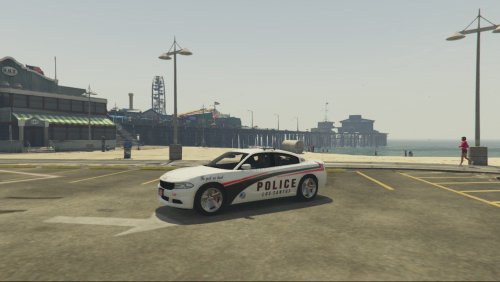
For vehicle ...
All install instructions are included in the file. If you use this skin on a patrol and record it lemme know!!
- 36 Downloads
- 4 Comments
Updated -
For vehicle -
ALL INSTALL INSTRUCTIONS ARE BASED ON THE FACT THAT YOU FOLLOWED THE INSTALL INSTRUCTIONS GIVEN BY THE VEHICLE MAKER / MODELER
YOU MUST USE OPEN IV
ALWAYS ALWAYS ALWAYS BACK UP FILES!!
To install –
1. Click update
2. Click x64
3. Click dlcpacks
4. Click patchday3ng
5. Click dlc.rpf
6. Click x64
7. Click levels
8. Click gta5
9. Click vehicles.rpf
10. Replace vehicle textures in police2.ytd with the ones from this download
- 21 Downloads
Updated -
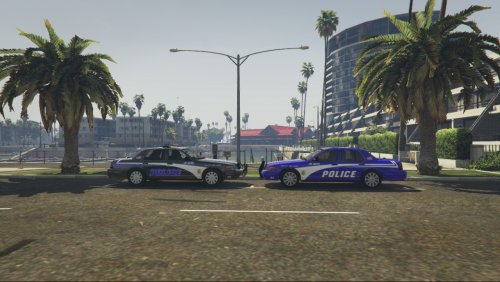
NOCITYLIMITS LOS SANTOS POLICE SKIN INSTALL
ALL INSTALL INSTRUCTIONS ALSO INCLUDED WITH FILE AND ARE BASED ON THE FACT THAT YOU FOLLOWED THE INSTALL INSTRUCTIONS GIVEN BY THE VEHICLE MAKER / MODELER
YOU MUST USE OPEN IV
ALWAYS ALWAYS ALWAYS BACK UP FILES!!
F5544's CVPI
Nightkid's CVPI
To install on nightkids CVPI model
1. Click x64e.rpf
2. Click levels
3. Click gta5
4. Click vehicles.rpf
5. In your police4.ytd file replace the file titled cvpi_sign_1 with either one of the templates in this download
To install on F5544 model
1. Click update
2. Click x64
3. Click dlcpacks
4. Click patchday4ng
5. Click dlc.rpf
6. Click x64
7. Click levels
8. Click gta5
9. Click vehicles.rpf
10. In your police.ytd replace vehicle textures with either of the templates in this download
- 19 Downloads
Submitted -
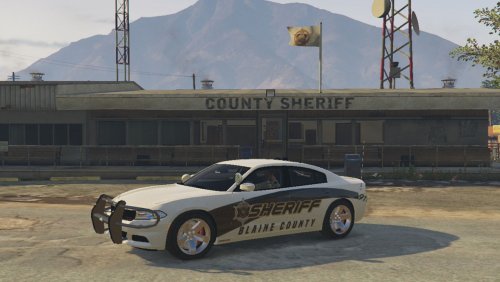
This was made at the request of a friend / LSPDFR community member!
This skin is for F5544's 2012 Ford Taurus Interceptor only
Install instructions are also included in the read me file of this download
TO INSTALL
1 - YOU MUST USE OPEN IV
2 - CLICK UPDATE
3 - CLICK X64
4 - CLICK DLCPACKS
5 - CLICK PATCHDAY4NG
6 - CLICK DLC.RPF
7 - CLICK X64
8 - CLICK LEVELS
9 - CLICK GTA 5
10 - CLICK VEHICLES.RPF
11 - REPLACE ALL VEHICLE TEXTURES WITH THE ONE IN THIS DOWNLOAD
- 55 Downloads
- 9 Comments
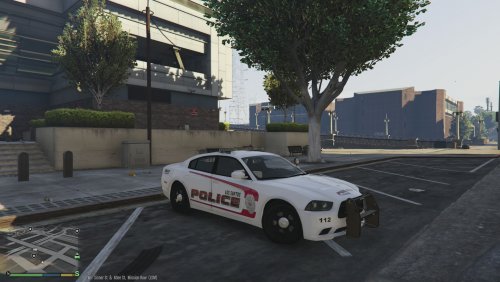
Submitted -
ALWAYS BACK UP YOUR ORIGINAL FILES
This is my first COMPLETED skin / texture! It is only for F5544's dodge charger. Since this is my first texture it isn't perfect by no means and needs some minor detail work. I am always open to suggestions or comments! Install instructions are also included.
F5544's Charger link -
To install texture -
YOU MUST USE OPEN iV !!
1 - ONCE THE OPEN iV PROGRAM IS OPEN, CLICK ON THE EDIT MODE BUTTON
2 - CLICK THE UPDATE FOLDER
3 - CLICK X64
4 - CLICK DLCPACKS
5 - CLICK PATCHDAY4NG
6 - CLICK DLC.RPF
7 - CLICK X64
8 - CLICK LEVELS
9 - CLICK GTA5
10 - CLICK VEHICLES.RPF
11 - LOOK FOR THE POLICE.YTD FILE AND DOUBLE CLICK IT
12 - ONCE IT OPENS, REPLACE ALL VEHICLE TEXTURE FILES WITH THE .png FILE IN THIS DOWNLOAD (SHOULD BE 4 OF THEM TOTAL)
- 185 Downloads
- 4 Comments
Updated