




Tracerec
Members
-
Joined
-
Last visited
Everything posted by Tracerec
-
-
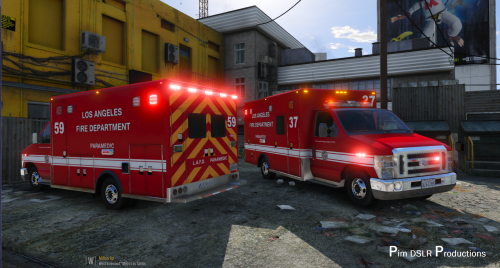 @rybak04 I got it fixed. The siren settings for ambulance need to be 4. The firetruck if you take a look is off too. It needs to be 7. I linked the carvariation that I fixed. I finally figured out I got the carvari file from Pim DSLR's 2008 Cherolet Tahoe Unmarked download. So if you use that file I may mess up your settings for FBI2 depending on what you have. carvariations.meta
- 42 comments
- 19 reviews
-
I'm pretty sure when I installed a carvariation file a couple of weeks ago for a police model my sirens settings got all out of wack for my ambulance. Any Idea what the correct siren setting for an ambulance is ? I'm trying to remember what car vari I installed and I can't remember. Any help would be great.
- 42 comments
- 19 reviews
-
 One of the best models I have ever used. Its amazing. Only problem I have is I put it in the sheriff2 slot so the rambar falls off. Would love to get it optimized for that spot. Great work!
- 122 comments
- 29 reviews
-
.thumb.jpg.4066677156985e22489bfecddc2f6c45.jpg) Is there something in the installation package for this vehicle that would make lightbars on other vehicles in the sheriff slot not work correctly ?
Is there something in the installation package for this vehicle that would make lightbars on other vehicles in the sheriff slot not work correctly ?- 376 comments
- 81 reviews
-
.thumb.jpg.4066677156985e22489bfecddc2f6c45.jpg)
