


Robbyrayrock
Members
-
Joined
-
Last visited
Everything posted by Robbyrayrock
-
When i spawn my cars in only one works with ELS and that is the POLICE 1 slot but all the others wont work, and they are all ELS supported.
-
If I want to insert new vehicles should I put the Yft, Tyds ect.. in the newest Patchday (Patchday 22ng)
-
Is this going to break all of my plugins/mods
-
All that is good, now when RPH launches it says "GTA Failed to Start, if persist restart computer" http://prntscr.com/mntpc0
-
It wont let me access the vehicle folder Plus my game when launching rage, it just auto crashes
-
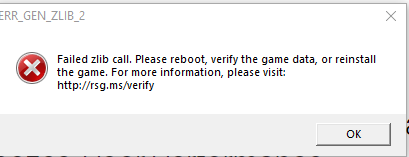
Hello, to anyone reading this, I have recently been having a problem when trying to spawn in any of my police cars this pops up(see picture) and I cannot spawn anything. If anyone knows a fix please let me know.
-
Hello, to anyone reading this, I have recently been having a problem when trying to spawn in any of my police cars this pops up(see picture) and I cannot spawn anything. If anyone knows a fix please let me know.

-
How would I put it in there?
-
I recently have just got the issue of when I replace a vehicle of a vanilla police car and I go in game and try to spawn it, it still is the vanilla police car. I replaced and renamed all of the file correctly. I did the ELS in the pack_default folder in the ELS folder. I have a slight suspicion that it is something w/ OpenIV. This only occurred when I updated OpenIV last night and hit the Green button to copy the mods folder. Again, I have replaced the vehicles in OpenIV with names such as, "police.ytf" and so forth. However, when I go ingame to spawn it, it still is the vanilla police car from GTA V not my own custom one I put in. Please someone help, thank you.
-
Currently I have 3 custom cars I have put it which are all supported by ELS. This vehicle I have tried to put in, which is an unmarked tahoe, is also supported by ELS. I have read the read.me file, and did everything it said to do. I replaced the vehicle.meta, and I renamed all of the ytf,ytd, and the ytf_hi to all police5 (insert the name of the file) . And, then when I launch the game it doesn't show any of the unmarked tahoes I put in. I tried spawning it through the Rage trainer, and another trainer, and still does not allow me. I do not know if I have to switch the other files out that I have for my custom cars with the new one to make it work. I was trying to get some help on here before I did that. Also, is there like a limit I can have on custom vehicles. The link to the vehicle is here -Thank you so much!Do I need to unzip the file or anything or setup anything, or should it just work after installationWait, is that all I needed. So it will work?I literally just go it, and I haven't even unpacked it from the zip fileI have no log fileYes I installed it into Pack_defaultSo my friends who are good at modding tried to help me, but we could not resolve the issue. The issue is that when I launch the game and I get into my custom vehicles which are ELS supported, and when I get into it and ELS does not work at all and I tapped j three times, I tried the scroll lock issue. I changed the vehicles and I reinstalled ELS through everything. Also, I uninstalled and reinstalled ASI manager, and it still didnt work.Yet, ELS I does not pop up, and refuses to work in anyway shape, or form.. Also, the key bind are very weird. E is set to the horn which is the computer, and j and q are wail, and yelp.

