


CASHMONEY0986
Members
-
Joined
-
Last visited
Everything posted by CASHMONEY0986
-
Swapped out update folder and reinstalled everything may start over again ive checked my carvariations.meta for missing pieces of code and dont see anything, game was working before i put in all my vehicles again
-
ok so i swapped out police2 with f5544 newest update and also tried to put the civilian '15 charger on buffalo not buffalo2 so i overwrote buffalo with original game files and changed out buffalo2 as i had already done and it was working fine (just wanted to try and see if i could get customization features) have installed everthing according to readme but something still isnt right it loads up and as soon as rage starts loading and says "loading story mode" game dies so i know its something with a vehicle not sure if my rage log will show whats messed up or not so i thought i would make a post here with log and see if anyone has any ideas if need be i will just use a different vehicle for police2 and put original game files back on buffalo2 and delete the variations for it CrashReport_chris_635859281282098541.rcr
-
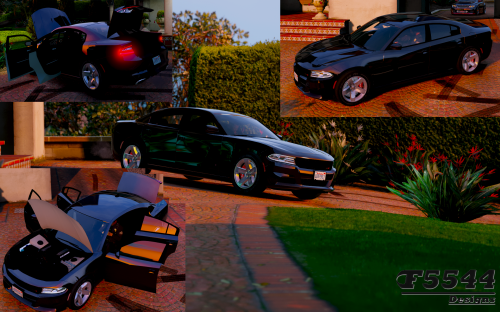 no upgrades available thru trainer or ls customs not even just the performance ones great looking car tho and the engine sound on it and the police version are awesome
- 42 comments
- 3 reviews
-
 great model corona mod fixed the cartoonish lights and made them super bright keep up the good work man
- 159 comments
- 53 reviews
-
-

- 2
-
-
-
 everything works great but for some reason when i try and use the binoculars lspdfr crashes and the ped gets stuck in that view, comes up with message unhandled exception...where am i supposed to put the template for the binoculars?
- 302 comments
- 66 reviews
-
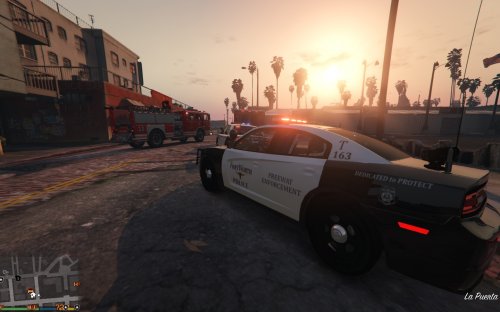 gotta find someone that can do dallas county sheriff those 15 chargers they are getting in look uber aggressive from the front and they did a really good job on the wrap design
- 8 comments
- 3 reviews
-
hellz yea first i find a state troopers skin for charger and cvpi now i have a ft worth skin for the interceptor making GTAV Texas one skin at a time
- 8 comments
- 3 reviews
-
-
- 1
-
-
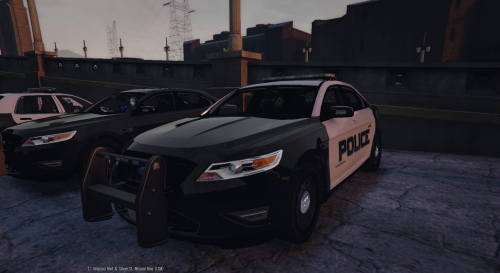 good looking vehicle i like the livery on yours but i have no hi beam lights on the model moving the lights up to the push bar from inside the grille was a good idea and love the lights on the mirrors if they followed the doors that'd be awesome i know u said on your unmarked you'll fix that in a future update switching back to f5544 model so i can have the hi beams so i can see whats going on when its dark that and the original has a spotlight so when using the spotlight mod it looks a lil more legit but i will keep an eye on this and try it out again next update thanks for the upload
- 49 comments
- 8 reviews
-
 did you make sure it is on the same line and not split into 2 lines? had another cat i was helping for like 3 days get his figured out he kept crashing check all your code and make sure theres nothing missing if you miss even one < or > itll crash so double check your handling, vehicles and variations files and make sure everything is perfect
- 202 comments
- 51 reviews
-
<Item> <modelName>police</modelName> <txdName>police</txdName> <handlingId>POLICE</handlingId> <gameName>POLICE</gameName> <vehicleMakeName /> <expressionDictName>null</expressionDictName> <expressionName>null</expressionName> <animConvRoofDictName>null</animConvRoofDictName> <animConvRoofName>null</animConvRoofName> <animConvRoofWindowsAffected /> <ptfxAssetName>null</ptfxAssetName> <audioNameHash /> <layout>LAYOUT_STANDARD</layout> <coverBoundOffsets>POLICE_COVER_OFFSET_INFO</coverBoundOffsets> <explosionInfo>EXPLOSION_INFO_DEFAULT</explosionInfo> <scenarioLayout /> <cameraName>DEFAULT_FOLLOW_VEHICLE_CAMERA</cameraName> <aimCameraName>DEFAULT_THIRD_PERSON_VEHICLE_AIM_CAMERA</aimCameraName> <bonnetCameraName>VEHICLE_BONNET_CAMERA_MID_HIGH</bonnetCameraName> <povCameraName>DEFAULT_POV_CAMERA</povCameraName> <FirstPersonDriveByIKOffset x="0.000000" y="-0.060000" z="-0.050000" /> <FirstPersonDriveByUnarmedIKOffset x="0.000000" y="-0.050000" z="-0.020000" /> <FirstPersonProjectileDriveByIKOffset x="0.000000" y="-0.075000" z="-0.045000" /> <FirstPersonProjectileDriveByPassengerIKOffset x="0.000000" y="-0.075000" z="-0.045000" /> <FirstPersonProjectileDriveByRearLeftIKOffset x="0.000000" y="0.020000" z="0.030000" /> <FirstPersonProjectileDriveByRearRightIKOffset x="0.000000" y="0.020000" z="0.030000" /> <FirstPersonDriveByLeftPassengerIKOffset x="0.000000" y="0.000000" z="0.000000" /> <FirstPersonDriveByRightPassengerIKOffset x="0.000000" y="-0.060000" z="-0.060000" /> <FirstPersonDriveByRightRearPassengerIKOffset x="0.000000" y="0.000000" z="0.000000" /> <FirstPersonDriveByLeftPassengerUnarmedIKOffset x="0.000000" y="0.000000" z="0.000000" /> <FirstPersonDriveByRightPassengerUnarmedIKOffset x="0.000000" y="0.000000" z="0.000000" /> <FirstPersonMobilePhoneOffset x="0.125000" y="0.293000" z="0.516000" /> <FirstPersonPassengerMobilePhoneOffset x="0.136000" y="0.223000" z="0.415000" /> <FirstPersonMobilePhoneSeatIKOffset> <Item> <Offset x="0.136000" y="0.146000" z="0.435000" /> <SeatIndex value="2" /> </Item> <Item> <Offset x="0.136000" y="0.146000" z="0.435000" /> <SeatIndex value="3" /> </Item> </FirstPersonMobilePhoneSeatIKOffset> <PovCameraOffset x="0.000000" y="-0.140000" z="0.650000" /> <PovCameraVerticalAdjustmentForRollCage value="0.000000" /> <PovPassengerCameraOffset x="0.000000" y="0.000000" z="0.000000" /> <PovRearPassengerCameraOffset x="0.000000" y="0.000000" z="0.000000" /> <vfxInfoName>VFXVEHICLEINFO_CAR_GENERIC</vfxInfoName> <shouldUseCinematicViewMode value="true" /> <shouldCameraTransitionOnClimbUpDown value="false" /> <shouldCameraIgnoreExiting value="false" /> <AllowPretendOccupants value="true" /> <AllowJoyriding value="false" /> <AllowSundayDriving value="false" /> <AllowBodyColorMapping value="true" /> <wheelScale value="0.236900" /> <wheelScaleRear value="0.236900" /> <dirtLevelMin value="0.000000" /> <dirtLevelMax value="0.300000" /> <envEffScaleMin value="0.000000" /> <envEffScaleMax value="1.000000" /> <envEffScaleMin2 value="0.000000" /> <envEffScaleMax2 value="1.000000" /> <damageMapScale value="0.600000" /> <damageOffsetScale value="1.000000" /> <diffuseTint value="0x00FFFFFF" /> <steerWheelMult value="1.000000" /> <HDTextureDist value="5.000000" /> <lodDistances content="float_array"> 15.000000 30.000000 60.000000 120.000000 500.000000 500.000000 </lodDistances> <minSeatHeight value="0.839" /> <identicalModelSpawnDistance value="20" /> <maxNumOfSameColor value="10" /> <defaultBodyHealth value="1000.000000" /> <pretendOccupantsScale value="1.000000" /> <visibleSpawnDistScale value="1.000000" /> <trackerPathWidth value="2.000000" /> <weaponForceMult value="1.000000" /> <frequency value="100" /> <swankness>SWANKNESS_1</swankness> <maxNum value="2" /> <flags>FLAG_HAS_LIVERY FLAG_EXTRAS_STRONG FLAG_LAW_ENFORCEMENT FLAG_EMERGENCY_SERVICE FLAG_NO_RESPRAY FLAG_DONT_SPAWN_IN_CARGEN FLAG_HAS_INTERIOR_EXTRAS FLAG_REPORT_CRIME_IF_STANDING_ON</flags> <type>VEHICLE_TYPE_CAR</type> <plateType>VPT_FRONT_AND_BACK_PLATES</plateType> <dashboardType>VDT_GENTAXI</dashboardType> <vehicleClass>VC_EMERGENCY</vehicleClass> <wheelType>VWT_MUSCLE</wheelType> <trailers /> <additionalTrailers /> <drivers> <Item> <driverName>S_M_Y_Cop_01</driverName> <npcName /> </Item> </drivers> <extraIncludes /> <doorsWithCollisionWhenClosed /> <driveableDoors /> <bumpersNeedToCollideWithMap value="false" /> <needsRopeTexture value="false" /> <requiredExtras /> <rewards> <Item>REWARD_WEAPON_PUMPSHOTGUN</Item> <Item>REWARD_AMMO_PUMPSHOTGUN_ENTER_VEHICLE</Item> <Item>REWARD_STAT_WEAPON</Item> </rewards> <cinematicPartCamera> <Item>WHEEL_FRONT_RIGHT_CAMERA</Item> <Item>WHEEL_FRONT_LEFT_CAMERA</Item> <Item>WHEEL_REAR_RIGHT_CAMERA</Item> <Item>WHEEL_REAR_LEFT_CAMERA</Item> </cinematicPartCamera> <NmBraceOverrideSet /> <buoyancySphereOffset x="0.000000" y="0.000000" z="0.000000" /> <buoyancySphereSizeScale value="1.000000" /> <pOverrideRagdollThreshold type="NULL" /> <firstPersonDrivebyData> <Item>STD_POLICE_FRONT_LEFT</Item> <Item>STD_POLICE_FRONT_RIGHT</Item> <Item>STD_POLICE_REAR_LEFT</Item> <Item>STD_POLICE_REAR_RIGHT</Item> </firstPersonDrivebyData> </Item> this is my vehicles.meta line for this vehicle and my rambar stays on so you can use it if you like and just change the name at the top to whatever police slot your using.......make sure the flag line is all one line for somereason here it makes it 2 lines but it should be one line
- 202 comments
- 51 reviews
-
changed out handling and it works great also added sheriff lights out of the corona mod to make the lights pop even more looks and works great thanks for a great model and thanks for fixing the dashcam view this one is definately a keeper now if someone can do a charger and a newer tahoe up to this scale itd be great i changed handling with police 3 since im using police slot and that fixed the rolling for me
- 202 comments
- 51 reviews
-
yea installed like it said just simply changed the name to police from police3 then copied and pasted over police in carvariations.meta and i do have office so i could open the readme will copy handling from police3 and overwrite police and see what happens
- 202 comments
- 51 reviews
-
great model just downloaded the new update and installed everything and when i went into game i couldnt hardly drive it go around a corner and the thing would roll right over so i swapped the model files back out for the old ones and it drives fine,like fireems above i am using it on police slot i changed the variations file back to the old one before swopping the actual model with no affect....but changing the model fixed the driveablity issues but i did notice a significant brightness change in the lights on the new so not sure whats up
- 202 comments
- 51 reviews
-
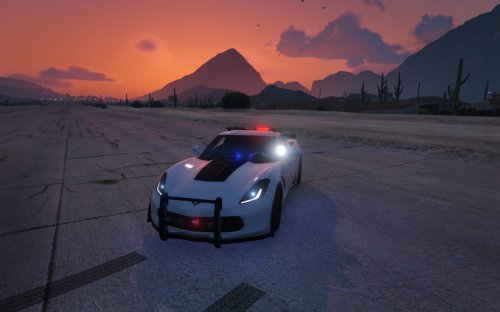 Sweet, havent checked it with dashcam yet i had the mustang and it didnt work with dashcam but uber nice model tho
- 53 comments
- 8 reviews
-
Make a mods folder zach housekenekt on youtube shows how to do it while installing a zentorno police vehicle i had to do the same i had the same problem with mods folder i have no issues Amazing models couldn't get them to cooperate as stand alone so i made the marked version my fbi car and everything works seamlessly great work
- 53 comments
- 8 reviews
-
-
- 1
-

