cp702
Friends of LSPDFR
-
Joined
Files posted by cp702
-
This mod raises various siren limits in GTA V.
The per-vehicle siren limit is raised from 20 to 32. Vehicles can now have siren1 through siren32, which are all fully functioning and independent. The siren_glass limit is also raised to 32. Note that the limit of 128 total bones on a vehicle still exists.
The maximum value of a siren setting ID in carcols is raised to 65535. In the base game, siren settings can conflict if one of them has a value over 255. Now, siren setting IDs can go up to 65535 without conflicting with each other.
This mod also expands the maximum number of unique siren settings you can have. If you have 400 cars, and they all have unique light patterns, that'll work.
Installation
Copy the included ASI to your game folder.
Usage
For additional lights, just use siren21 through siren32 and add extra entries to the siren settings in carcols.meta. Again, note that there is still a limit of 128 total bones on a single vehicle.
For the increased ID limit, just use a number bigger than "255" as the ID. The values 0, 255, and 65535 are reserved, so don't use those specific values. No additional configuration is required.
RPH Users
SSLA does not require RAGEPluginHook, but it is compatible with it. However, it is ONLY compatible with the latest version! RPH version 1.98 has a compatibility patch that will play nicely with SSLA v2. The latest RPH version can be found bundled with LSPDFR, or on the RAGEPluginHook Discord server.
If you had RAGEPluginHook and SSLA v1, you may have had a compatibility DLL in your Plugins folder. This DLL is no longer required and should be removed. RPH now talks directly to SSLA.
RPH plugins that deal with emergency lighting will continue to function, but may need to be updated to support lights 21 through 32.
FiveM Users
SSLA v2 is compatible with FiveM. The server owner must enable ASIs in server.cfg with sv_scripthookallowed true, and Each user must copy the ASI into the plugins folder in their FiveM Application Data. No changes are required to the server config.
RPH Developers
In RPH version 1.98 and up, the Lights member of an EmergencyLighting will be length EmergencyLighting.MaxLights (a static class property) instead of necessarily being length 20. They will still all have the same length, it's just that that length will be longer than 20 if SSLA is installed.
Logging
This ASI produces a SirenSettings.log file in your game directory. It records:
Every loaded SirenSetting, its name, its ID, and its internal index; Every loaded vehicle, its name, its siren ID, and the index it was matched to; Any conflicts, where two SirenSetting entries have the same ID. License
Please link to an official upload instead of redistributing this yourself.
- 306,741 Downloads
- 334 Comments
Updated -
This plugin lets you switch gloves on an MP freemode ped without fiddling with the various uppr_### entries. For instance, if you want to put on surgical gloves from whatever uniform you're wearing, you can just select "surgical gloves" in the menu and not worry about the 100+ possibilities for "Upper Skin."
How to install:
Copy contents of the Glove Switcher folder into your GTA V directory. This script requires RAGE Plugin Hook.
How to use:
Press the menu key (default is F10). "Glove" is the glove you're wearing. "Cutaway" is how that torso model is cut away to prevent clipping through the ped's clothes. The right cutaway to use depends on your specific outfit. You normally only need to change the cutaway if you've changed your character's clothing.
There are also "special" configurations, which only work with particular outfits (e.g. the arms for the Space Creature suit). The Special menu lets you choose any uppr_### entry by index, and the INI file allows you to create presets for particular entries. All special configurations in the base game are included in the INI file, except for some duplicates. If you have other mods that change stuff, you can add more special entries following the same pattern.
Please ask for permission if you want to reuse this in your own mod.
- 4,992 Downloads
- 15 Comments
Updated -
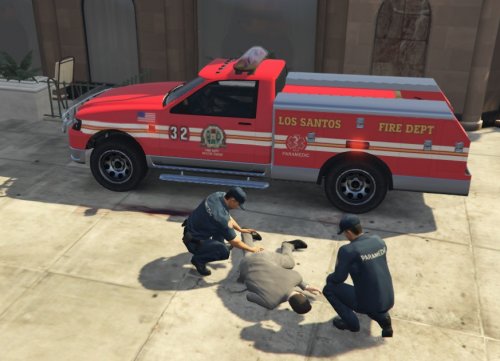
Vapid Motor Company is proud to announce a new version of its popular Contender utility truck. Designed for the Los Santos Fire Department's paramedic rescue units, this vehicle now features:
Extra compartment space for maximal equipment storage Emergency lighting equipment: Perfect to shift the blame to the person you ran over! Fire extinguisher permanently mounted in cargo bay: never get to the scene without one again! Back-up lights: This revolutionary new invention lets you *see* when backing up at night -- gone are the days of wondering who you hit! Reliability and performance improvements, by the same team responsible for our state-of-the-art Police Interceptor.
This is an emergency version of the Contender utility truck (utillitruck3). It uses ambulance-type emergency lighting, and can be put in the ambulance slot
or in its own slot. It has 4 liveries:
LSFD Paramedic Rescue Blaine County Fire & Rescue Rapid Response Mission Row San Andreas Paramedic Mission Row San Andreas Supervisor
Permissions:
You may freely edit and redistribute this model and these skins. However, you must provide credit where credit is due.
- 3,542 Downloads
- 10 Comments
Updated -
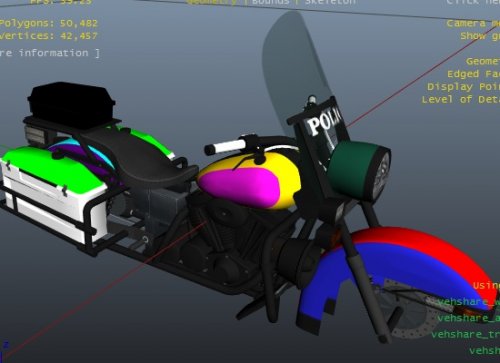
This is a colormapped police motorcycle. It's a development resource designed to make it easier to produce police bikes with certain styles of livery; this bike is optimized for two-tone liveries.
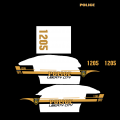
The template for this bike is almost the same as for the default bike. However, in the upper left corner, there are 10 squares which can be filled with 10 different colors. Each square controls the paint color for a different part of the bike: the top and side of the front and rear fenders, the middle and side of the gas tank, the headlight, the saddlebags and their lids, and the box behind the seat.
This bike was designed to make two-tone liveries possible. A sample LSPD livery is included. To make a livery, you start with the included paintmap, and decide what the ten colors will be; you then fill those areas in on the paintmap. Then, you add what I'm calling the "visual elements" -- the POLICE logo on the box behind the driver, the seal, the slogan, and the number. It's just like making a skin for the default bike, but you fill in the appropriate paint colors first.
The paintmap does not currently work *perfectly* at all LOD levels (particularly the low ones); it works well enough as far as I'm concerned, though.
This bike does not support multiple liveries. A future version might. A future version might also have different lights.
You may edit and redistribute this model freely, provided you give credit.
- 1,424 Downloads
- 7 Comments
Submitted -
This mod provides an LCPD cop with short sleeves and shorts, like a cop on beach patrol. You can replace any ped with it.
You may edit to your heart's content and upload edited versions, *with credit*. However, please don't re-upload unless you've done something actually new with it. Certainly don't just upload these exact files. And definitely give credits if you do make an edited version.
- 279 Downloads
- 5 Comments
Submitted -
The Alderney State Police is excited to announce the next phase of their split from the LCPD. In the first phase, back in 2008, the ASP began to hire its own patrol officers. The second phase saw the ASP begin to manage its own vehicles. Now, the department also controls its own stations.
This mod replaces LCPD logos with State Police logos on two of the three police stations in Alderney (the third station had no department-specific logos, so I left it as is). Most of the logos are generic State Police (don't specify Alderney); the one that isn't is over the doors of the Leftwood station, and says "Alderney State Police." I might make a New Liberty version later.
- 558 Downloads
- 6 Comments
Updated -
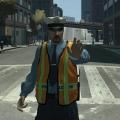
This mod adds an LCPD traffic vest to the traffic cop. To install, replace the appropriate files in componentpeds.img.
- 1,487 Downloads
- 11 Comments
Updated -
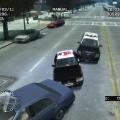
This mod lets you have any car you want with any ped you want spawn in traffic. The original idea was to spawn NOOSE vehicles and EFLC vehicles in traffic, but it is more general than that. This is a beta; ideas and bug reports are welcome. I'll be starting a thread; post stuff there, instead of PMing me.
Thanks go to jitsuin, thaCURSEDpie, LMS, MulleDK19, and everyone else at #gtaivnetscripthook for help and support with this script.
Note: This requires Scripthook .NET v1.7.1.7. LCPDFR, last I checked, came with 1.7.1.4. This mod has 1.7.1.7 included; simply put that in your GTA IV directory and you'll be good. This shouldn't cause issues with LCPDFR (it doesn't on my computer), but it may. Just a warning.
Installation instructions:
Put ScriptHookDotNet.asi in your main GTA IV directory, and put SpawnCars.net.dll in your scripts folder.
READ THE README.
This is the correct 0.6. If you downloaded it before, redownload it. Sorry for the mistake.
- 4,296 Downloads
- 28 Comments
Updated -
This pack consists of LCSO cars from NeoJD and FOwner, modified to LCPD. It currently consists of only AMBB and CHGR skins. I do plan on expanding it (to the new Enforcer, maybe some other ambulances, some CVPI and AMBB and LAN2 skins, Tahoe, etc.)
- 129 Downloads
- 3 Comments
Updated