John23
Members
-
Joined
-
Last visited
Files posted by John23
-
You actually clicked on this? Well since, you're here, why not download it and try it in game?
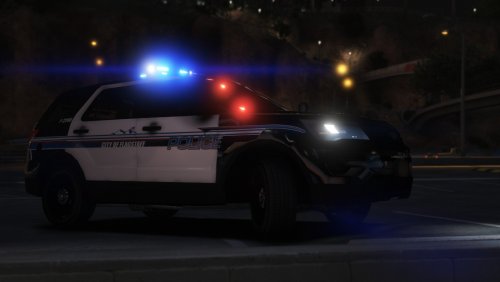
Included in the download is 1 Chevy Tahoe skin that is an exact replica of the Freeport, TX Chevy Tahoe. The skin took about 5 hours to make, and was all streamed on my Twitch account. I have to say, this is by far the best skin I have made. I have a bunch sitting on my hard drive, but never thought they were good enough.
I really hope you enjoy this skin. If you do, please be sure to comment, leave a review, and follow my Twitch so you can be notified of when I stream me making another skin. I stream 3-4 days a week and each stream, I start AND finish a police texture! twitch.tv/JohnLillywhite23
Huge shoutout to 0sc4r for making the LSPD Mega Pack, which this skin is for. So be sure to show him some love, and download his pack.
Again, thank you for your download, and if you enjoy, make sure to comment, review, and follow my Twitch!
- 37 Downloads
- 1 Comments
Updated -
I have been working on these skins for a while now, and the standard skins are completed. For a list of what I have future plans to work on, visit my WIP thread!
I'd like to thank thegreathah for his LSPD 4.0 pack. These skins will probably work with other cars, but I made them for his LSPD 4.0 Pack.
Enjoy, and be on the lookout for my next release.
- 168 Downloads
- 4 Comments
Updated