


Effegi88
Members
-
Joined
-
Last visited
Everything posted by Effegi88
-
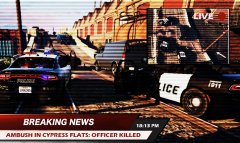
From the album: Los Santos Real TV
This evening, an officer was killed while responding a call in the industrial area of Cypress Flats. The only informations released by LSPD report that the officer was ambushed by two subjects, receiving multiple gun shots. He was able to call for help and three units were dispatched: one of the subjects was shot dead by officer's return fire, the other one is on the run. -
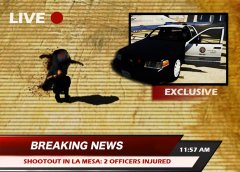
From the album: Los Santos Real TV
This morning, at about 11:30 AM, men at work in La Mesa Canal noticed a suspicious person. Accordingly to the LSPD, as a unit arrived on scene, the suspect started to shoot at the officers with a pistol. Officers were both injured. Additional units were dispatched. At the time, the conditions of the two injured officers are unknown. The suspect was shot down and declared dead by EMS. His identity is still unknown. -
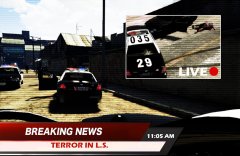
From the album: Los Santos Real TV
10/25/2015 At about 10:00 AM this morning, two subjects started to shoot at people in a road alongside capital Boulevard, in La Mesa, killing one person and injuring other two people. Accordingly to the LSPD, five units arrived on scene, engaging a shootout with one of the killers while the second, after a short foot pursuit, was able to hijack a car, fleeing from the police. Two units joined the pursuit that ended in El Burro Boulevard, Palomino Highlands, after almost an hour. Both of the heavily armed suspects were shot dead by the officers. -
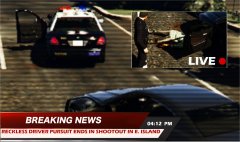
From the album: Los Santos Real TV
10/17/2015 At about 03:40 this afternoon, a driver stopped for reckless driving forced multiple units and an helicopter in a high speed pursuit from Popular street to Elisyan Island where, boxed by police cars, stepped off the vehicle and started to shoot at the officers with a handgun. Accordingly to the LSPD, twelve shots hit the suspect. Paramedics reported the suspect was DOA. -
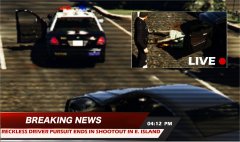 Thanks! Unfortunately I play GTA with a notebook... Editing is the only decent way I can show my gameplay! :P
 -
-
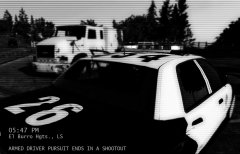
From the album: Los Santos Real TV
05:30 PM - Dispatch calls: a civilian report an armed driver in El Burro Heights 05:30 PM - Traffic Officer 1 Adam 12 responds Code 3. 05:33 PM - T.O. 1 Adam 12 is on scene. 05:34 PM - T.O. 1 Adam 12 signals he's in pursuit of an heavy vehicle. 06:35 PM - An additional unit (Ocean 1) is dispatched 06:40 PM - O1 joins the pursuit. 06:46 PM - The suspect loses the control of the truck, slewing and coming to a complete stop. The driver starts to shot at the approaching Officers, and rams a police car. 1 Adam 12 returns fire. Suspect is shot to death. 06:46 PM - Callout is Code 4. CSI and Coroner are dispatched. -
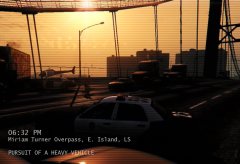 05:57 PM - Traffic Officer 1 Adam 12 performs a traffic stop on a truck. Driver ignores the lights and flees. 05:57 PM - T.0. 1 Adam 12 signals he's in pursuit. 05:58 PM - One additional unit (Adam 6) and Air Support (Charlie 4) are dispatced. 06:01 PM - C4 gains visual contact with the suspect. 06:03 PM - A6 joins the pursuit. 06:07 PM - Suspect enters the Freeway. 06:31 PM - Trying to avoid a collision, the suspect loses vehicles control, crashing on the barriers and coming to a complete stop. 06:32 PM - Suspect is in custody. Code 4. Thanks to: CVPI LSPD Mx7000/Arjent. by F5544
 -
-
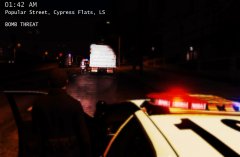 01:42 AM - Traffic Officer 1 Adam 12 noticed a suspicious vehicle parked at the center of the lane in front of an industrial complex. 01:47 AM - Perimeter is set. 01:48 AM - LSPD Bomb Unit and K-9 are dispatched 01:54 AM - Bomb Unit and K-9 on scene. 02:13 AM - No explosives detected. Emergency is Code 4.
 -
.thumb.png.e88f1892e13ddb98db35e668d465c34b.png) Hi! I have an issue with this model. I follow all instructions and copy vehicles.meta and carvariations.meta in the right folders with OpenIV. Opening police2.yft, unfortunately, there's no model. I tried to rename all the model files as police3 but nothing happened! I saw the Chevy on Jeff Favignano's videos and I'm sure it's a 5 stars rating... but I'd like to test it by myself!
Hi! I have an issue with this model. I follow all instructions and copy vehicles.meta and carvariations.meta in the right folders with OpenIV. Opening police2.yft, unfortunately, there's no model. I tried to rename all the model files as police3 but nothing happened! I saw the Chevy on Jeff Favignano's videos and I'm sure it's a 5 stars rating... but I'd like to test it by myself!- 182 comments
- 44 reviews

.thumb.png.e88f1892e13ddb98db35e668d465c34b.png)