




jsjosh225
Members
-
Joined
-
Last visited
Everything posted by jsjosh225
-
-
hey man, I sent you a pm - some info on Zmod 3. hope this helps! ill be back in about uh 20min
-
Yo man! Zmod 3 is a pain to buy every month. $5 for a month. or $75 I think for 12. well what ever. there is a free version out there.
-
can I have more thank on audio hash with in the "<audioNameHash>???<audioNameHash/>" also does the emergency vehicle hashes give the vehicle all the sound like the door or the sound of driving on dirt? a reply would greatly appreciated Dang man that's a sick ride there! yes and I can relate to you. I'm assuming this vehicle is currently editable by you so I would import it back into Zmod 3. why, well a few weeks ago I put a light bar that I cut from the police buffalo and I rotated it the wrong way and the texture or so called "light texture" got screwed up during rotation. I really recommend recutting them and putting them on again to see. this might take a few tries. Zmod is very tricky in many was so be carful. I know when using a tool you have to select it in a certain way and also grab it a certain way with the tool. I hope this helped and keep me updated!
-
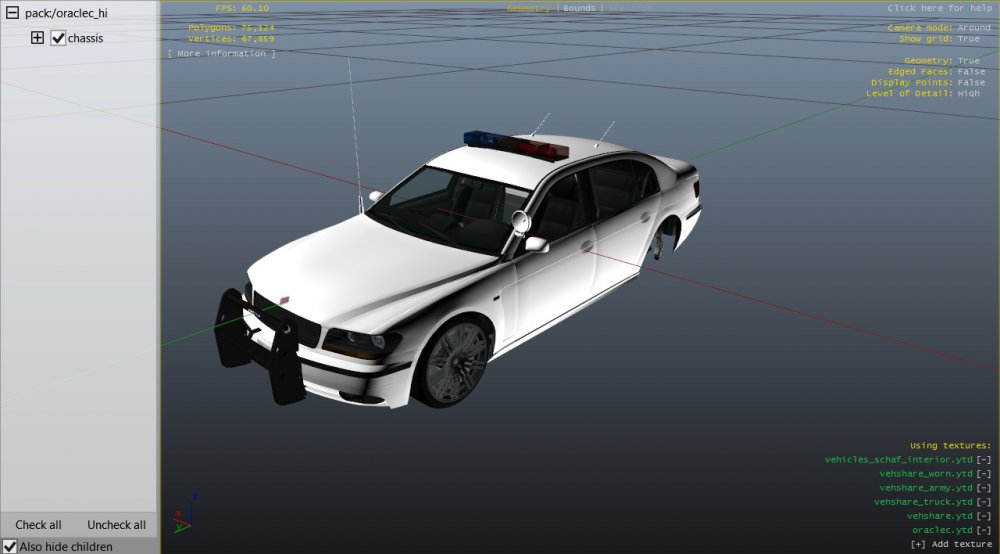
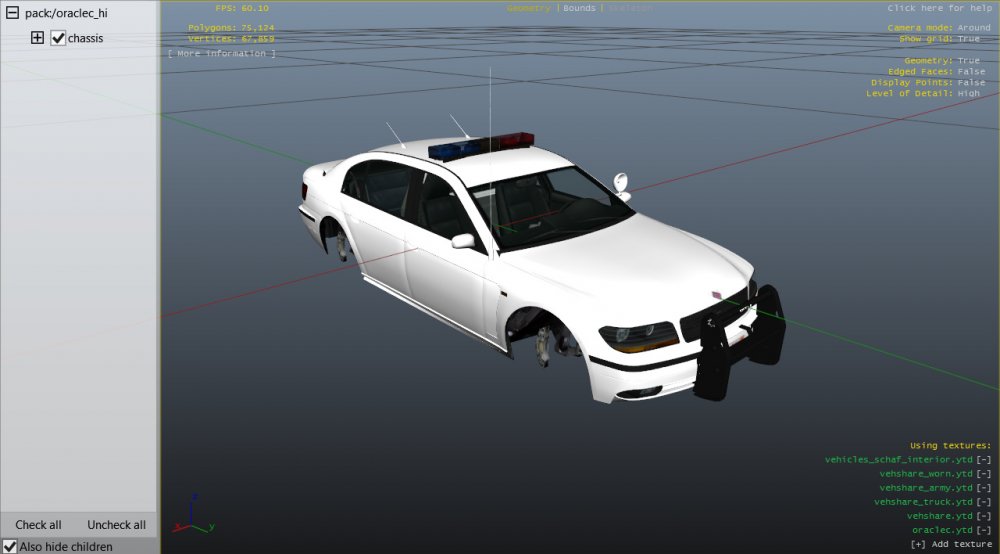
Hay man. same here with not getting the vehicle to load. but I see you've got it working now. your actually ahead of me. I just finally got the vehicle to load but now I will be putting parts on it. Now how are the lights messed up? are they hovering above the vehicle? is the flash and color pattern messed up? or is it the texture that cant be seen in the game? here is a vehicle that I jazzed up with lights and antennas. this is my test vehicle BTW. if you have any other questions feel free to pm me or ask mercuri, or The Loot. There very helpful.
-
I've seen no problems with the police suv. I'll do some research for you to see what I find. I need some backup information. 1) is this a vehicle you edited. 2) are you replacing the police suv with the granger. 3) Are you adding it as an add on without taking place of another vehicle. I will reply as soon as find some info... PM me in the meantime is you have any other questions. I recommend if I can't find anything contact mercuri, or The Loot. There very helpful
-
Dang man I was having the same problem I built a mod and the game wouldn't evan start but I change some code somewere to load the game. HAD THE SAME ISSUE - entering the vehicle Game crashes. I've been in a big mixup with code and still very confused. Try asking mercuri or Loot. They can very helpful.
-
ok that's good to know. cause my car doesn't even have sound so it looks like a need a "Audio Hash" caould you give me the different types od audio sounds and were I should put the audio hash? thanks example block of code <Item> <modelName>emperorc</modelName> <txdName>emperor</txdName> <handlingId>EMPEROR</handlingId> <gameName>EMPERORC</gameName> <vehicleMakeName>ALBANY</vehicleMakeName> <expressionDictName>null</expressionDictName> <expressionName>null</expressionName> <animConvRoofDictName>null</animConvRoofDictName> <animConvRoofName>null</animConvRoofName> <animConvRoofWindowsAffected /> <ptfxAssetName>null</ptfxAssetName> <audioNameHash>9F</audioNameHash> < here? <layout>LAYOUT_STANDARD</layout> <coverBoundOffsets>EMPEROR_COVER_OFFSET_INFO</coverBoundOffsets> <explosionInfo>EXPLOSION_INFO_DEFAULT</explosionInfo> <scenarioLayout />
-
hey thanks again! and ill let you know how it goes
-
so I somewhat figured it out both choice A & B ways. but I ran into an issue, you didn't specify were to put the "audoNameHash" in the vehicles.meta? obviously in the block of code that's dedicate to the vehicle. this code here is the vehicle.meta code for a mod I built but I don't have sound. here's the code Audo - B <Item> <modelName>emperorc</modelName> <txdName>emperor</txdName> <handlingId>EMPEROR</handlingId> <gameName>EMPERORC</gameName> <vehicleMakeName>ALBANY</vehicleMakeName> <expressionDictName>null</expressionDictName> <expressionName>null</expressionName> <animConvRoofDictName>null</animConvRoofDictName> <animConvRoofName>null</animConvRoofName> <animConvRoofWindowsAffected /> <ptfxAssetName>null</ptfxAssetName> <audioNameHash>9F</audioNameHash> < here? <layout>LAYOUT_STANDARD</layout> <coverBoundOffsets>EMPEROR_COVER_OFFSET_INFO</coverBoundOffsets> <explosionInfo>EXPLOSION_INFO_DEFAULT</explosionInfo> <scenarioLayout /> before it was this but than I replaced it with B: Audio - A <Item> <modelName>emperorc</modelName> <txdName>emperor</txdName> <handlingId>EMPEROR</handlingId> <gameName>EMPERORC</gameName> <vehicleMakeName>ALBANY</vehicleMakeName> <expressionDictName>null</expressionDictName> <expressionName>null</expressionName> <animConvRoofDictName>null</animConvRoofDictName> <animConvRoofName>null</animConvRoofName> <animConvRoofWindowsAffected /> <ptfxAssetName>null</ptfxAssetName> <audioNameHash/> < here - original. <layout>LAYOUT_STANDARD</layout> <coverBoundOffsets>EMPEROR_COVER_OFFSET_INFO</coverBoundOffsets> <explosionInfo>EXPLOSION_INFO_DEFAULT</explosionInfo> <scenarioLayout /> were do I put this "<audioNameHash>"?
-
yeah I would choose the first one to. so like this: <Item> <modelName>oraclec</modelName> <txdName>oraclec</txdName> <handlingId>ORACLE</handlingId> <gameName>ORACLEC</gameName> <vehicleMakeName>Car_Manufacturer</vehicleMakeName> with the texture like: <Item> <parent>vehicles_oracle_interior</parent> <child>oraclec</child> </Item> and the car-Vary... file being: <Item> <modelName>oraclec</modelName> <colors> <Item>... hey you make DLC pack. that's cool. I've been wondering how to do those. do you know of a tutorial or instructions were I can learn to make a DLC specifically for vehicles. I mean... that's awesome!
-
ok that makes since. but what vehicles from GTA 5 are unlocked. I used the oracle vehicle from the game and turned it into a cop car. but maybe the oracle isn't unlocked? maybe that's why my game keeps crashing!
-
yes GTA 5. Zmod 3 is ok but I could use something better and I was wondering if there is other software to make or edit vehicles from the game? it would be grate and I hope there is other software. oh and GTA v uses .yft and .ytd
-
ok I'm starting to understand. so if I wanted give oracle its own handling I would have to use the handling.meta plus the carvariations.meta and vehicle.meta. but if I copy the oracle handling line and paste it into the vehicles.meta in the mpchristmas2 dlc and it to oraclec does this mean I only have to use vehicles.meta and carvariations.meta?
-
Yeah makes since. is there a way I can give it its own handling. like you know I want it to be its own thing. is there any vehicle mod developers you know of that I might be able to talk too?
-
so I edited the oracle xs a put a lightbar on it and it looks great! but I don't want to keep the same name "oracle" I want to change it to "oraclec" "c" for "cop" and I've been testing it and I changed the texture file, and the .yft file to "oraclec" but when I load it the game crashes. I've been trying to figure it out. the block of code down below is what I used to add the vehicle in the "vehicle.meta" file <modelName>oraclec</modelName> <txdName>oraclec</txdName> <handlingId>police</handlingId> <gameName>Oraclec</gameName> <vehicleMakeName>POLICE</vehicleMakeName> And I also renamed the files "oraclec.yft" and "oraclec_hi.yft" and "oraclec.ytd" both texuture and lo and hi model files My game still crashes though. I got one of my older mods to work sum what but it wasn't dedicated to the police, I would be driving around and AI divers would be driving it. basically the mod that I'm making is a car with a light bar and I want it to be its own vehicle without is taking the main "oracle" vehicle place. the link below is the extra car slots, instructions on hot to do it, and a YouTube tutorial on it - the only issue and me trying to figure it out and how to rename the vehicle or me putting stuff in the wrong slots. I've watched a tutorial on it and followed the instructions on it. "Extra Vehicle Slots" - Link: https://www.gta5-mods.com/vehicles/more ... o-add-v1-2 "Adding new vehicles to the game" - Link: http://www.lcpdfr.com/forums/topic/5090 ... ow/?page=1 YouTube tutorial for extra vehicle slots - Link: https://www.youtube.com/watch?v=cU71inGhyBE I've look at all of these and still can't figure it out. a reply would be greatly appreciated!
-
so I edited the oracle xs a put a lightbar on it and it looks great! but I don't want to keep the same name "oracle" I want to change it to "oraclec" "c" for "cop" and I've been testing it and I changed the texture file, and the .yft file to "oraclec" but when I load it the game crashes. I've been trying to figure it out. the block of code down below is what I used to add the vehicle in the "vehicle.meta" file <modelName>oraclec</modelName> <txdName>oraclec</txdName> <handlingId>police</handlingId> <gameName>Oraclec</gameName> <vehicleMakeName>POLICE</vehicleMakeName> And I also renamed the files "oraclec.yft" and "oraclec_hi.yft" and "oraclec.ytd" both texuture and lo and hi model files My game still crashes though. I got one of my older mods to work sum what but it wasn't dedicated to the police, I would be driving around and AI divers would be driving it. basically the mod that I'm making is a car with a light bar and I want it to be its own vehicle without is taking the main "oracle" vehicle place. the link below is the extra car slots, instructions on hot to do it, and a YouTube tutorial on it - the only issue and me trying to figure it out and how to rename the vehicle or me putting stuff in the wrong slots. I've watched a tutorial on it and followed the instructions on it. "Extra Vehicle Slots" - Link: https://www.gta5-mods.com/vehicles/more ... o-add-v1-2 "Adding new vehicles to the game" - Link: http://www.lcpdfr.com/forums/topic/5090 ... ow/?page=1 YouTube tutorial for extra vehicle slots - Link: https://www.youtube.com/watch?v=cU71inGhyBE I've look at all of these and still can't figure it out. a reply would be greatly appreciated!
-
ok something like this? <modelName>oraclec</modelName> <txdName>oraclec</txdName> <handlingId>oraclec</handlingId> <gameName>Oraclec</gameName> <vehicleMakeName>POLICE</vehicleMakeName> And I also did for the files "oraclec.yft" and "oraclec_hi.yft" and "oraclec.ytd" both texuture and lo and hi model files I think I'm doing something wrong in the code?
-
so I edited the oracle xs a put a lightbar on it and it looks great! but I don't want to keep the same name "oracle" I want to change it to "oraclec" "c" for "cop" and I've been testing it and I changed the texture file, and the .yft file to "oraclec" but when I load it the game crashes. does any know what's happing? A reply would be greatly appreciated! thanks: josh
-
Thank you.
-
So I took the tornado and put a light bar on it. Looks great but I didn't want to replace a police car. There's a file thing that I got its call "extra police vehicle slots" and it works with mods that people made online but I tried to change the name of the tornado that I edited to "tornadoc". I put the vehicle in the 2 files and when I load the game and load the car the game crashes. Is there a way to rename a car and have it work in the game. link: https://www.gta5-mods.com/vehicles/more-police-cars-to-add-v1-2 A reply would be greatly appreciated. Thanks: josh
-
Good to know. Another quick question, how can I make light for headlights you know like how it shines on the road and the look of the lights and when there on and off Thanks: josh
-
Great video. Very helpful when new to Zmod. Quick question, what is UV mapping. Is it were you can map headlights and the shine of the lights. Thanks: josh
-
So when you say .wft format, does this mean a use of another editor. And I was also wondering is there any other editor besides zmodeler to edit vehicles? Also what does Rockstar use to build vehicles for the game? Thanks: josh
-
I will defiantly start easy and with default vehicles. Thanks for the tips too.




