


.png.21034f6c0a6c380b830fdd6cd3a9e8c1.png)
NO569
Members
-
Joined
-
Last visited
Everything posted by NO569
-
Sorry I was confusing the RPH logs with the crash reports. Here is an updated RPH log. The same problem still persists even with DX11, Windowed and 60,000 timeout. It still says it cannot find LSPDFR. RagePluginHook_13102020_144406.log
-
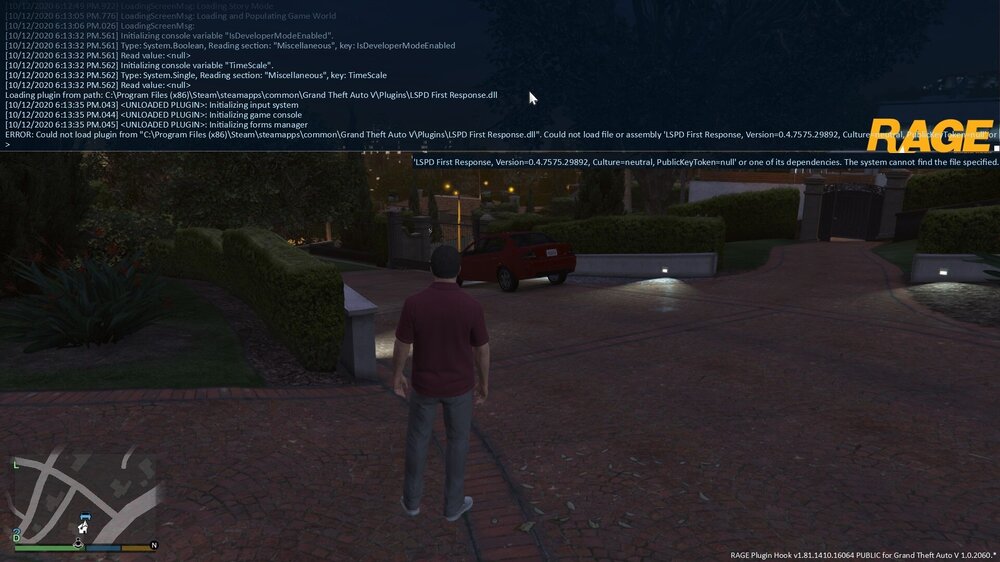
When I changed it to 60000, it prevents it from "crashing" on startup. Instead, it loads into the game but just without LSPDFR and then gives me what is in the console in the above screenshot. Given that, it doesn't generate a log file, so I can't get a log file that says 60000.
-
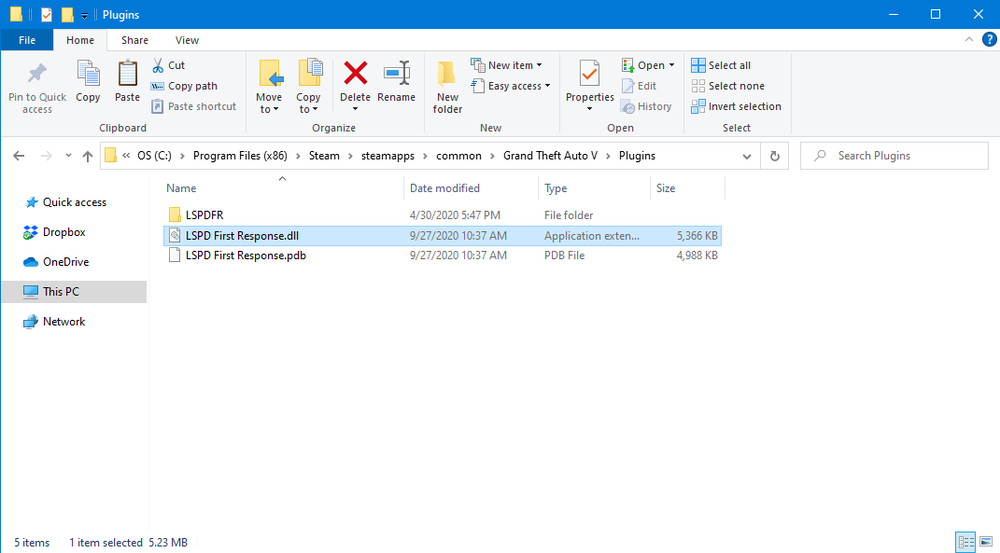
I believe everything is installed correctly. I have used LSPDFR many times in the past with no issues; I didn't have this issue with the previous version of LSPDFR. I've used both the manual and automatic installation, so it should be installed correctly. I have attached a screenshot of the LSPDFR.dll location. I uploaded the full RPH log to the first post. If you cannot view it, I have attached it to this post too. RagePluginHook_03102020_135311.log
-
Hi Charlie686, thanks for the quick response! I actually tried 60,000 timeout already; I saw it as a potential solution on another post on this site. Changing the timeout stops the game from crashing when its set to load LSPDFR on startup. Instead, the game starts up but LSPDFR isn't loaded and there's a message in the console saying "Could not load file or assembly 'LSPD First Response . . ." (Attached screenshot; I edited in the full line so you could see it). I have tried both manual install as well as the automatic (.exe) install. I have also tried downgrading to 0.4.7
-
If I set RPH to load LSPD:FR on startup, it gets to the point of loading screen where it says loading LSPDFR then quits to the desktop with a crash report (attached). In the crash report, it says "LSPD First Response: Exception type: System.AccessViolationException" and "LSPD First Response: Exception message: Attempted to read or write protected memory. This is often an indication that other memory is corrupt." If I set RPH to not load any plugins on startup, the game starts up fine, and RPH loads just fine. However, when I go into the console and type LoadPlugin LSPD First Response.dll, it says that it could not find the specified file. My game is fully up-to-date, I have updated ScriptHook, LSPDFR and RPH. I have tried reinstalling LSPDFR, removing plugins, etc. but I keep getting the same error. I know it is not an issue with other mods installed, as the game loads and plays (without any crashes) in all other situations - except when trying to load LSPDFR. I have also excluded the file and the whole GTA V directory from my antivirus, as that seems to be an issue for some users. Does anyone know how to fix this? RagePluginHook_03102020_135311.log
.thumb.png.3641e2d49ce785617314d4cfa196fd96.png)

