

MaxS15
Members
-
Joined
-
Last visited
Everything posted by MaxS15
-
I had that same problem, fix for me was to remove the More Radio Chatter plugin. Working fine for me now.
-
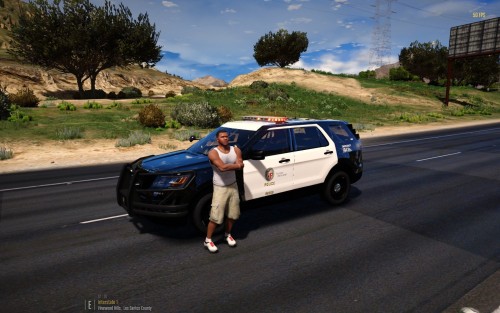 Hello Everyone! So i came across an awesome 2016 Ford Explorer Model by @Maurice97 and i decided to make an LAPD skin for it. This is my first ever skin so any tips would be much appreciated! INSTALLATION: Download the model from link below. Open OpenIV, when opened enable edit mode and click Ctrl+F3 to search. In the search bar search for : police4.ytd (or whatever slot you would like the vehicle in) Choose the file from the most recent dlcpack. Replace the files and open the .ytd file. Search for 'template' and you should find the skin of the vehicle. Click replace and replace with the skin from my file. The windows should be underneath the vehicle skin - If you choose to want to make the windows lighter Link for the vehicle model : Thank you & enjoy!!