BuzzShotGaming
Members
-
Joined
-
Last visited
Files posted by BuzzShotGaming
-
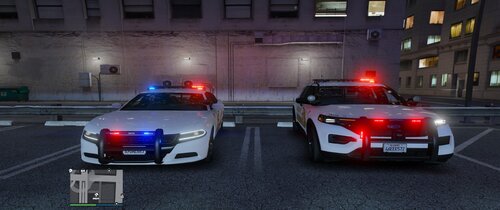
DLS configurations for Nathan's Contra Costa Mini-Pack. DLS configurations are provided for all vehicles included in the pack. Also included are custom traffic advisor patterns.
Please note, these configurations are not based on the IRL agency.
In the file, there are two options for steadyburns, CA steadyburns and Non-CA steadyburns. The CA steadyburn option will enable the top red and blue module on the lightbar when enabled. The non-CA steadyburn option will flash the front blue module on the push bumper. This is loosely based on the South Dakota Highway Patrol's traffic stop pattern were only minimal front amber light(s) will flash. See blue boxes in the screenshots for reference. Regardless of what option you pick, the red and blue modules of the lightbar will be a steadyburn pattern on stages 2 and 3. The steadyburn option will only change what happens when the "[" key is pressed using DLS.
Preview of the lighting patterns
Link to the vehicle download
- 360 Downloads
- 3 Comments
Updated -
DLS Configurations for VaricaI's San Bernardino County Sheriff Pack.
DLS configs for all cars asides from the CVPI. These configs are not meant to be realistic lighting patterns.
Preview video:
Link to the vehicle pack:
- 455 Downloads
- 6 Comments
Updated -
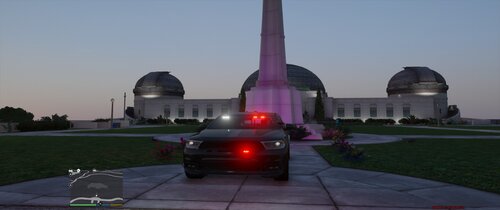
DLS Configuation for Virtualmorphous' 2019 Slicktop Durango
Features 3 stage lighting
Stage 1 - Rear lights
Stage 2 - Rear lights (slow flashing) & taillight modules, side lighting (slow flashing), front lighting (slow flashing)
Stage 3 - Rear lights (quick flashing) & taillight modules, side lighting (fast flashing), front lighting w/ white lights (fast flashing)
Use default DLS traffic advisor config for traffic advisor.
This is my first time making a DLS configuration. Hope yall' don't hate it. In my opinion, DLS is a superior lighting system to ELS, however, is limited due to the lack of vehicles/configurations utilizing it, and the ones that are out there are primarily for lore friendly vehicles. I plan on making more configurations in the future for non-lore vehicles.
Preview Video:
Link to vehicle:
- 67 Downloads
Updated -
I've had this sitting on my desktop for a while and since I really don't play GTA that much anymore after getting into A3PL I decided to release these to you guys!
Enjoy!
Vehicles used:
- 408 Downloads
Submitted -
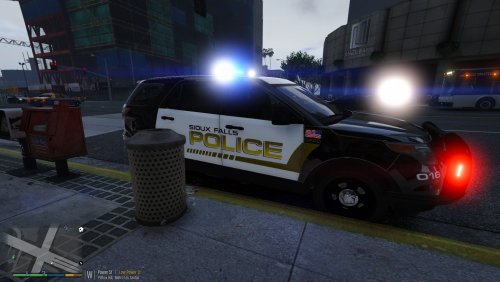
Today I present to you the Sioux Falls South Dakota Police Department Pack featuring SFPD textures for the FPIU, FPIS, and Tahoe. All of the vehicles can be found here:
Enjoy!
- 182 Downloads
- 3 Comments
Submitted -
This is a simple modification to make your TS3 mic click audio sound like the California Highway Patrol PA audio system
Video Preview here:
https://www.youtube.com/watch?v=qnLwtYgUQPU
- 717 Downloads
- 1 Comments
Submitted -
Just a simple skin for TWISTEDSCOPES' Miami Police Pack
More textures to come in the future!
You can find the pack here:
Please do not re upload without my permission.
- 111 Downloads
Submitted -
This is a simple mod that replaces SOME of the lines the GTA cops say with the lines the GTA IV cops say.
This mod is in early beta so expect bugs!
Video Preview:
<Install>
Drag and drop all the stuff in the "Grand Theft Auto V" folder into your directory
and you should be set to go
~Not for practical use, I am aware that there is a mixture of V Sounds and IV sounds
MAKE A BACKUP OF YOUR POLICE SCANNER FOLDER!!!!!
If the callout pack that you want is not in here yet please let me know and I will include it for you!
WORKS BEST WHEN CALLING IN BACKUP!!!
- 550 Downloads
- 9 Comments
Updated -
This will allow you to use any cvpi and possibly other cars in the policeold2 slot in case you are running out of room!
You can report any errors but I probably wont do anything about it due to the fact I have no idea how to work more in-depth with handling lines.
If you need to know what car was used in the screenshot here it is:
- 1,391 Downloads
- 5 Comments
Updated -
- 16 Downloads
Submitted -
This is my first skin so please don't judge!
Ford Taurus Moddel: http://www.lcpdfr.com/files/file/9359-ford-police-interceptor-2012-model/
Known Issues:
Skin looks blue in the day
Some of the decals are a bit dirty
If you do use this skin i would recommend using it at night so the decals don't look blue
This is a exact decal of the Rock County Sheriff Department (my hometown)
Also take a look at my YouTube Channel: https://www.youtube.com/channel/UCxO22mVJv8bhk47h8YNHygA
- 25 Downloads
Updated