


JMar929
Members
-
Joined
-
Last visited
Everything posted by JMar929
-
-
Hello. I have been trying to add lights to this unlocked vehicle. All I want to add is a beacon to the car. I successfully got the vehicle into ZModeler3 with no problem, but when I add the beacon, it doesn't show up in Zmodeler, nor do I know how to add the textures that are in the folder. I am getting this error too: http://prntscr.com/cee6pi (See Screenshot)
-
Awesome!
-
Do you know when it will be out?
-
Where is it ;-;
-
 It'd be great to see this work with the "Cop Holster" script. Seems the game crashes when using one of the presets :).
- 2,353 comments
- 238 reviews
-
-
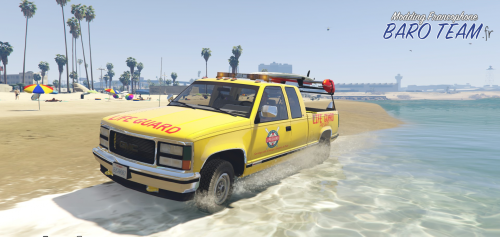 Even a marked one, if you just changed the lightbar color and took the surfboard and rack off the back/top of the truck? (And all the lifeguard gear, of course) I'd be happy to make some skins for it. Btw, can I get a template for this?
- 11 comments
- 2 reviews
-
-

- 2
-
-
Looks awesome, I've been looking for one of these but for a police car. Are you able to create one for an unmarked/marked vehicle?
- 11 comments
- 2 reviews
-
-
- 1
-
