


ElbeTV
Members
-
Joined
-
Last visited
Everything posted by ElbeTV
-
Mhhh ok i dont try this :)
-
Here: GTA V Re-Sized [Not Just Another FPS improvement Mod] - GTA5-Mods.com (gta5-mods.com)GTA V Re-Sized [Not Just Another FPS improvement Mod] - GTA5-Mods.com (gta5-mods.com) 😉
-
i have it since Sunday what about this: Resized mod <- is this usabel and good, for middel Clas PCs?? And the Game is running fine 🙂 ok not rly fine, but better 🙂 i played 1 Hour without Errors And the Performance is mutch better now
-
Mhh its not running fine.... Its lagging hard and its crash again.... First of all, i delete REDUX now. Its a rly nice Mod, but it is to Hungry 😄 And EUP will be to deleted..... So the Only thing in Mods Folder a Gameconfig and a Vehicle Pack I hope the game is running better with these changes
-
Ok error found 😄 I think it was the Vehicle Mod... i replaces the DLC Folder
-
i install after game Works fine, all these Mods 😉 First i reset the DLC.rpf and when it dosnt work i think i have to make a New Mods Folder.... 😄 but thats a littel Problem with a old HDD 😄
-
i Install REDUX EUP <- But EUP i uninstall alrdy after the Crashes And 2 Car Pack One for Sheriff and One for Normal Police Maybe i do somthing wron, when i was insert the original vehicle-rpf?
-
No
-
i think i do somthing wrong. The Game is crashing when its in Loadingscreen RagePluginHook.log
-
So, the Game is running Fine now 🙂
-
Yes i renamed it back to mods 😉 So game is still not running.... When i go On Duty and comming back to the Streets, the wohle City is buggy and glitching. I uninstall now the mods Folder and make it new, only with Redux the GTA Config mod for Heapadjuster packfileadjuster and i a Simpel Car Mod. So when this still dosnt run i will kill LSPDRF 😄 RagePluginHook.log
-
i will test it 🙂 Start up is still fine
-
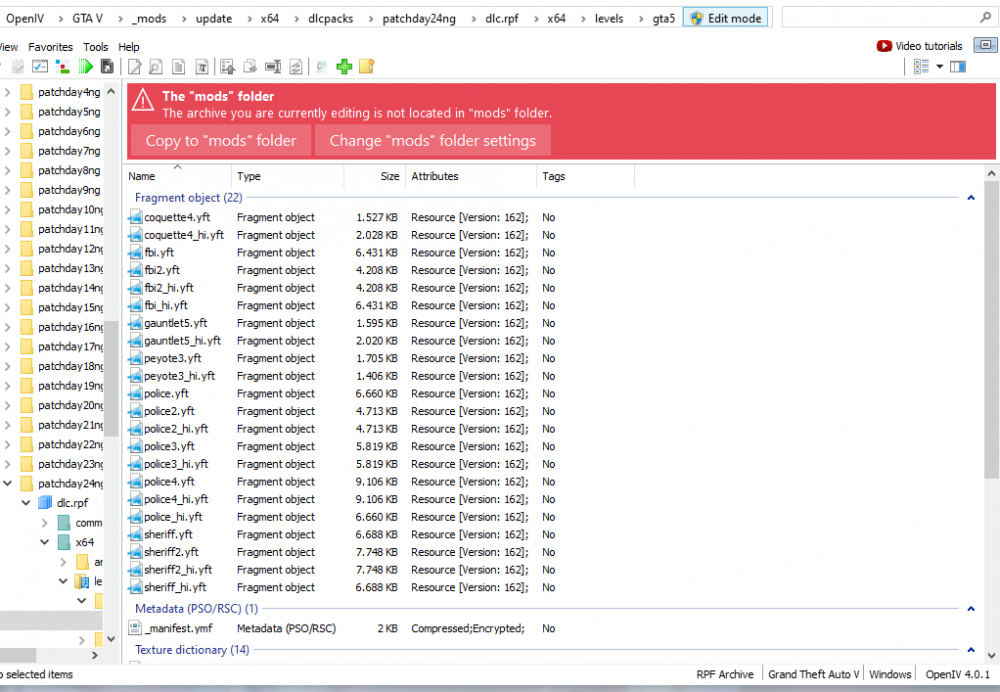
Hey i am back my Friend 😄 I have a Question, u tell me to rename the mods Folger in to _mods. I have done this and now i dindt see my PolicecarMods. Only the Vanilla.... Is this a Bug, or Error? Thanks btw. i link a Photo from Open IV, watch the Redzone
-
What u dont love Tea? Ah shit 😄 Ok Thank u mate ❤️
-
Oh shit 😄 Sorry i mean Tea! 😄
-
Fine 🙂 I hope all will work now 🙂 Thank u very mutch! Sir! I give u a Tee 🙂 Ok?
-
Soooo 🙂 I start the game 2 times and the Plugin loading fine. I will test a longer Seasion later or tomorrow 😉 I give u my last Log, i think it is clear? Greetings and Thank u! ❤️ RagePluginHook.log
-
Its done Sir 🙂 No Broken Files was found... 🙂
-
ahh yes, i take Mods and not Game Files.... 😉 i renamed allready the Folder in to _Mods 😉
-
I install it over Open IV .oiv File Thats the Way i do it: If I understand correctly, the mod will be installed in the modfolder. "If you want to remove GTA 5 Redux simply delete the mods folder in your GTA 5 folder."
-
Yes i have the Mod Redux installed
-
Hey, maybe it is Redux?
-
The plugin still crashes on Startup. I will take a break now and maybe test again tomorrorw for gamecrashes i thank u for your help 🙂RagePluginHook.log
-
Ok i Rename the Folger to "_mods" Crashes atm I dont know, i need to test. Give me a few Hours comming back later 😉
-
Ok its done 🙂 but here is the next Log...... 🙄 I think this will be my last attempt. So far, thank you very much for your help RagePluginHook.log
