
Skip to content
View in the app

A better way to browse. Learn more.

LCPDFR.com

A full-screen app on your home screen with push notifications, badges and more.

To install this app on iOS and iPadOS
  1. Tap the Share icon in Safari
  2. Scroll the menu and tap Add to Home Screen.
  3. Tap Add in the top-right corner.
To install this app on Android
  1. Tap the 3-dot menu (⋮) in the top-right corner of the browser.
  2. Tap Add to Home screen or Install app.
  3. Confirm by tapping Install.

KaayD

Members
  • Joined

  • Last visited

  1. And it's gonna work for GTA ? Thank you ! Oh yes It's working, thank you so much ! ;)
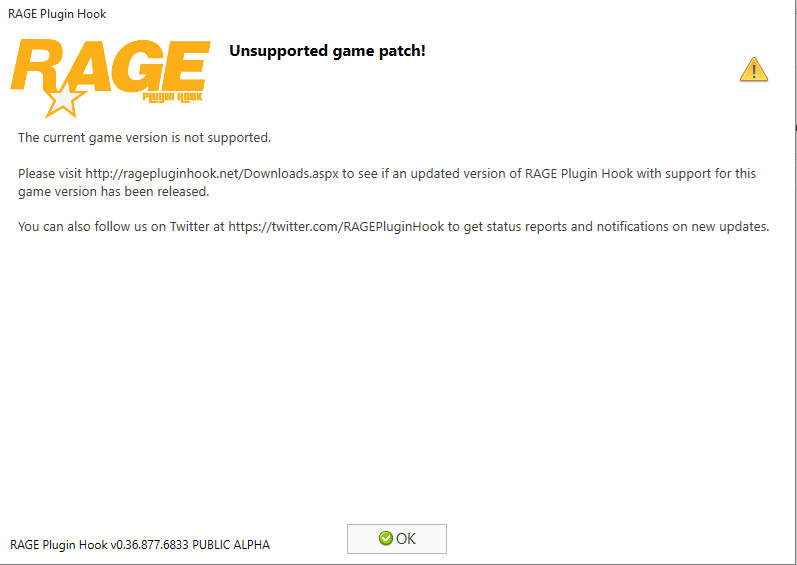
  2. Hello, I have the GTA V version 1.0.678.1 and when I install Rage Plugin Hook I have an error message who say "The current game version is not supported.". What I'm supposed to do ? Thank you for your future answers ! ;)

  3. Thank you very much, I'm going to test that. Sorry for the bad emplacement...
  4. Hello, Before starting, sorry for my bad english, I'm french. I have follow the tutorial of Jeff Favignano to installtion LSPDFR and other mods and scripts. I install evrything like in the video but when I launch my game, a download is starting. I have to download a part of GTAV. If I install a lot of mods I must download 5Go, and less if I install less mods. When the game is again download, the scripts and the mods has disappear. Theres are not installed. Thank you very much, have fun !

Account

Navigation

Search

Search

Configure browser push notifications

Chrome (Android)
  1. Tap the lock icon next to the address bar.
  2. Tap Permissions → Notifications.
  3. Adjust your preference.
Chrome (Desktop)
  1. Click the padlock icon in the address bar.
  2. Select Site settings.
  3. Find Notifications and adjust your preference.