



Guncharted78
Members
-
Joined
-
Last visited
Everything posted by Guncharted78
-
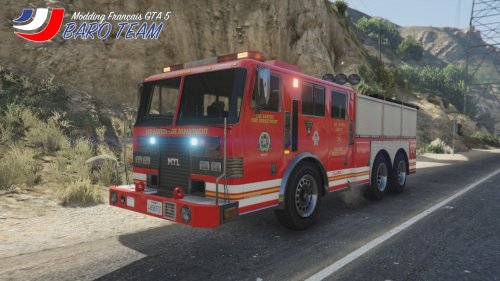 For the moment, the game support totally this lightbars and led (from the original firetruck). So I don't planned to do this in the next updates.
- 12 comments
- 3 reviews
-
DESCRIPTION: This vehicle remplaces the original GTA 5 Firetruck by a new Heavy rescue vehicle. FEATURES: -10 wheels (8 rear, 2 front) -100% compatible with original firetruck reskins -NO WATER CANON -No issues detected, except non-breakable windows Instructions are available both in french and english. CREDITS: Firetruck - Heavy rescue vehicle Version by Guncharted78 for Grand Theft Auto V. Current version is v1.0 BARO TEAM's mods : baroteam.fr forum.baroteam.fr
- 12 comments
- 3 reviews
-
-

- 8
-
-
 Have you follow all theses steps ? ENGLISH: -How to install files 1. Unzip the folder on your computer 2. Start OpenIV 3. Switch to "Edit mode" 4. Go to Grand Theft Auto V / update / x64 / dlcpacks / patchday2ng / dlc.rpf / x64 / levels / gta5/ vehicles.rpf 5. Do a right-click on fbi2.ytd and replace the file with the new fbi2.ytd 6.Do a right-click on fbi2_hi.ytf and replace the file with the new fbi2_hi.ytf 7.Do a right-click on fbi2.ytf and replace the file with the new fbi2.ytf WARNING: If you have an edited vehicles.meta file (in update.rpf / ... / levels / gta5 only, other vehicles.meta aren't affected), follow the instructions on the bottom of this file. [NOTE: If you don't have an edited vehicles.meta follow the 5 steps bellow !] -How to install: vehicles.meta 1. Unzip the folder on your computer 2. Start OpenIV 3. Switch to "Edit mode" 4. Go to Grand Theft Auto V / update / update.rpf / common / data / levels / gta5 5. Do a right-click on vehicles.meta and replace the file with the new vehicles.meta --------------------- IF YOU HAVE AN EDITED VEHICLES.META FILE (in update.rpf / ... / levels / gta5 only, other vehicles.meta aren't affected) Info. You can use ctrl+f in your text editor software to open a search bar (don't work with all text editor) 1. Open your vehicles.meta, and go at the end of the file and search this line : <Item> <parent>vehicles_cav_interior</parent> <child>fbi2</child> </Item> 5. Replace it by : <Item> <parent>vehicles_bob_brown_interior</parent> <child>fbi2</child> </Item> 6. Save, close the file and click on rebuild. 7. It should work if you have correctly followed these steps. Enjoy !
- 16 comments
- 2 reviews
-
Have you correctly modified (by replacement or add lines) the vehicles.meta file like it's noticied in the readme ?
- 16 comments
- 2 reviews
-
 Ok cool :) I will think about it but I'm not sure to do this because I don't have so much free time these days.
- 16 comments
- 1 review
-
I can create a version with lightbar but I don't know how to make vehicle template. So unfortunately, I will not be able to make a marked templated version. Yeah why not ! But have you an idea how looks halogens lights ? Because I don't know how do that ^^
- 16 comments
- 2 reviews
-
-
-
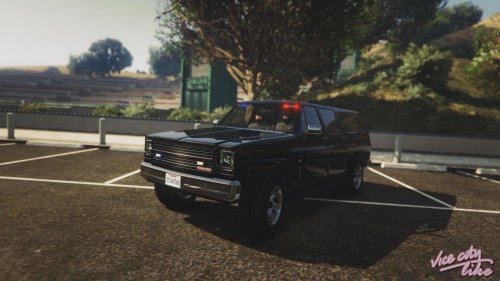
This mod replaces original F.I.B. Granger by a F.I.B. Rancher (Like in Vice City). Police radio isn't included in car interior. INSTALLATION: INSTRUCTION ARE IN THE .zip FILE. This mod replaces F.I.B. Granger. Or it could be use like a standalone, standalone files are included (in this case, car's name is fbisuv). CREDITS: F.I.B. Rancher (Like Vice City) by Guncharted78 for Grand Theft Auto V. Original Rancher model by Rockstar Games. Original Standalone data files by footballmatt. Current version is 1.0 VIDEO TRAILER:
- 16 comments
- 2 reviews
-
-
- 8
-
-
Hi, I don't know why it doesn't works and I never had a texture glitch bug with this model :/ And I don't know why this vehicle doesn't works with Vehicle Search, but it's probably because it's a standalone or probably because it's define as FIB vehicle, not police vehicle. I don't really understand what do you mean ^^ Can you more explain the problem please ? :)
- 16 comments
- 1 review
-
 I really don't know why it doesn't work. Because all my files are like the other standard mods files. So I don't know how to fix that. If you install my mods as standalone ; Washington = fbi3 and vacca = fbisport. It's easy to remember ^^
- 4 comments
- 1 review
-
-
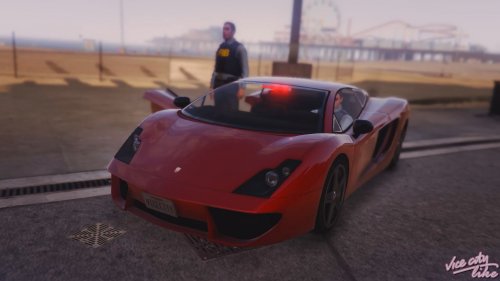
This mod replaces original F.I.B. Buffalo by a F.I.B. Vacca (Like the FIB Cheetah in Vice City). Police radio isn't included in car interior. INSTALLATION: INSTRUCTION ARE IN THE .zip FILE. This mod replaces F.I.B. Buffalo. Or it could be use like a standalone, standalone files are included (in this case, car's name is fbisport). KNOWN ISSUES/BUGS : -In first person, the hand of character don't touch perfectly the wheel (see image) -The speedometer needle isn't at the right place (see image) CREDITS: F.I.B. Vacca (Like Vice City) by Guncharted78 for Grand Theft Auto V. Original Vacca model by Rockstar Games. Original Standalone data files by footballmatt. Current version is 1.0 VIDEO TRAILER:
- 4 comments
- 1 review
-
-
-
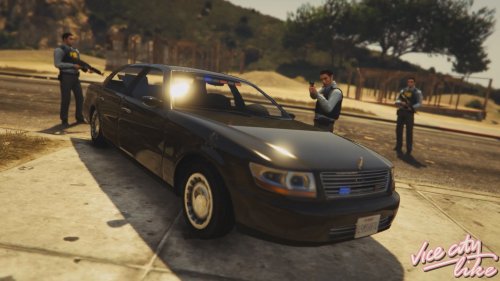
This mod replaces original F.I.B. Buffalo by a F.I.B. Washington (Like in Vice City). Police radio isn't included in car interior. INSTALLATION: INSTRUCTION ARE IN THE .zip FILE. This mod replaces F.I.B. Buffalo. Or it could be use like a standalone, with v1.1 standalone files are now included. CREDITS: F.I.B. Washington (Like Vice City) by Guncharted78 for Grand Theft Auto V. Original Washington model by Rockstar Games. Current version is 1.1 VIDEO TRAILER: https://www.youtube.com/watch?v=tWPpLhjE0W8
- 16 comments
- 1 review
-
-
- 6
-

