Skip to content
View in the app

A better way to browse. Learn more.

LCPDFR.com

A full-screen app on your home screen with push notifications, badges and more.

To install this app on iOS and iPadOS
  1. Tap the Share icon in Safari
  2. Scroll the menu and tap Add to Home Screen.
  3. Tap Add in the top-right corner.
To install this app on Android
  1. Tap the 3-dot menu (⋮) in the top-right corner of the browser.
  2. Tap Add to Home screen or Install app.
  3. Confirm by tapping Install.

Rapaelo

Members
  • Joined

  • Last visited

Everything posted by Rapaelo

  1. Yes. For GTA V. When it goes, both
  2. Ok. Thx. But did you know where can help me?
  3. Why should I look on your Channel?
  4. Hi community, can someone create an NCIS skin? (As Police officer, the Van or other things?) Like that from GTA IV: This would be great!
  5. can you do that for LSPDFR? (GTA 5)
  6. It´s doen. works! Thx for your help!
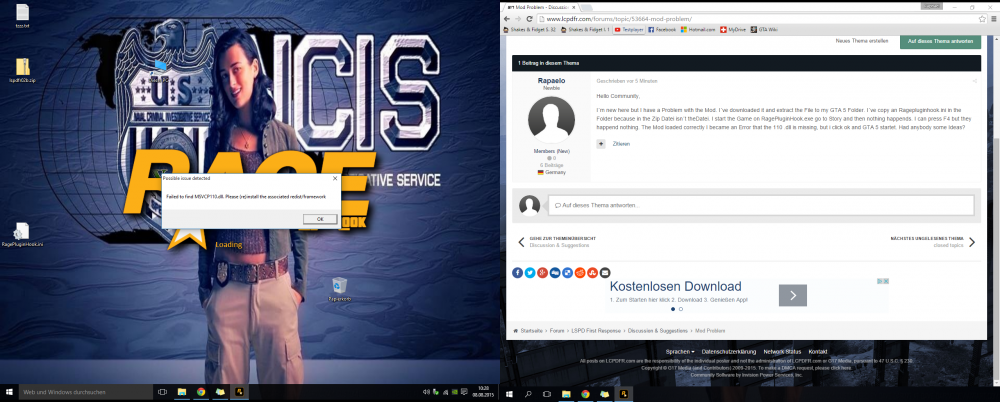
  7. Hello Community, I´m new here but I have a Problem with the Mod. I´ve downloaded it and extract the File to my GTA 5 Folder. I´ve copy an Ragepluginhook.ini in the Folder because in the Zip Datei isn´t theDatei. I start the Game on RagePluginHook.exe go to Story and then nothing happends. I can press F4 but they happend nothing. The Mod loaded correctly I became an Error that the 110 .dll is missing, but i click ok and GTA 5 startet. Had anybody some Ideas? This is the ones error:
Account

Navigation

Search

Search

Configure browser push notifications

Chrome (Android)
  1. Tap the lock icon next to the address bar.
  2. Tap Permissions → Notifications.
  3. Adjust your preference.
Chrome (Desktop)
  1. Click the padlock icon in the address bar.
  2. Select Site settings.
  3. Find Notifications and adjust your preference.