


Officer19
-
Joined
Everything posted by Officer19
-

From the album: O19
-
Try to remove LCPDFR log file please ? Your game is working properly ?
-
if you are having a problem with the mod so tell me what's it but i would like to inform you that this LOG check won't affect your game and this log is going to help you to find your issue if you have oneCould you post a screenshot from your Log checker or your LCPDFR troubleshooter :D ??

From the album: LSPDFR [WIP]

From the album: LSPDFR [WIP]
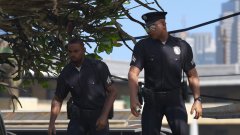
From the album: LSPDFR [WIP]

From the album: LSPDFR [WIP]

From the album: LSPDFR [WIP]

From the album: LSPDFR [WIP]

From the album: LSPDFR [WIP]
 I guess so .. :D Nice one :D
From the album: LSPDFR [WIP]
Please install DirectX if that doesn't work so download this file and take it to system32 From there you can get the best DirectX : https://www.microsoft.com/en-us/download/details.aspx?id=35&nowin10Hey could you take a screenshot from your troubleshooter ?
From the album: LSPDFR [WIP]
Just follow the Author's instructions :DTry to cut your Rockstar Games that yo can find it in the documents and make it in another place then start your game i think this is going to fix your issue :DThis this a Add-on not a modded vehicle :D you have to follow the instruction of the Author's file "You can use Simple Trainer Spawn it by name." This is what the Author said about this vehicle :D but the best way to add an Add-on or Modded vehicles you have to get mods folder and you have to check that you have the last version's game files :DYou just need mods folder to edit what do you want to edit in this folder :DYour answers could be found here : http://ragepluginhook.net/Requirements.aspxYou are going to take a ReadMe file with the vehicle files, this is going to help you to how to install Vehicles but the necessary is to get a mods folder :D So to add a modded vehicle take the the rpf file to your mods folder and edit it from your mods folder (I mean to take for example x64e.rpf and copy it to your mods folder and freely you can edit it in the mods folder and add your modded cars) ::D



Account
Navigation
Search
Configure browser push notifications
Chrome (Android)
- Tap the lock icon next to the address bar.
- Tap Permissions → Notifications.
- Adjust your preference.
Chrome (Desktop)
- Click the padlock icon in the address bar.
- Select Site settings.
- Find Notifications and adjust your preference.
Safari (iOS 16.4+)
- Ensure the site is installed via Add to Home Screen.
- Open Settings App → Notifications.
- Find your app name and adjust your preference.
Safari (macOS)
- Go to Safari → Preferences.
- Click the Websites tab.
- Select Notifications in the sidebar.
- Find this website and adjust your preference.
Edge (Android)
- Tap the lock icon next to the address bar.
- Tap Permissions.
- Find Notifications and adjust your preference.
Edge (Desktop)
- Click the padlock icon in the address bar.
- Click Permissions for this site.
- Find Notifications and adjust your preference.
Firefox (Android)
- Go to Settings → Site permissions.
- Tap Notifications.
- Find this site in the list and adjust your preference.
Firefox (Desktop)
- Open Firefox Settings.
- Search for Notifications.
- Find this site in the list and adjust your preference.