
LowRid3R
Members
-
Joined
-
Last visited
Everything posted by LowRid3R
-
-
@GabLeGamer Thanks for the Info... to be honest my main language is German. 🙂 .. so it could be that my English does not make sense. Appreciate your comments / corrections -> will implement them in the next release. Also maybe my content generator got mixed up.. was 4 years ago that I last used it, so I will investigate if there is a problem with the sorting of the text. I also will add another parameter for seconds of displaying the text within the ini file, so that users can modify to their need. BR
-
 You cant, its directly taken from your Charactername you have created within the LSPDFR Character Menu
- 166 comments
- 75 reviews
-
What i've seen so far is that the callouts get aborted cause you're out of the spawn radius ( set in the *.ini file ) .. means you are to far away... but i will look into the detail if there is something wrong with the code
- 166 comments
- 75 reviews
-
Hi, thanks for the info. I have this bug on my list but I'm having troubles reproducing it. Would it be possible that you share your log / console window with the error message so that i can investigate ? Would be much appreciated. BR Hi, i expect so yes. But to be honest i did not try. Only thing is that you would need to update your Rage Version to 1.86.
- 166 comments
- 75 reviews
-
Hi all, sorry for the late reply. At the moment i don't have a free minute cause work and family is keeping me busy 150%. Don't expect a content update soon. I'll try to find the time to fix the occurring errors but at the moment i just don't find a minute to do that. BR
- 166 comments
- 75 reviews
-
Hi all, sorry for the late reply. I currently have no time for coding as work is keeping me busy all the time. As soon as i have a time ready i will continue support.!
-
@AndyAlmighty thx for reporting, never had the issue before with an animation not loaded... i will look into it BR
- 166 comments
- 75 reviews
-
@Dippa Issue should be resolved with the new version 0.2.7.1 @fireboy6117 as far as i can tell from the logs, should be same issue, please try 0.2.7.1
-
I already looking into this issue, as soon as i have a solution ready and update will be done..
- 166 comments
- 75 reviews
-
-

- 1
-
-
@Albo1125 Thanks for you comments. Appreciate it to hear this! Regarding the Copyright. The Plugin which i use for controlling the music is from un4seen, called Bass.Net, this is completely free to use without any notice. Talking about the music you mentioned.. you right, i forgot to mention it , i will do it with the next plugin update, but its the same as for the Bass.Net. Completely free to use and edit under creative commons, ( music is from playonloop.com ) , but i will add a notice in the plugin section and the folder of the music. What i noticed in your video is that you ended the callout manually. No need to do that as when you are leaving the area ( 200f ), callout will be ended. BR
- 166 comments
- 75 reviews
-
-
- 1
-
-
I found an issue in the Assist Drifter callout, will be fixed in the next release...
-
@epicmrjuan i'm facing the same issue. Problem is that ELS is coded with scripthook. Problem is without the help of the developer its not possible to access it with ragehook as we would need the entrance point of the assembler file ( *.asi ) to access the function and assign it to an entity in Rage... So from my point, will stop with ELS integration within my callouts...
-
@DavidJD051 i already know this issue and i'm working on it.. next update soon
- 166 comments
- 75 reviews
-
-
@Tony Koekelcoren Please provide your LPCModelDef.xml , for now it seem to be that a model can't be loaded, so i want to check if everything is correctly defined.
-
@Wilson Sellars i'm already looking into ELS, so expect the support of it in the next releases... @The Knight yes more callouts are planned, but at the moment focus is on more stability and support of computer+ and ELS, after that new callouts will come...
- 166 comments
- 75 reviews
-
-
- 2
-
-
@DutchXarms please provide your RageLog File and a list of installed plugins. Otherwise i can't investigate your issues. @badass22 Please try the new version. Callout Manager will always show an error as long as spawned callout is out of radius.
- 166 comments
- 75 reviews
-
@vladimir850 thx for the log, i will look into crashes. RDE is causing the crashes. Somehow the script removes the ped models. At the moment i don't know why but i'm on it...
- 166 comments
- 75 reviews
-
@Yard1 do you have an update for me regarding the list ( really want to get the next release out , with RDE support included )
-
@fireboy6117 thx fot the log. Seems to be same Error that other people have, i'm still investigating it.
-
@Yard1 could you please provide me a list with all modelnames so that i can create a template for RDE within the editor ?
-
@BeastyBill88 You're right, the editor allows you to set the models to anything you like.. ( so RDE is not a must , but it uses the same function/interface ). After the next release, plans are to integrate computer+ as well as a new callout type, maybe some more location for the existing ones.
-
@BeastyBill88 RDE will be an option, not a must, if you have installed it then you can use it, if not, default models will be loaded.
-
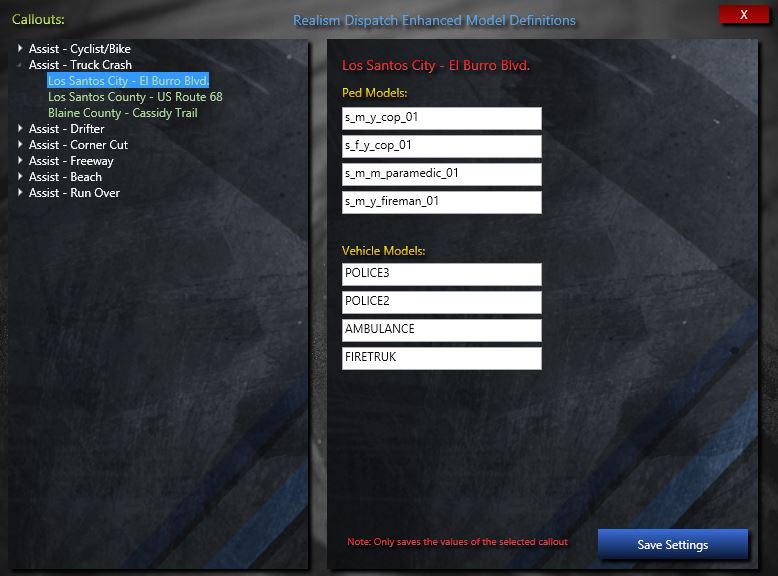
@Yard1 this is how the editor will look like. I'm using xml serializsation for the strings.. therefore the editor is more usefull than directly editing the xml file... hope this is what you expected...