


dilapidated
Members
-
Joined
-
Last visited
Everything posted by dilapidated
-
 Thank you! Is there anyway to do this via a controller? That would be my preferred method as I mainly use an Xbox controller and would like to do it on the fly without breaking out the keyboard. :P
- 220 comments
- 55 reviews
-
-
@Lt.Caine One suggestion: Is it possible you could add controller mapping to enable/disable this scripts on screen display? For example: (controller) Press and hold the Left D-Pad for 3 seconds to enable/disable script Not a major feature but would be a neat alternative to disabling the subtitles. Great job on this! :)
- 220 comments
- 55 reviews
-
-
 You may want to check the meta files within rde dlc.rpf. It's possible you may need to edit them there if so text lines are being overwritten. As far as the sounds themselves they should fine as we haven't added any so they aren't being overwritten. Sure thing. So first off rde dlc.rpf is the last file loaded and because in content.xml <overlay value="true" /> it overwrites any files with the same text lines within them. This is why you need to load your vehicle replacements within rde/dlc.rpf/x64/levels/........rdevehicles.rpf Install the Coroner Boxville in that location... make sure you add the correct text lines to vehicles.meta and handling.meta (Again the ones in rde dlc.rpf) and it should work. Undecided but to be honest it will most likely not be added to the BCSO division. Reason being is I'd personally rather save it for a fish and wildlife division at some point. Not sure though, nothing is set in stone Please see my post to bradp802
- 1,509 comments
- 85 reviews
-
-

- 2
-
-
@Yard1 Thanks for keeping up with all the questions and taking care of everyone during my absence. You're the man! Pretty sure you already knew that though :P
- 1,509 comments
- 85 reviews
-
No problem, glad I could help. Sadly I can't replicate the OpenIV error on my end. I'll have Yard reach out to the OpenIV team about this "out of memory" error in the OIV installer. Good idea to check dlclist.xml but also as a suggestion if you don't have any other mods installed attempt to install 2.2.1 from a fresh mods folder.
- 1,509 comments
- 85 reviews
-
-
- 1
-
-
Thanks for the screen. We will take care of it from here. Like I said though the mod should still work properly. Please test and report back here if that is indeed the case.
- 1,509 comments
- 85 reviews
-
I've seen others have this issue however the installation installed properly. If you get a crash with OpenIV package installer chances are everything still installed correctly. If this happens though please take a screen so we can send it over to Good-NTS and the OpenIV team. Thanks again and enjoy We made some general bug fixes to improve performance and stability as well as fixed a crashing issue for some users. If you're happy with 2.2 and had no issues you should be okay to keep it. Keep in mind though you may experience issues at some point so it would be a good idea to go ahead and update just to be on the safe side.
- 1,509 comments
- 85 reviews
-
-
- 1
-
-
RDE 2.2.1 is here! This should fix any crashing issues users were experiencing. You just simply need to install this version with open iv over the previous installation. Please let us know if you have any issues.
- 1,509 comments
- 85 reviews
-
-
- 1
-
-
-
Great to hear :) Again awesome job! Can't wait to check this out once released. Goodluck to you and your team!
-
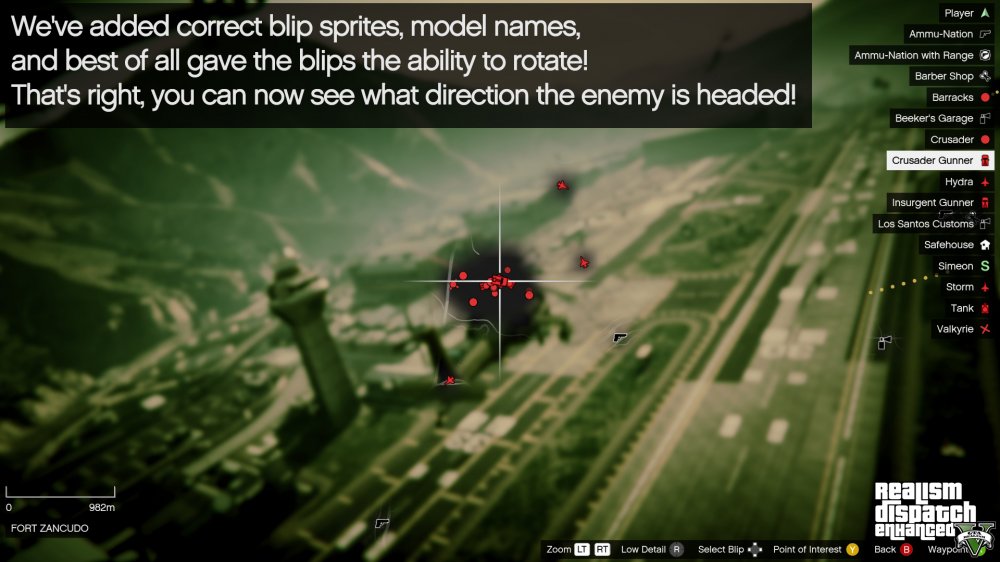
Awesome good to know. The reason I ask is because our script forces specific blips to show a certain way. (mostly army blips but still) Hopefully with that selected in the INI the two wont clash. We put a lot of work into blips as you can see below:
-
Is there option included to disable the police/enemy blips from showing on the radar/start menu legend unless you are wanted?
-
Great job! We would love to incorporate something like this into Realism Dispatch Enhanced. :)
-
No problem! Glad you were able to get it working. We will be releasing 2.2 in a few days :) Enjoy! I've not used skin control extensively myself so I don't have much info on that.... but I can tell you the CBP model is "s_m_m_noose_01"
- 1,509 comments
- 85 reviews
-
-
- 1
-
-
 It takes the screens or it gets the hose again
 -
UPDATE: As it turns out Good-NTS has informed me that these vehicle type settings are hardcoded so we'll have to find another way around this. Possibly via scripting,... SO... before I exhaust a lot of effort and time into this I'd like to gauge everyone's interest. Would you like to see small scale boats with the ability for passengers to use turrets? Perhaps a battleship with cannon weapons? Or better yet Submarines with the ability to use torpedo's?
-
I have a question regarding the types of vehicles that can be added to vehicles.meta Our team has created an RHIB boat with the turret however because it is a boat vehicle type the turret doesn't work. Switching it to a car vehicle type allows the turret to work however we lose all functionality of the boat. (It sinks like a rock). How can we edit or add vehicle types? Where is the file located to do this? Currently you can add the following to vehicles.meta: VEHICLE_TYPE_BICYCLE VEHICLE_TYPE_BIKE VEHICLE_TYPE_BLIMP VEHICLE_TYPE_BOAT VEHICLE_TYPE_CAR VEHICLE_TYPE_HELI VEHICLE_TYPE_PLANE VEHICLE_TYPE_SUBMARINE VEHICLE_TYPE_TRAILER VEHICLE_TYPE_TRAIN VEHICLE_TYPE_QUADBIKE I have no clue where these settings are but I'd really like to diff compare VEHICLE_TYPE_BOAT vs VEHICLE_TYPE_CAR so I can see why the car vehicle type can have vehicle weapons while the boat vehicle type cannot. Any ideas?
-
INSTALL THE NIGHTLY BUILD OF SHVDN, OR THE WANTED LEVEL WILL NOT FUNCTION PROPERLY, AND WON'T GO ABOVE 5 STARS. INSTALL OVER A CLEAN GAME FOLDER WITHOUT OTHER MODS BEFORE COMPLAINING ABOUT THINGS NOT WORKING PROPERLY. DO NOT INSTALL THE XMLs THAT COME WITH SHVDN, THEY MAY CAUSE TEXTURE LOADING ISSUES. Current game version: 1.72 INSTALLATION Install the included OIV file via OpenIV over a clean game directory. Install SHV & SHVDN (NIGHTLY). ADDITIONAL SCRIPTS/TOOLS ScripthookV (REQUIRED) - https://www.dev-c.com/gtav/scripthookv/ SHVDN (REQUIRED) - https://github.com/scripthookvdotnet/scripthookvdotnet-nightly/releases fwBoxStreamerVariable and decals limit patch (RECOMMENDED) - https://www.gta5-mods.com/tools/ymap-load-list-extent-limit-fix-fwboxstreamervariable-patch Packfile Limit Adjuster (RECOMMENDED) - https://www.gta5-mods.com/tools/packfile-limit-adjuster OPTIONAL ADDONS RDE Expanded & Enhanced (More agencies, rebalanced difficulty, modified systems & additional features that provide an alternative experience) - https://www.gta5-mods.com/misc/rde-expanded-enhanced-thatspella FEATURES 10 Star Wanted Level 6 Stars wasn’t enough. Illustrated by a darkening red hue, the wanted level can now go up to 10, allowing for more gradual escalation as the law responds to your path of destruction. You will also have a more difficult time shaking the law compared to 3.1 due to improvements and fixes made to chase AI and spawning. Overhauled Peds & Vehicles Tons of new peds & vehicles have been added, and existing ones have had enormous facelifts to improve quality, diversity & polish. Significant Performance & Stability Improvements Over 3.1 The wanted level script has received a major uplift. Performance issues have been fixed, allowing for the game to perform as though you’re running vanilla. LODs have been improved and expanded upon, and all of this combines to prevent recurring problems that plagued 3.1, such as crashes, pop-in and map streaming issues. Enhanced Support For Story Missions & Cutscenes Cutscenes have been modified to include RDE peds where necessary. In addition, scripting has allowed for RDE peds and vehicles to show up in various story and stranger missions. Updated LSPDFR Support New compatibility files are included to allow for RDE peds and vehicles to be properly utilised when playing LSPDFR. Updated WOV Compatibility A lite version of WOV 10.1 is integrated, adding a ton of extra detail to the game world alongside RDE’s assets. This includes the Gangs of Los Santos overhaul, which, combined with personality, loadout and relationship edits, makes South LS more dangerous than ever, both for the player and for the law. Thanks to Cass & LDNENG for permissions here. PEV: Dispatch, Tactics, Ambience Remastered Features Jayden585 was kind enough to provide optional files that allow RDE to make use of various PEV features, such as more intricate search AI and fine-tuned combat behaviour (You should still only install one mod or the other, not both). Countless Extra Features Laser sights support for heli snipers (Thanks to AlexGuirre), improved loadouts, extra police weapon animations, overhauled roadblocks, additional wanted level music, corrected ped and vehicle soundbanks, new license plate designs, K9 response, paratroopers, restored ground response in certain zones like Mt Chiliad, high-speed response, streamlined script xmls, bug fixes. There’s even more, but we’ll let you experience it for yourself. RDE Lite RDE Lite is included in the download section of this mod page. It's a more stripped down version of RDE, intended for users who'd like to make their own entirely custom dispatch setups from scratch. Law Enforcement Agencies: Local: Los Santos Police Department (LSPD) Los Santos Sheriff Department (LSSD) Blaine County Sheriff's Office (BCSO) Los Santos Port Authority Police (LSPP) State: San Andreas Highway Patrol (SAHP) San Andreas State Park Rangers (SASPR) San Andreas Department of Corrections and Rehabilitation (SADCR) San Andreas National Guard (Military) Federal: National Office of Security Enforcement (NOOSE) Federal Investigation Bureau (FIB) United States Coast Guard (USCG) United States Marshal Service (USMS) Misc: Merryweather (MW) RDE DESIGN PHILOSOPHY RDE is: Lore Friendly - each of the changes introduced does not stand out from the GTA universe created by Rockstar Games. The concepts introduced by Rockstar have instead been expanded and revamped with loving care. Realistic - many of the introduced changes bring GTA V closer to real life - examples include new AI behaviours and tactics, agency jurisdictions, response types and more. However, realistic does not mean real - it’s still the GTA universe, just better. Detailed - every aspect of the mod has been fine-tuned, from higher quality models and textures to new police stations. Even the tiny details such as port police officers replacing private security in relevant places in the Port of South LS are included, and many more details have been added to already existing models. Fun - RDE has been made to be a challenging but fun experience. The specialised, built-from-ground-up wanted level system allows for truly epic chases and shootouts - but watch out! Cops have some new tools in their equipment, and they know how to use them - to great effect. Ten Stars is now in effect - can you survive the law enforcement agencies of San Andreas throwing everything they have at you? WIP FEATURES Revamped Arrest Warrant Scripted divers More female ped variants More bug fixes FAQ: Q: I noticed a bug; how should I submit a report for it to be fixed? A: Please provide a brief explanation of the bug and submit your logs. To do this open SixStarResponse.ini and make the following changes: “Debug=1” “NativeDebug=1” then save the ini. Reproduce the bug and open your SixStarResponse.log, gather the contents, use pastebin.com to post the log contents, and then submit the link to us with your description. Q: Please help! I’m getting crash issues upon loading the game or selecting story mode. A: There’s numerous things that could cause this. If a new game update is released it will require changes to the gameconfig, among various other potential file changes. If you have an excessive amount of extra vehicles or dlc archives in addition to RDE, that could cause issues with gameconfig as well. Our advice: Remove everything and start with a fresh mods folder (yes remove any other scripts as well) then install only RDE and slowly add the others back one by one; testing with each addition. We’ve also included Pool Manager, which, in particular circumstances, will tell you if a particular value in gameconfig is to blame for your crashing. Q: I do not own a legal copy of the game, will this mod still work? A: We only provide support for players with legal copies of the game. Q: Can I develop my own configs for RDE and submit them on GTA5-mods/LSPDFR? A: Not only are you allowed to do this but we encourage you to do so! However you are not permitted to share our files, models, scripts, etc. Only the config files are to be shared so be sure to have your users install RDE first before adding your mod/edits. Q: Why is the game failing to load the multiplayer map? A: This is most likely due to too many dlc archives being installed. RDE 4.0 by itself works fine with the mp map, so use some diligence when it comes to installing extra content on top of it that pushes the game past this limitation. Q: Why are the cops not using their weapons correctly? A: If you find yourself with cops just staring at you with bugged animations, that's because you've overwritten our weaponanimations.meta file located in update.rpf. To fix this, simply copy the contents here - https://pastebin.com/T8sdN3Dx and paste them right at the top of the meta file, so it should end up looking like this - https://i.imgur.com/MBRPntd.png CREDITS RDE TEAM Dilapidated, Jax765, NefariousBonne, Cpast, SuperStumpje, Jacobmaate, ArtehFailz, ThatsPella, SnH Firefighter, The Loot RDE BETA TESTERS Sweeps, The Apple, Requies, Colonel Sanders, DoubleHelix, TheMonotoneScone, William Halverd, Spyke, Guppiemann5000, KGBHeadofCommunications ADDITIONAL CREDITS Yard1, MrJayden585, Yorpie, AlexGuirre, Mkeezay30, 11John11, AlexVonShep, Alex_Ashfold, Aquamenti, Bilago, BobJaneTMart, BroCop, DukSezQuak, Dying, EddIm, NailBiter, rms8723, SkylineGTRFreak, Skyprone, Cass, LDNENG, Albo1125, PieRGud, PNWParksFan, Keegan, GlitchGamer, Lozano71, Illusionary, drp4lyf, Thero, Unmutual, Netman, Custo, Olanov, RM76, OfficerLund, RekRam, Lt. Caine, LtMattJeter, DLer, Abraxas, Bad_Company, blackhack09, Fenton, Resource, AverageKittenLover22, Monkeypolice188, F5544, Lumoize, Tap! We have exercised all due diligence in ascertaining correct credits for included content. If you feel that we have made an error or omission in credits, please contact Dilapidated or NefariousBonne on either LCPDFR.com or GTA5-mods.com privately. MISCELLANEOUS 12.30.2023 VirusTotal results for containing DLL/ASI files: https://www.virustotal.com/gui/file/cf1ca63122caa7566be16c728a8120111cec5bfbb08d12e79832b72d8a84478e/details Have feedback, a bug to report, or a suggestion? Go here: https://goo.gl/forms/tTAmEdMUQ98g52qh2 Official RDE Discord Server: https://discord.gg/QJhPPxB
- 1,509 comments
- 85 reviews
-
-
-

- 97
-
-
Before the fix it stopped @ 5% and threw that error. Now it appears to get more than halfway done but I get the same error message @ 54% now.
-
Thanks for the reply. Hopefully you're right and it's something easy that can be fixed. I've been trying to upload it since Friday night with no luck :(
-
I'm trying to upload a file but keep getting this message. "There was a problem processing the uploaded file. -200" This is a mod that me and my team are trying to upload here. The file is 187mb... is it because the file size is too large maybe? If it is an issue with the file size can I host the file on mediafire for example and give a moderator here the link to the file? Any help is greatly appreciated.
-
Hey everyone, I'm trying to post this on lcpdfr for you guys but keep getting this error while uploading. "There was a problem processing the uploaded file. -200" What does this -200 error code mean? The file is 187mb. Is it because the file is too large?


