


LaBeenoFish
Members
-
Joined
-
Last visited
Everything posted by LaBeenoFish
-
I have the exact same problem when i drag files into Openiv they dont go in, nothing changes instead i have to click the green plus button and add then that way which makes modding lots of cars very time consuming.
-
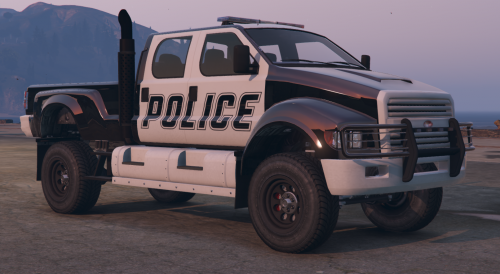 I decided to create this mod as i felt the LSPD needed some muscle in its arsenal after loocking through cars i thought looked threatening chose the guardian. *****Info***** You may only retexture this model, if you wich to upload you retexture pleas only upload the .ytd and not the model. Also make sure to state that the model is by me. ****Features**** -Woking Dials (almost) -Breackable glass -Tintable glass -Damage -Sirens (obviosly) ****To DO**** -Fix Dials -Fix first Person and positions -Fix minor models Imperfections ****Install**** 1-Load Openiv 2-Place police.yft police_hi.ytf and police.ytd in x64e.rpf\levels\gta5\vehicles.rpf 3-place handaling.meta in common.rpf\data 4- go to update\update.rpf\common\data\levels\gta5 and place vehicles.meta in there 5-Finaly head to update\x64\dlcpacks\mpchristmas2\dlc.rpf\common\data and place carvariations.meta there ****Important***** Make sure you back up all files befor installin this mod. Also dont play online i am not responable for anyone getting band. ENJOY
- 9 comments
- 1 review
-
Hi i am curently making a car mod that will replace the policet.yft (police transporter) but the police transporter uses a rotaiting light bar style lights instead of the LED one that my model uses. The problem is that i can find the file hat lets me chnage the seting, i know that it is in carvariations.meta but i herad that file isnt decryped for non DLC vehicle yet. any ideas on a work around?
-
-
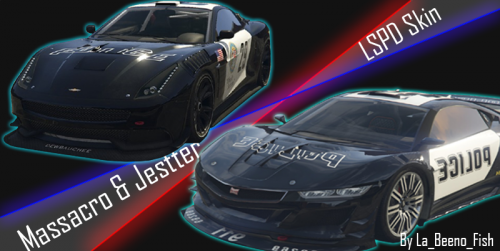 This is a small retexture that i did because i was bored of the small amout of police cars in the game. Hope you like it, i may do the jester in the future if you want it. v2.1 - Updated Jester texture v2.0 - Added Jester ----- You Need----- Openiv - http://openiv.com/ Alexander Blade's Scrip Hook V - https://www.gta5-mods.com/tools/script-hook-v (to be able to use Openiv) ----- Install - Massacro ------- 1) Open Openiv and navigate to updatez\x64\dlcpacks\patchday3ng\dlc.rpf\x64\levels\gta5\vehicles.rpf. 2) Find and replace massacro2.ytd with the one you downloaded. ----- Install - Massacro ------- 1) Open Openiv and navigate to update\x64\dlcpacks\mpchristmas2\dlc.rpf\x64\levels\gta5\vehicles\xmas2vehicles.rpf 2) Find and repalce jester2.ytd with the one you downloaded. ----- Info ----- Dont play online, i dont know if you will get band but dont risk it. To uninstall just do the same install prosses but with the origional file in the downloded .zip
- 8 comments
- 1 review
-
-

- 3
-
