




DrDanthrax99
Members
-
Joined
-
Last visited
Everything posted by DrDanthrax99
-
 Very good job on the vehicles, I especially enjoy the ram truck. Once you're able to add lightbars on them, it'll be even better. :)
- 16 comments
- 1 review
-
-

- 1
-
-
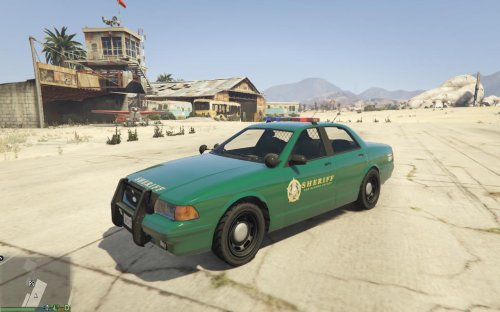 The Los Santos Sheriff's Department is going green! Not with fuel efficiency, with new liveries! Nothing too spectacular, just made the Sheriff Cruiser a dark green, and gave the SUV the same color trim. Figured it would spice up the bland white cruiser, and I just did the SUV to make it match. HOW TO INSTALL: Make a backup! I am not responsible if you boof yourself. Open OpenIV, and start edit mode. Navigate to: GTA V/update/x64/dlcpacks/patchday3ng/dlc.rpf/x64/levels/gta5/vehicles.rpf And replace: sheriff.ytd sheriff2.ytd With the ones provided in the download. Enjoy!
- 5 comments
- 3 reviews
-
With all due respect, I spent 2 days doing all of those suggestions, cleaning and re-installing from scratch several times before asking for support. My game is legal, not cracked, Steam version, updated to 1.0.7.0, I have no other mods, I have the LCPDFR folder, I have only Dsound.dll, I'm running the game as admin. The contents themselves of my folder are not read-only but the folder itself has a read-only tick mark that is untickable. I have all the required files, and I'm using version 1.1. And I have both the .NET framework and Visual Studio. I have access to the Scripthook.log file now: That's all I got.
-
Hello, I have recently downloaded LCPDFR 1.1 because I can't get Rage Script Hook to work on GTA 5, but that's another issue. Anyway, every time I try to load my GTA 4 after installing LCPDFR 1.1, after the Rockstar login window, I get "Grand Theft Auto IV has stopped working.", and "GTA 4 has been shut down by Data Excecution Prevention." I am running the game as administrator. I have Windows Vista Home Basic, A Nvidia Geforce 960 GTX, And an intel quad core processor. Here's my logs: AdvancedHookInit.dll log ScriptHook.log gives me "This file being used by another process and cannot be opened." ScriptHookDotNet.log: Any help would be greatly appreciated, thank you for your time. :)

